Serve secondary templates from your site
Get your site ready before an author deploys a secondary template. Your site then shows a secondary template only to links that name it, keeps it out of search engines and shared caches, and answers 404 for a link it can't serve.
A secondary template is a connected template on the same content type as the primary one, at exactly the same Template URL. It opens only when the address carries cs-template and its composition UID. Freeform templates and sections can't be secondary. Authors use it to show a redesign on your real address before visitors see it. For the model, see Primary and secondary templates.
The example on this page is the Blog post template, primary at /blog/{{entry.slug}} on production, and Blog post v2, a secondary template at the same URL. Its link is https://www.example.com/blog/ai-101?cs-template=blog_post_v2.
Prerequisites
- Your template route fetches by address and answers 404. See Wire template preview routes.
- You know whether you render on the client or the server. See CSR or SSR.
What this is and what you get
The Studio SDK decides which template a request gets. Your site decides how that page is served: its status code, its headers and whether search engines may index it. The SDK adds nothing to the page's HTML, so these steps are yours.
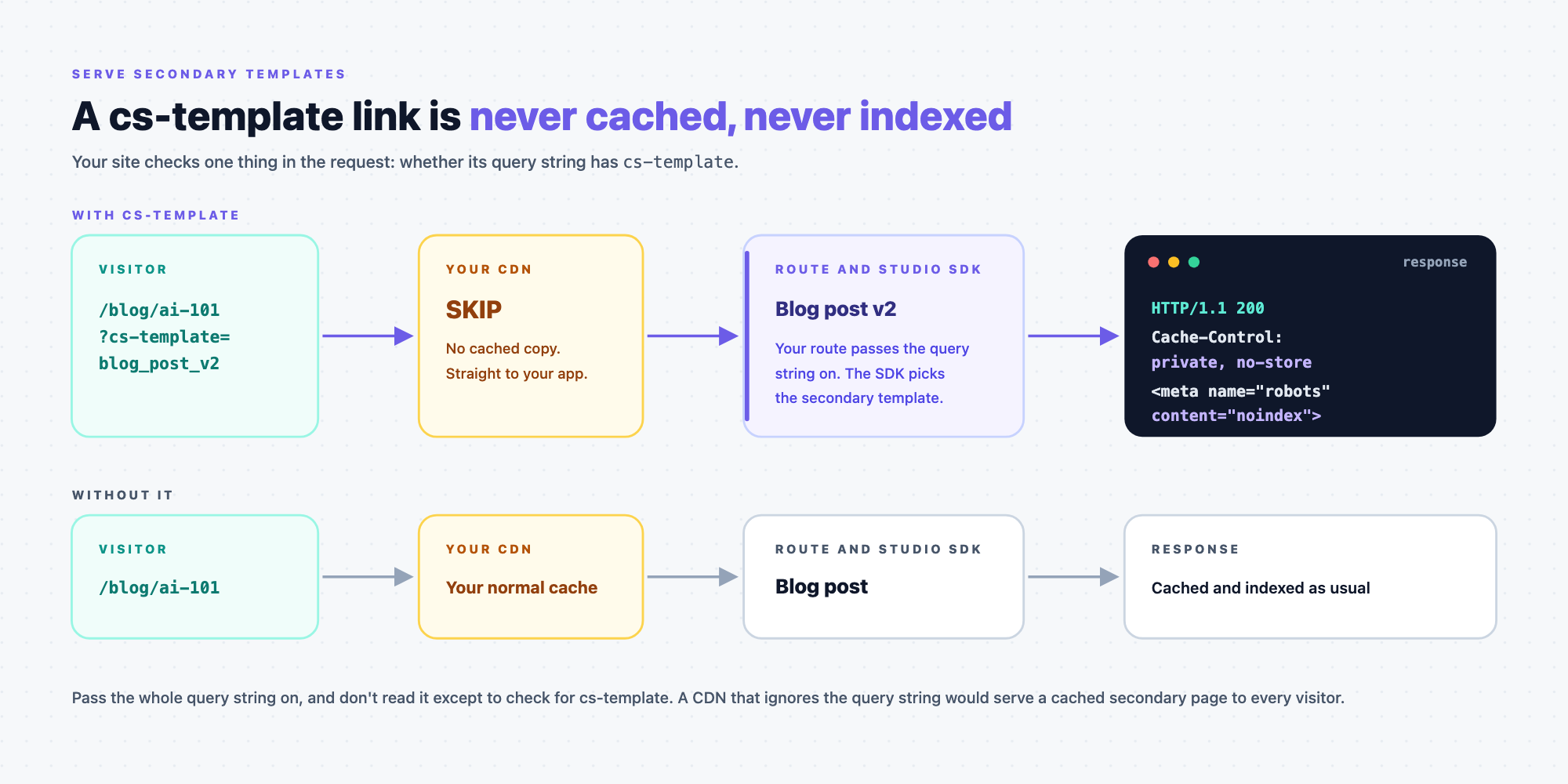
When you're done:
/blog/ai-101shows Blog post to every visitor, from your cache as before./blog/ai-101?cs-template=blog_post_v2shows Blog post v2, withnoindexand no shared caching./blog/ai-101?cs-template=blog_post_v3answers 404.
Faster ways to do this
- Skill. Ask your agent to get your site ready for secondary templates, and it uses
deploy-studio-site. It checks your Studio SDK version, your query string, your robots tag and your cache headers. See What are skills?
Run Studio SDK X or later on every deployment
Upgrade @contentstack/studio-react to Studio SDK X or later, then deploy your site everywhere it runs. See Install the Studio SDK.
An older Studio SDK doesn't know which template is secondary. It treats Blog post and Blog post v2 as two templates at one URL, so visitors can get Blog post v2 without the link.
Studio checks the version only on the site the canvas loads. If that site is too old, Studio greys out the secondary choices when an author deploys. It can't see your other deployments, such as your production servers, so upgrading them is up to you.
Keep cs-template in the query string
A secondary template's link works only when cs-template reaches the Studio SDK. Pass the query string through, and don't read it yourself.
- On the server, pass the request's whole query string to
fetchCompositionDataassearchQuery, as you already do for Studio. See Forward the request's query string as searchQuery. - In the browser,
useCompositionDatareads the address itself.
Code that builds a new URL from the path alone drops cs-template, such as a proxy or a rewrite. Copy the original query string onto any URL you build. See Keep Studio's query string.
A page you build ahead of time, with no request to forward, gets no cs-template. It always shows the primary template.
Never put cs-template in a link on your site, in a Custom Preview URL or in a URL rule. Everyone who follows that link sees the secondary template.
Keep secondary templates out of search and shared caches
A request with cs-template in its query string can show a secondary template. Treat every such request the same way:
- Add a
noindexrobots tag, so search engines leave the page out. - On the server, send
Cache-Control: private, no-store, so no shared cache keeps the page.
The plain address, without cs-template, stays indexed and cached as before. A link whose cs-template names the primary template gets noindex too, which does no harm, because search engines still index the plain address.
On the server:
import { isCompositionNotFound } from "@contentstack/studio-react";

const hasTemplateParam = new URLSearchParams(search).has("cs-template");

try {
  const specOptions = await sdk.fetchCompositionData({ url: pathname, searchQuery: search });
  return {
    status: 200,
    headers: hasTemplateParam ? { "Cache-Control": "private, no-store" } : {},
    robots: hasTemplateParam ? "noindex" : null, // write <meta name="robots" content="noindex" /> into the head
    specOptions,
  };
} catch (error) {
  if (isCompositionNotFound(error)) return { status: 404, robots: "noindex" };
  return { status: 500 };
}
In the browser, add the tag while the address has cs-template:
useEffect(() => {
  if (!new URLSearchParams(window.location.search).has("cs-template")) return;
  const meta = document.createElement("meta");
  meta.name = "robots";
  meta.content = "noindex";
  document.head.appendChild(meta);
  return () => meta.remove();
}, []);
A site that renders only in the browser can't set response headers. Keep its cs-template links out of shared caches at your CDN instead, as the next step shows.
Keep your CDN from serving a cached secondary template
A CDN that ignores the query string stores /blog/ai-101?cs-template=blog_post_v2 and /blog/ai-101 as one page. It can then give Blog post v2 to every visitor. Skip the cache for any request with cs-template in its query string. Cache-Control: private, no-store on secondary pages also keeps them out of a cache that honors it.
Studio's own requests need the same care. See Caching and invalidation.
Answer 404 for a cs-template link you can't serve
When cs-template names a template your site can't show at the address, the fetch fails with a not-found error, as it does for an address no template matches. It never falls back to the primary template.
code | When | isCompositionNotFound | Respond with |
|---|---|---|---|
REQUESTED_COMPOSITION_UNAVAILABLE | cs-template names a composition UID that isn't a secondary template here: mistyped, not deployed in this environment and language, at another URL, or on another content type. | true | A 404 |
NO_PRIMARY_TEMPLATE_FOR_SECONDARY | cs-template names a secondary template at this URL, but no template is primary there. | true | A 404 |
isCompositionNotFound already counts both, so the 404 handling from Send a 404 when no template matches covers them. Add noindex to the 404 too. The message names the code, the address and the composition UID:
[Contentstack Studio] REQUESTED_COMPOSITION_UNAVAILABLE: Check that the composition UID is correct and that it's published in this environment and locale.
For each code, what it means and how to fix it, see REQUESTED_COMPOSITION_UNAVAILABLE and NO_PRIMARY_TEMPLATE_FOR_SECONDARY.
How each way of fetching treats secondary templates
Studio, Visual Editor and Live Preview ignore cs-template, and show the template the author opens. On your live site, it depends on how your route fetches:
- By address, a visitor gets the primary template, or the secondary template that
cs-templatenames. See Fetch by address. - By composition UID, a visitor gets the template you name, secondary or not. Use it only for templates you mean to show. See Fetch a template and an entry by UID.
- By content type, a visitor gets a primary template, and
cs-templateis ignored. See Fetch by content type.
A secondary template falls back across languages the way the primary template does. See Fetch content in a language.
Check that a secondary template is served correctly
Ask an author to deploy Blog post v2 as a secondary template, then:
-
Open
https://www.example.com/blog/ai-101. It shows Blog post. -
Open
https://www.example.com/blog/ai-101?cs-template=blog_post_v2. It shows Blog post v2, and the page source has<meta name="robots" content="noindex" />. -
Check the headers of the same address. On a server-rendered site, the response has
Cache-Control: private, no-store:curl -sI "https://www.example.com/blog/ai-101?cs-template=blog_post_v2" -
Open
https://www.example.com/blog/ai-101?cs-template=blog_post_v3. It answers 404.
If it doesn't work
- Visitors see Blog post v2 without the link. A deployment of your site runs a Studio SDK older than X, or your CDN cached the secondary page under the plain address. Upgrade every deployment, and purge the cached page. See Run Studio SDK X or later on every deployment and Keep your CDN from serving a cached secondary template.
- The link shows Blog post.
cs-templatedoesn't reach the SDK, or a cache answered with the primary page. Check your proxy, rewrites and CDN. See Keep cs-template in the query string. - The link answers 404. Read the code in your server log or browser console. See Answer 404 for a cs-template link you can't serve.
- The link answers 500, not 404. Your route doesn't check
isCompositionNotFound. See Send a 404 when no template matches. - A secondary page turns up in search results. Your site doesn't add
noindexwhen the address hascs-template. See Keep secondary templates out of search and shared caches.
Where to go next
- Deploy, share and swap a secondary template in Studio: Review a redesign, step by step.
- Plan how a Deploy reaches visitors through your caches: Caching and invalidation.