Repeaters and condition blocks
This page covers the nodes that repeat and branch: the Repeater and the Condition Block. It also shows how they apply to groups, reference fields and modular blocks. You need it when a layout shows a list, or shows something only when a condition holds.
The examples use the Blog project: the Blog post content type, the Post hero and Related posts Sections, and the entry AI 101.
Repeater node
A Repeater shows its children once for each item in a list. It's a node of type repeater with a props.items binding, and the children that repeat sit in its slots.
This Repeater shows a PostCard for each related post of the Blog post.
{
  "uid": "related_posts_repeater",
  "type": "repeater",
  "attrs": {},
  "metadata": { "mode": "preview" },
  "props": {
    "items": {
      "type": "array",
      "binding": { "type": "template", "value": { "path": { "related_posts": {} } } }
    },
    "children": { "type": "slot", "slot": "items_slot" }
  },
  "slots": {
    "items_slot": [
      {
        "uid": "related_post_card",
        "type": "PostCard",
        "attrs": {},
        "metadata": {},
        "props": {
          "title": {
            "type": "string",
            "binding": {
              "type": "repeater",
              "value": { "repeaterUID": "related_posts_repeater", "path": { "title": {} } }
            }
          }
        },
        "slots": {},
        "styles": {}
      }
    ]
  },
  "styles": {}
}
| Part | What it does |
|---|---|
props.items | The list to repeat. It has type array and a binding. A Repeater renders nothing when items isn't a list, and your site shows no error. |
metadata.mode | design or preview. See below. |
metadata.repeaterBindingFieldType | reference or modular_block. Studio sets it for those two field types and leaves it unset otherwise. Studio uses it for the empty-slot hint and drag rules. The SDK doesn't read it to render. |
| The children | Each child reads the current item with a repeater binding. |
Mode
On your site, a Repeater renders every item, whatever metadata.mode says. In the Studio canvas, a top-level Repeater with no metadata.mode shows the design view, which is one placeholder.
A placed Section with no metadata.mode gets design if it holds a Section Slot, and preview if it doesn't. In Studio, a placed Section's metadata.mode overrides the mode of every Repeater and Condition Block inside it.
Reading the current item
A repeater binding reads dataSources.repeater.<repeaterUID>.context, followed by the path.
repeaterUIDmust equal theuidof the Repeater node that supplies the item. ArepeaterUIDthat matches no enclosing Repeater shows the prop's default. The API doesn't check it.- An object item is the context itself, so
path: { "title": {} }reads the item'stitle. For a list of strings or numbers,path: {}reads the item. - In nested Repeaters, each item stays under its own
repeaterUID, so a child can read the inner or the outer item. - An inner Repeater over a list in the outer item binds
itemswith typerepeaterand the outer Repeater'srepeaterUID. - A
templatebinding with a fixed index on an inner Repeater repeats the first outer item's list in every outer item. - On your site, a Repeater wraps each item in a
divwithdisplay: contents.
The path for items
The scope decides the path. On a Template the scope is the whole entry, so items names the field, as in { "related_posts": {} }. On a Section whose selected_field is the array, the scope already is the array, so items takes path: {}. On a Section with no selected_field, the scope is the whole entry, so items names the field.
What the API checks
The API rejects a Repeater with no props.items.binding. It warns when metadata.mode isn't preview: the canvas shows one placeholder while your site still repeats. It also warns when a Repeater has children and none is a condition-block, whatever field it iterates.
Condition Block node
A Condition Block shows its children only when its condition passes. It's a node of type condition-block with one metadata.condition, and the children sit in slots.
This Condition Block shows its children when a Repeater item is a Blog post entry.
{
  "uid": "blog_post_branch",
  "type": "condition-block",
  "attrs": {},
  "metadata": {
    "condition": {
      "type": "reference",
      "operator": "eq",
      "value": "blog_post",
      "conditionBinding": {
        "type": "repeater",
        "value": { "repeaterUID": "featured_repeater", "path": { "_content_type_uid": {} } }
      }
    }
  },
  "props": {
    "children": { "type": "slot", "slot": "branch" }
  },
  "slots": {
    "branch": [
      {
        "uid": "featured_post_card",
        "type": "PostCard",
        "attrs": {},
        "metadata": {},
        "props": {},
        "slots": {},
        "styles": {}
      }
    ]
  },
  "styles": {}
}
Part of metadata.condition | What it does |
|---|---|
type | The kind of field the condition tests. |
operator | How value is compared. The valid operators depend on type. |
value | What the field is compared with, such as a content type UID or a block UID. |
conditionBinding | The binding that reads the tested field. It can use any binding type, such as template, contentstack or repeater. |
dataBinding | A repeater binding. Its path becomes the item that child repeater bindings read. |
subType | Studio records it. The SDK reads only subType: "length". |
- One Condition Block holds one condition, with no
and,oror negate. To require several conditions, nest Condition Blocks. An inner block renders only when every outer block passes. - A Condition Block has no else branch.
- A Condition Block with no
conditionrenders nothing. The SDK treats a condition with noconditionBindingas false. - With no
dataBinding, or one that resolves to nothing, child bindings keep reading the whole Repeater item. - The evaluator ignores
content_type_uidandselected_fieldinsideconditionBinding.value. Studio also writesmetadata.conditionDisplayfor labels only, which the SDK ignores. - On your site, a Condition Block always evaluates its condition, whatever
metadata.modesays, and adds no element of its own. - The API doesn't check a Condition Block's condition shape, type or operator.
Condition types and operators
The SDK evaluates ten condition types. For the labels Studio shows for each operator, see Condition operators.
type | Tests | operator values |
|---|---|---|
string | A text field | eq, neq, contains, startsWith, endsWith, matches, isEmpty, isNotEmpty |
number, date, image_size | A number, a date, or an asset's file_size in bytes | eq, neq, gt, gte, lt, lte |
boolean | A boolean field | is, eq |
select | A single select field | is, eq, isNot |
select | A multiple select field | includes, excludes |
image_extension | An asset's file extension | is, eq, isNot |
array | The length of a list | eq, neq, gt, gte, lt, lte |
reference | The content type of a reference item | contentTypeIs, eq |
modular_block | Whether a block has a value | is, eq |
- Every type also accepts
exists,notExists,isEmptyandisNotEmpty, withvalueset tonull.existsis true when the bound key is present, even if its value is empty.isEmptyis true fornull, an empty string, an empty list and an empty object, and false for0andfalse. - A
stringcondition ignores letter case unless it setscaseSensitive: true, which Studio never writes.matchesreadsvalueas a regular expression and tests it against the original text, with case. - A
datecondition compares timestamps and takes an ISO date string. - On a
referenceormodular_blockcondition,eq,neq,gt,gte,ltandltecompare the item count whensubTypeislength. Without it,eqisn't a length check. - A
referencecondition withcontentTypeIsoreqpasses when the item's_content_type_uidequalsvalue. - A
modular_blockcondition withisoreqpasses when the bound value is truthy. It doesn't comparevalue, so keepvalueequal to the block key in the path. - In SDK 2.0.0, a single select condition with
neqis always false, though Studio writesneqfor Not Equals. UseisNot.
Groups and global fields
A group is a set of fields in the entry. A global field binds the same way, because its values sit inline in the entry.
- For a single group, bind the inner field directly with a path such as
{ "seo": { "canonical": {} } }. - For a multiple group, use a Repeater over the group field. Each item is one group row, and a child's path names the inner field, as in
{ "title": {} }for thechaptersgroup. - A dotted
selected_field, such aschapters.links, scopes a Section to a group nested in another group.
Reference fields
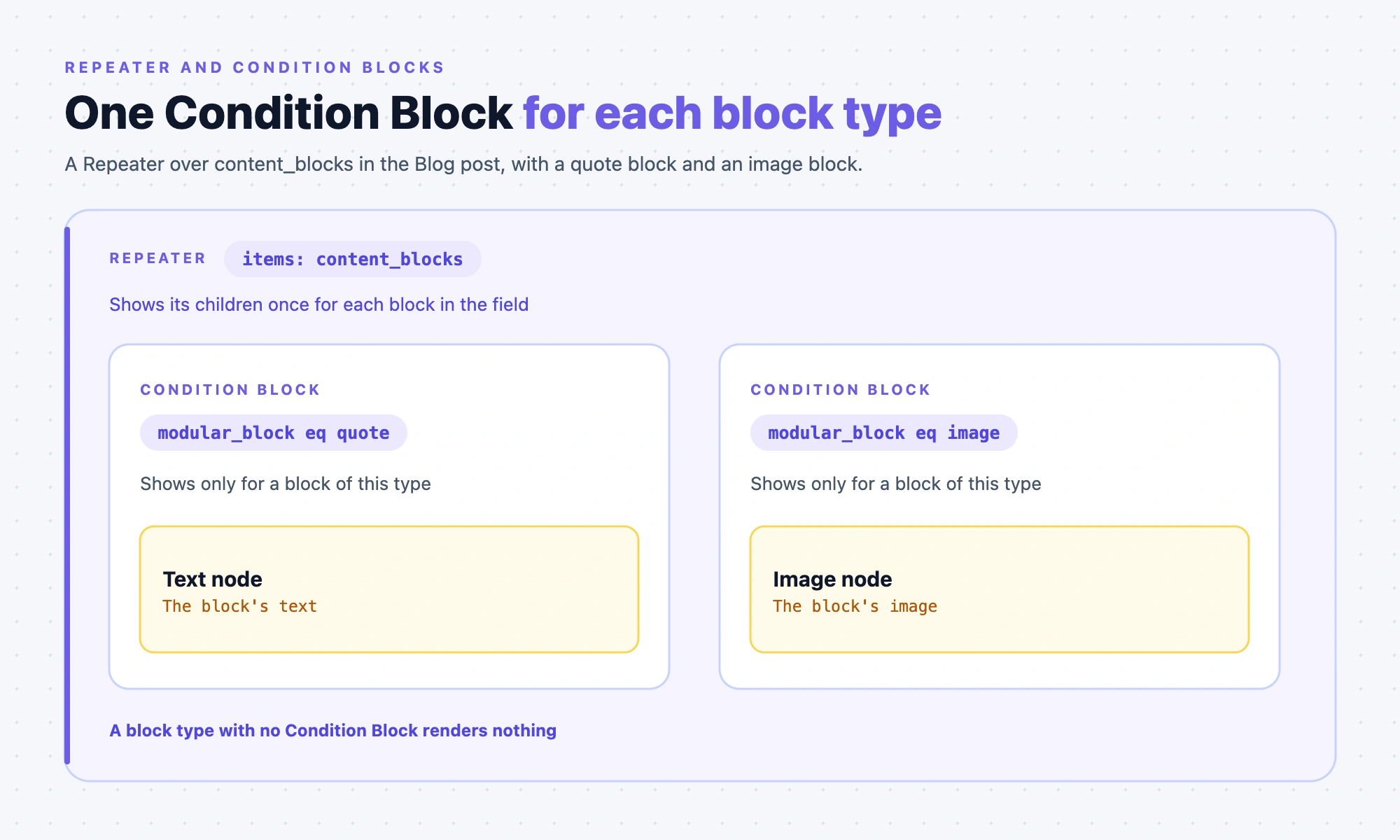
A reference field points at entries of one or more content types. To show a different card for each content type, put one Condition Block for each type inside a Repeater.
A Repeater over a reference field with one target content type iterates without a Condition Block. Studio still asks for one when you bind a Repeater to a reference field. For a field with several targets, such as featured_content, the Condition Block tells the types apart.
{
  "uid": "featured_repeater",
  "type": "repeater",
  "attrs": {},
  "metadata": { "mode": "preview", "repeaterBindingFieldType": "reference" },
  "props": {
    "items": {
      "type": "array",
      "binding": { "type": "template", "value": { "path": { "featured_content": {} } } }
    },
    "children": { "type": "slot", "slot": "items_slot" }
  },
  "slots": {
    "items_slot": [
      {
        "uid": "blog_post_branch",
        "type": "condition-block",
        "attrs": {},
        "metadata": {
          "condition": {
            "type": "reference",
            "operator": "eq",
            "value": "blog_post",
            "conditionBinding": {
              "type": "repeater",
              "value": { "repeaterUID": "featured_repeater", "path": { "_content_type_uid": {} } }
            }
          }
        },
        "props": { "children": { "type": "slot", "slot": "blog_post_slot" } },
        "slots": {
          "blog_post_slot": [
            {
              "uid": "featured_post_card",
              "type": "PostCard",
              "attrs": {},
              "metadata": {},
              "props": {
                "title": {
                  "type": "string",
                  "binding": {
                    "type": "repeater",
                    "value": { "repeaterUID": "featured_repeater", "path": { "title": {} } }
                  }
                }
              },
              "slots": {},
              "styles": {}
            }
          ]
        },
        "styles": {}
      }
    ]
  },
  "styles": {}
}
Add one more Condition Block with value set to author for the Author type.
_content_type_uidtells reference items apart, so theconditionBindingpath is{ "_content_type_uid": {} }.- A reference Condition Block has no
dataBinding. Its children read the referenced entry's fields directly, as in{ "title": {} }. - A path through a single reference nests a new key at the reference, as in
{ "author": { "title": {} } }.
Resolving the references
SDK 2.0.0 asks the Delivery API to include the paths in resolvedReferences and the paths of reference Condition Blocks. When a composition's schema_version is missing or below 1.1.0, it also works out include paths from the bindings. The SDK config option deriveIncludePaths overrides that choice. From 1.1.0, the SDK trusts the saved resolvedReferences as complete. Add each reference path to data_sources, or use a Condition Block.
{ "uid": "template", "resolvedReferences": { "template": ["related_posts"] } }
- The SDK reads every list under the
templatedata source'sresolvedReferences, so any outer key works. - For a pinned entry,
resolvedReferencesis keyed by the entry's UID. For a query, it's keyed by the query'suid. - The SDK drops index segments,
entriesand a leading<number>_from a path before it requests includes. - In the Data Picker, you can't bind a field inside a reference Repeater's item until you wrap the component in a Condition Block. Studio says: "It is recommended to drop a condition block inside the repeater to handle Modular Blocks & References."
Modular blocks fields
A modular blocks field holds items of different block types. An item is an object with one key, the block UID, holding the block's fields. Put one Condition Block for each block type inside a Repeater.
A Repeater over content_blocks binds items to the field. A modular blocks field needs no resolvedReferences, because the blocks come inline in the entry.
{
  "uid": "quote_branch",
  "type": "condition-block",
  "attrs": {},
  "metadata": {
    "condition": {
      "type": "modular_block",
      "operator": "eq",
      "value": "quote",
      "conditionBinding": {
        "type": "repeater",
        "value": { "repeaterUID": "blocks_repeater", "path": { "quote": {} } }
      },
      "dataBinding": {
        "type": "repeater",
        "value": { "repeaterUID": "blocks_repeater", "path": { "quote": {} } }
      }
    }
  },
  "props": { "children": { "type": "slot", "slot": "quote_slot" } },
  "slots": {
    "quote_slot": [
      {
        "uid": "quote_text",
        "type": "text",
        "attrs": {},
        "metadata": {},
        "props": {
          "text": {
            "type": "plaintext",
            "binding": {
              "type": "repeater",
              "value": { "repeaterUID": "blocks_repeater", "path": { "text": {} } }
            }
          }
        },
        "slots": {},
        "styles": {}
      }
    ]
  },
  "styles": {}
}
The Repeater around it sets metadata.repeaterBindingFieldType to modular_block. Add one more Condition Block with value set to image.
- For a block,
conditionBindinganddataBindingare bothrepeaterbindings with the path{ "<block uid>": {} }. - With
dataBindingset, a child path starts inside the block, so{ "text": {} }reads the quote's text. With nodataBinding, a child can read the field as{ "text": {} }or as{ "quote": { "text": {} } }. - A modular blocks item with no matching Condition Block renders nothing. A Repeater with no Condition Block renders the same children for every block type.
- Studio adds
content_type_uidandselected_fieldtoconditionBinding.valuewhen it knows the content type. The evaluator ignores them.
Next, see Section slots, overrides and exposed props for the nodes that connect Sections and Templates.