Components, sections and templates
Everything you build in Studio belongs to one of three layers: components, sections and templates. Read it before you build anything, because the rest of the docs use these three words in exactly this sense.
The example is the team blog. Its posts are entries of a Blog post content type, served under /blog, such as "AI 101" at /blog/ai-101.
Each layer is built from the one below
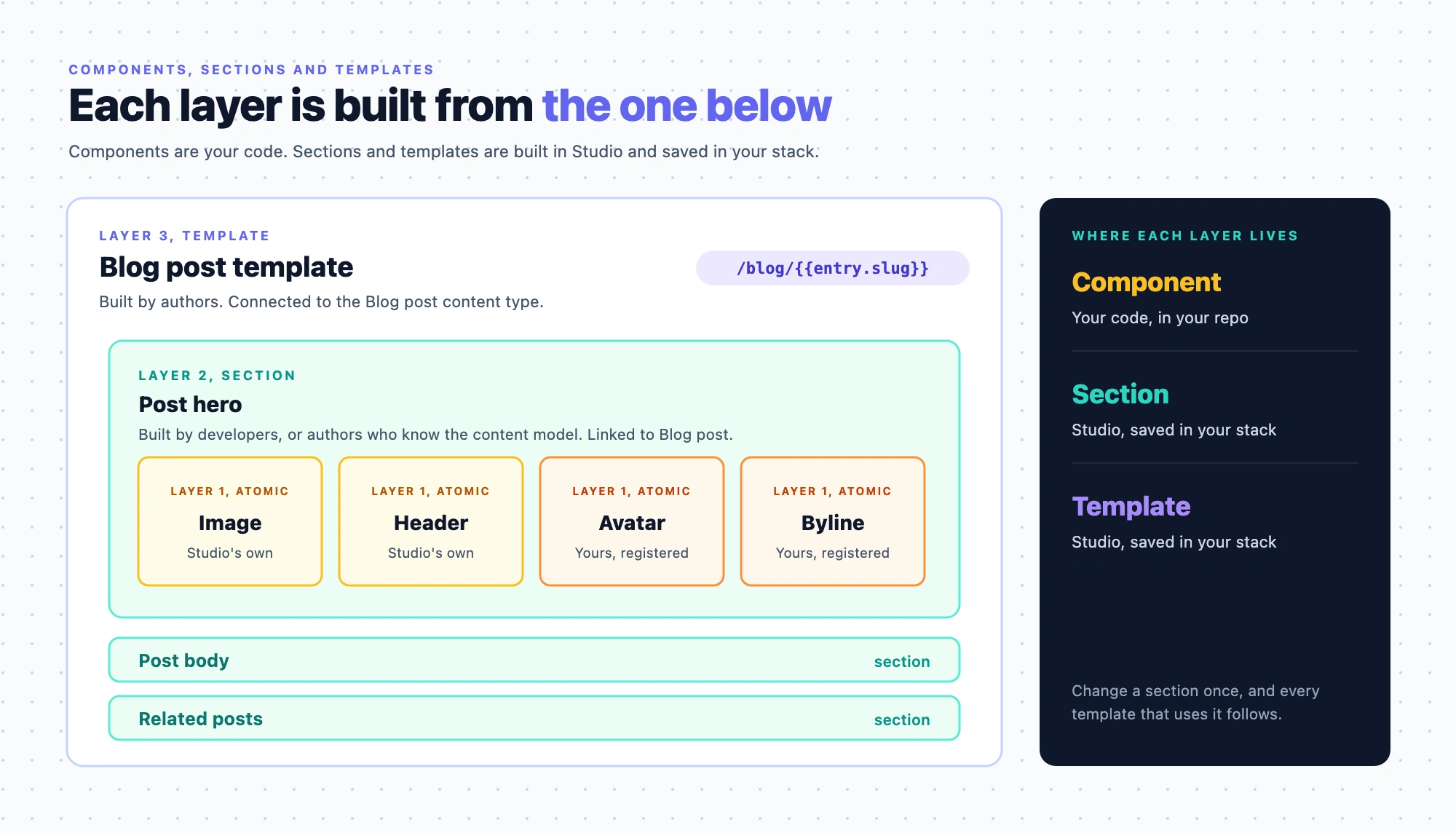
Each layer is built from the one below it, and each has a common owner.
| Layer | What it is | Where it lives | Built by |
|---|---|---|---|
| Component | A React component registered with Studio | Your code | Developers |
| Section | A reusable part of a layout, arranged from components | Studio, saved in your stack | Developers, or authors who know the content model |
| Template | A layout for a kind of page, arranged from sections | Studio, saved in your stack | Authors |
Components
A component is a piece of your React code that a developer has registered with Studio. Registering one puts it in the canvas's Components tab and gives it a settings form built from its props. Each prop can be bound to content, and the component shows in Layers wherever it's used.
Studio ships its own components, such as Text, Image, Box and Repeater, so you don't register the basics yourself. Most components, Studio's and yours, are one of three kinds:
- Atomic. It has no slot and renders its own content, such as text, an image or a link. Studio's Image, Header, Paragraph and Link are atomic. The blog registers
Avatar, a round author photo, andByline, an author's name. - Layout. It holds other components through a slot. Its own props are settings for the container, such as direction, gap or a link target, not content it shows. Studio's layouts include Box, Columns, Rows and Link Container, which wraps what it holds in a link. The blog registers
Stack, a row or column with a gap. - Compound. It renders several pieces of content in an arrangement fixed in your code, such as an
AuthorCardwith a photo, a name and a link. Register one only when its pieces always appear together, in the same order, and nobody rearranges them.
Register your own where the built-ins don't fit: a piece with behavior they don't have, or one that has to match your design system. The blog's Byline and Stack exist because its design system owns the byline's type style and its row and column spacing.
Build anything authors should be able to rearrange as a section in Studio, from small pieces. The blog's author card and related posts are built that way, so changing their arrangement needs no release. The blog keeps two compounds: BlogHero, its one fixed hero treatment, and PostCard, a card frame whose call to action goes in a slot. From a design to components walks through deciding which is which.
What registering does to your code is in Your components in Studio. To see what ships and register your own, go to Build your component library.
Sections
A section is a reusable part of a layout that someone arranges in Studio from components. The blog's Post hero section holds each post's cover image and title, and the author's photo and name, in the order every post shows them. Its Author card section builds a whole card from general pieces. A Link Container bound to the author's link holds a Stack set to a row, and the Stack holds an Avatar and a Byline.
A section does three things a loose group of components can't:
- It knows the shape of its data. A section is linked to a content type, or to a part of one such as a group, a global field, modular blocks or a reference field. Once linked, its components are bound to fields of that shape, and the same section can render any entry that has it.
- It exposes a few props. The section's builder picks which settings the template's author can change for each use, such as a heading's wording, and keeps the rest fixed.
- It can leave slots. A Section Slot is a space inside the section that the template's author fills with another section, such as a call-to-action section that differs between templates.
To build one, see Build sections. Slots have their own page, Section slots.
Templates
A template is the layout for a kind of page, arranged from sections, and it can hold components directly too. A template is one of two kinds:
- Connected. It's connected to one content type, and entries of that type render through it. The Blog post template is connected to Blog post, and its URL pattern
/blog/{{entry.slug}}gives every post its address. - Freeform. It's for a one-off page, such as a landing page. It has no content type, and its URL can't use an entry's values. A project has to have freeform turned on before anyone can make one.
To pick between the two kinds, see Connected or freeform template. To build one, see Create a template and Build a template from sections.
Change a section once
A template doesn't copy the sections it uses. It points at them. When someone changes the Post hero section and deploys it to an environment, every template that uses Post hero shows the new version in that environment the next time your site fetches it. Nobody edits or redeploys those templates.
What stays with each template is what its author set for that use: the content in the section's section slots, and the values of its exposed props.
The split also keeps each group's work separate. Authors build and change templates without touching code. Developers build a layout once, as a section, instead of once per page.
A finished template
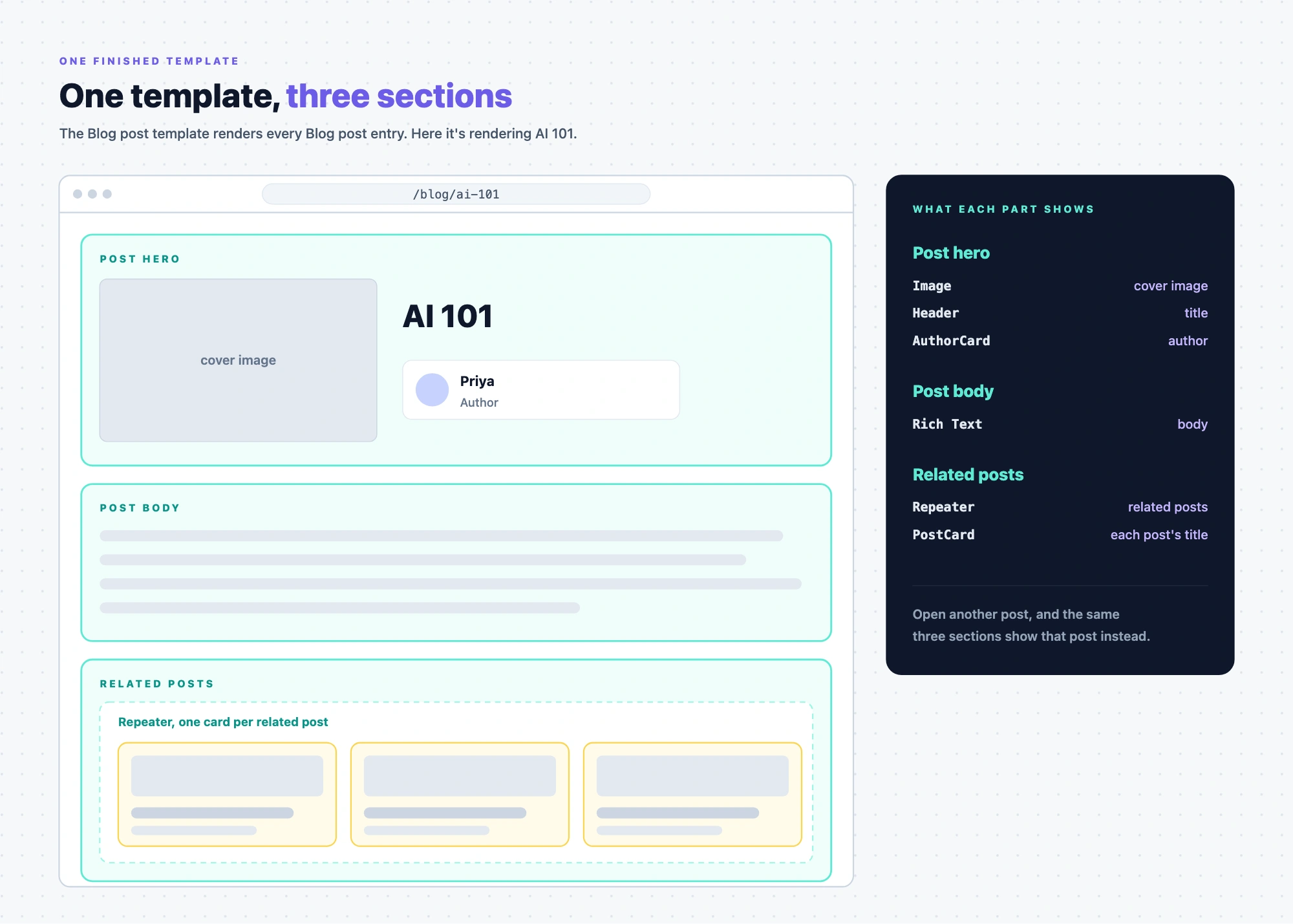
The Blog post template is connected to the Blog post content type and holds three sections, top to bottom:
- Post hero. The cover image, the title and the author's photo.
- Post body. The body text of the post.
- Related posts. One card for each post listed in the entry's related posts field.
When a visitor opens /blog/ai-101, the template renders the AI 101 entry through those three sections. When they open another post, the same three sections render that post's content instead.
Where data comes in
- A component declares the props it can receive. It doesn't know where the values come from.
- A section knows the shape of the data it expects, through what it's linked to.
- A template supplies the data: the entry being shown, plus any extra entries or queries the template adds.
The next page, The example blog, lists the names the examples use. What templates and sections are saved as is in What is a composition. How a value travels from an entry to a prop is in How components get content.