Query filters
Look up the YAML you can write in Input Filters, the filter box on step 2 of a query dialog. Use this page when you write or fix a filter. To create a query, see Add a query.
The example on this page is the Latest posts query on the Blog post content type in the Blog project. Its entry AI 101 has the slug ai-101 and the URL /blog/ai-101.
Top-level keys in Input Filters
Input Filters is YAML with two top-level keys.
| Key | What it sets |
|---|---|
params | How many entries come back, how many to skip, and the sort order. |
query | Conditions on fields, in Contentstack's query form. |
The params keys in Input Filters
In params, you can set limit, skip and one sort key, asc or desc, with a field UID as its value.
| Key | What it does |
|---|---|
limit | How many entries to return. |
skip | How many entries to pass over first. |
asc or desc | Sorts by one field UID. |
Latest posts looks like this.
params:
  limit: 3
  desc: created_at
Query conditions in Input Filters
query sets conditions on fields, in Contentstack's query form. Studio sends it as written, and the editor shows the message Contentstack returns for anything it rejects.
Example Input Filters
These examples use the Blog post content type.
| To get | Filters |
|---|---|
| The 3 newest posts | params with limit: 3 and desc: created_at |
| Every post except AI 101 | query with slug and $ne: ai-101 |
| Posts on a topic | query with taxonomies.topic and $in: ["{{url.params.topic}}"] |
Values Studio replaces
Studio replaces a filter value written as {{...}} when the query runs.
| Rule | Detail |
|---|---|
| One expression per value | Write one expression as the whole value. Studio ignores text around it. |
| Quotes | Studio adds quotes around a bare {{ }} value for you. |
| Where it works | Expressions in params, such as skip, resolve in the Studio table but not on your site. |
The page URL
{{url.params.topic}} reads the topic parameter from the query string of the page URL. On /blog/ai-101?topic=ai, it reads ai.
| Where the query runs | Which URL it reads |
|---|---|
| The editor | The canvas page's URL. |
| Your site | The visitor's URL. |
| A server-rendered route | The request's query string, which you pass as searchQuery. Without it, url.params is empty. |
| A client-rendered route | The browser's query string. Studio reads it itself. |
For searchQuery, see Fetch a composition.
Time values in a filter
Time values are:
{{now}}{{today}}{{this_week}}{{this_month}}{{now - 30 days}}or{{now + 7 days}}
The units are day, days, hour, hours, month and months. Weeks aren't supported. {{this_week}} starts on Sunday. Date values use the time zone of the machine that runs the query.
Suggestions in the filter box
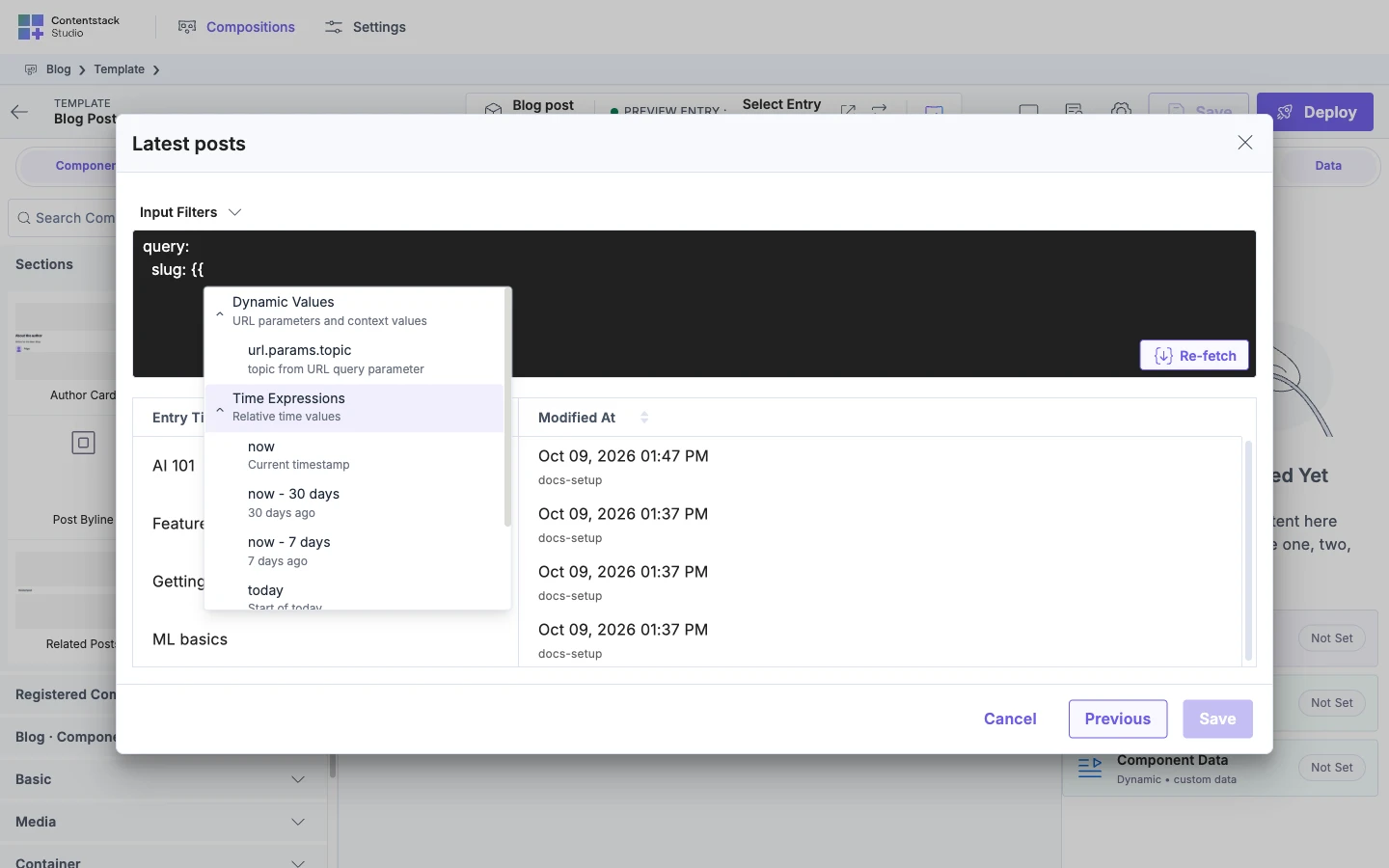
Typing {{ in Input Filters opens a list with two groups.
| Group | What it lists |
|---|---|
| Dynamic Values | Only the parameters in the canvas page's URL. It's missing when there are none. |
| Time Expressions | now, now - 30 days, now - 7 days, today, this_week and this_month. |
Keys you can't set
You can't set include, only or except. Studio removes them if you type them under params. Studio then shows "The only, except, and include params are removed from Input Filters because they are not supported here." The notice shows under the filter box, so you see it only with Input Filters open. Studio adds the reference includes your bindings need, so you don't set include.
After you edit the YAML
| What you see | Why |
|---|---|
| Save is disabled. | You haven't clicked Re-fetch. The Re-fetch button appears in the box after you edit the YAML. |
| A message under the box, such as "Indentation error at line 3, column 5. Check that spaces are aligned correctly." | The YAML is invalid. The message appears after you click Re-fetch, not while you type. |
On your site, a query that comes back empty logs a warning in development, or in production with debug: true. QUERY_RETURNED_NO_ROWS means the filter matched no entries. QUERY_REQUEST_FAILED means the request didn't complete, so the filter isn't the cause. See Warnings about content that didn't load.
To create or edit a query, see Add a query.