Pass data into a component slot
Pass data into a component slot when your component has a value that components in its slot need. Props can't pass values to what an author drops in a slot.
The example on this page is the Post card section in the Blog project, previewing AI 101. You build it here, linked to Blog post, with a Header bound to title and a PostCard with url bound to url. PostCard has a slot, ctaSlot, and a url value. An author drops a Button labelled "Read post" into the slot and binds its Link to url, so AI 101 links to /blog/ai-101.
Prerequisites
- You have a component with a prop of type
slot. See Component schema: props, types and defaults. - Your component has a value that dropped components need, such as PostCard's
url. - Your app uses
@contentstack/studio-react.
What this is and what you get
A slot prop gives your component a drop zone. Your component receives what authors drop as a React node.
Wrap the slot in Slot with a data object, and the components inside can bind its values. Each top-level key of data becomes a key authors can bind. In the example, Slot passes url, and the Button binds it.
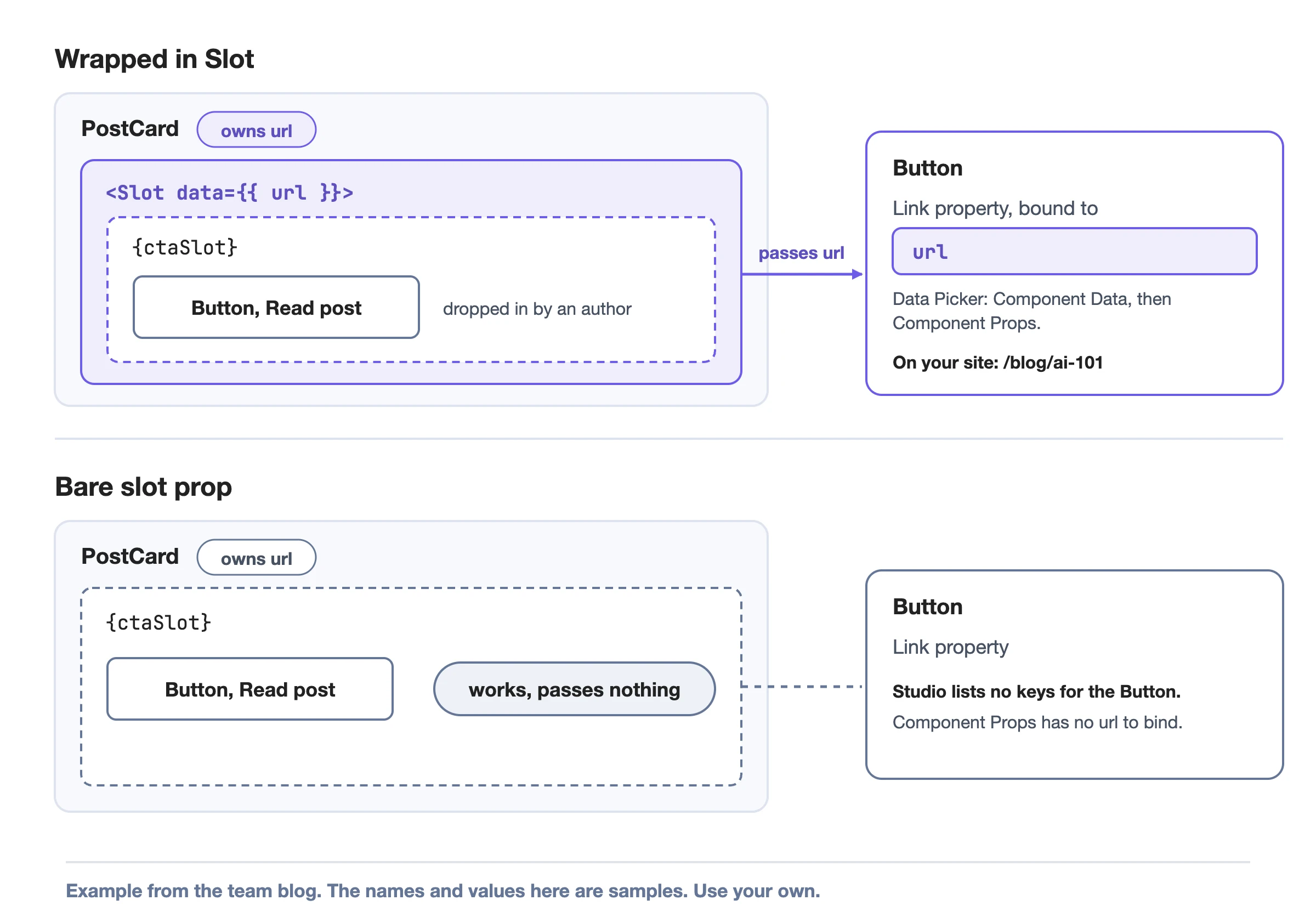
Slot only runs when your site renders. Studio doesn't save its data in the composition. Rendering the bare slot prop still works, and it passes no data.
A component slot is a slot prop in your code. A Section Slot is a component a section author places on the canvas. For Section Slots, see Section slots.
Wrap the slot prop in Slot
-
Import
Slotfrom@contentstack/studio-react. -
Wrap the slot prop with your data, as in
<Slot data={{ url }}>{ctaSlot}</Slot>.import { Slot, type SlotProps } from "@contentstack/studio-react";interface PostCardProps {title: string;url: string;ctaSlot?: SlotProps["children"];}export function PostCard({ title, url, ctaSlot }: PostCardProps) {return (<article><h2>{title}</h2><Slot data={{ url }}>{ctaSlot}</Slot></article>);}Studio lists the key
urlwhen you bind a component inside the slot, in the next section.
SlotProps["children"] is the type for a slot prop. Pass the slot prop straight through as children. Don't wrap it in another element, because Slot reads the slot's details from its first child element.
Name each key for its role in the slot, and don't rename it later. Props bound to a renamed key show their default.
Bind a dropped component to the slot's data
- Open the Post card section. Add a Header and bind its Text to
title. Add a PostCard and bind itsurlproperty to the entry'surlfield. See Build sections and Bind a component. - Drop a component into the slot, such as a Button into PostCard's
ctaSlot. Set the Button's Label to Read post. The Button appears under the slot in Layers. - Select the Button inside the slot, not PostCard.
- Open the Data Picker on the Button's Link, select the Component Data icon, then select Url under Component Props. The slot's keys appear in the same Component Props list as any other Component Data.
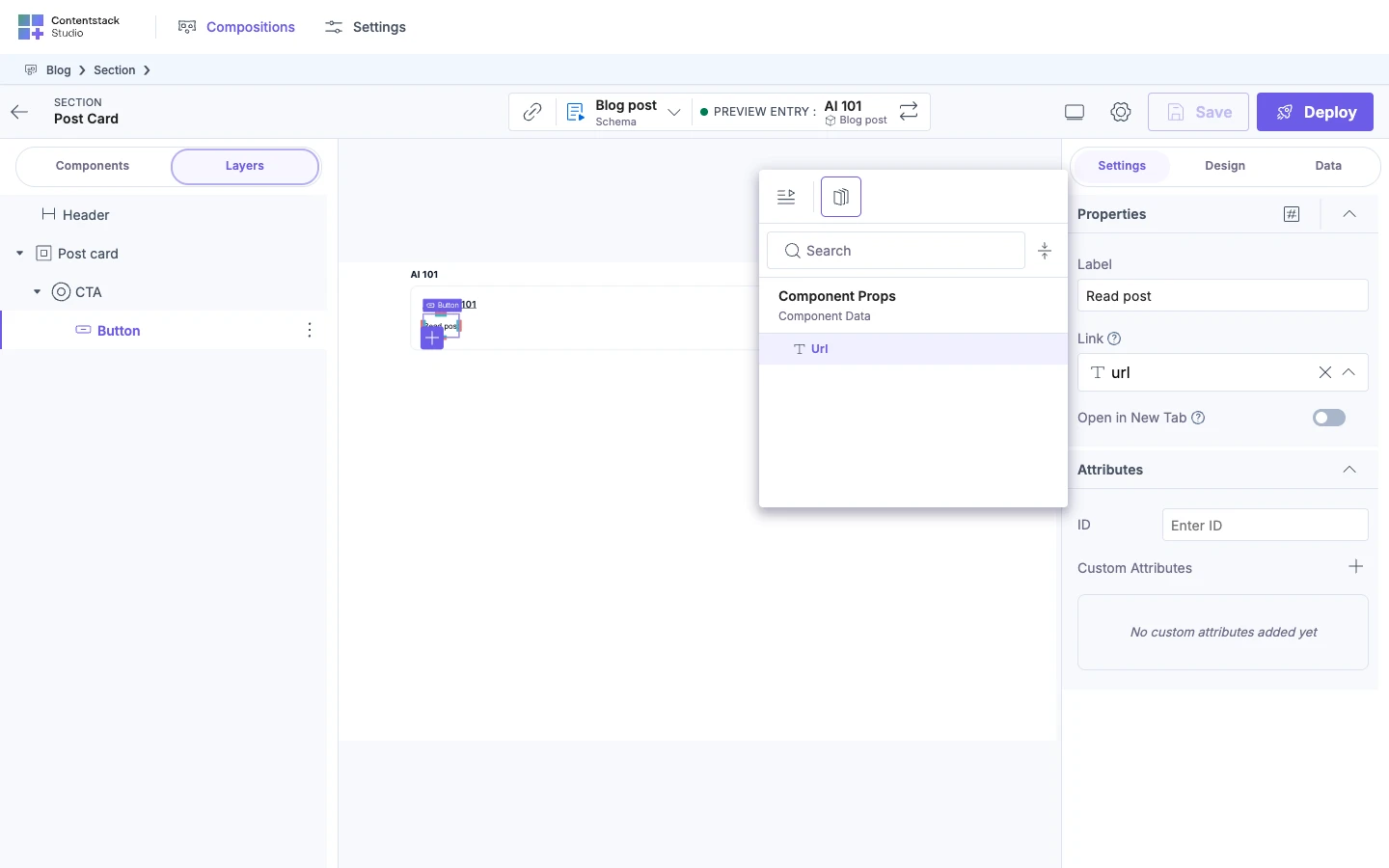
On your site, the Button's link is the url PostCard passed, such as /blog/ai-101 for AI 101.
Studio lists the keys only while your component runs inside the Studio canvas. Studio lists keys per slot, so a component in another slot doesn't see them. An array in slot data can feed a Repeater inside the slot. To give that Repeater the schema of the field the array came from, add dataFrom to the slot prop.
Which value applies when keys repeat
A slot's data merges over the values it inherits, one level deep.
| Case | Which value applies |
|---|---|
A key is in both the data prop of StudioComponent and a slot | The slot's value takes priority inside that slot. |
| Slots are nested | The nearest slot takes priority. |
| The key's value is an object | The slot's object replaces the whole object above it, because the merge is shallow. |
| A component is outside the slot | The outer value still applies. |
If it doesn't work
Studio lists no keys for the Button. Check these causes.
- Select a component inside the slot. Studio doesn't list the keys for PostCard, the component with the slot.
- Wrap the slot prop in
Slot. A bare slot prop reports nothing. - Check that your component passes the slot prop straight through as children.
A bound key shows its default or nothing. You renamed the key, or your value is undefined.
A slot shows its own value instead of the one from the data prop of StudioComponent. The nearest slot takes priority. Rename one key.
To look up every prop of Slot, see StudioComposition and Slot props. To pass your app's own data to a whole template or section, see Bring your own data.