Section slots
A section slot is a place inside a section that each template fills with its own content. Use one when templates share a section's layout but need different content in one part of it.
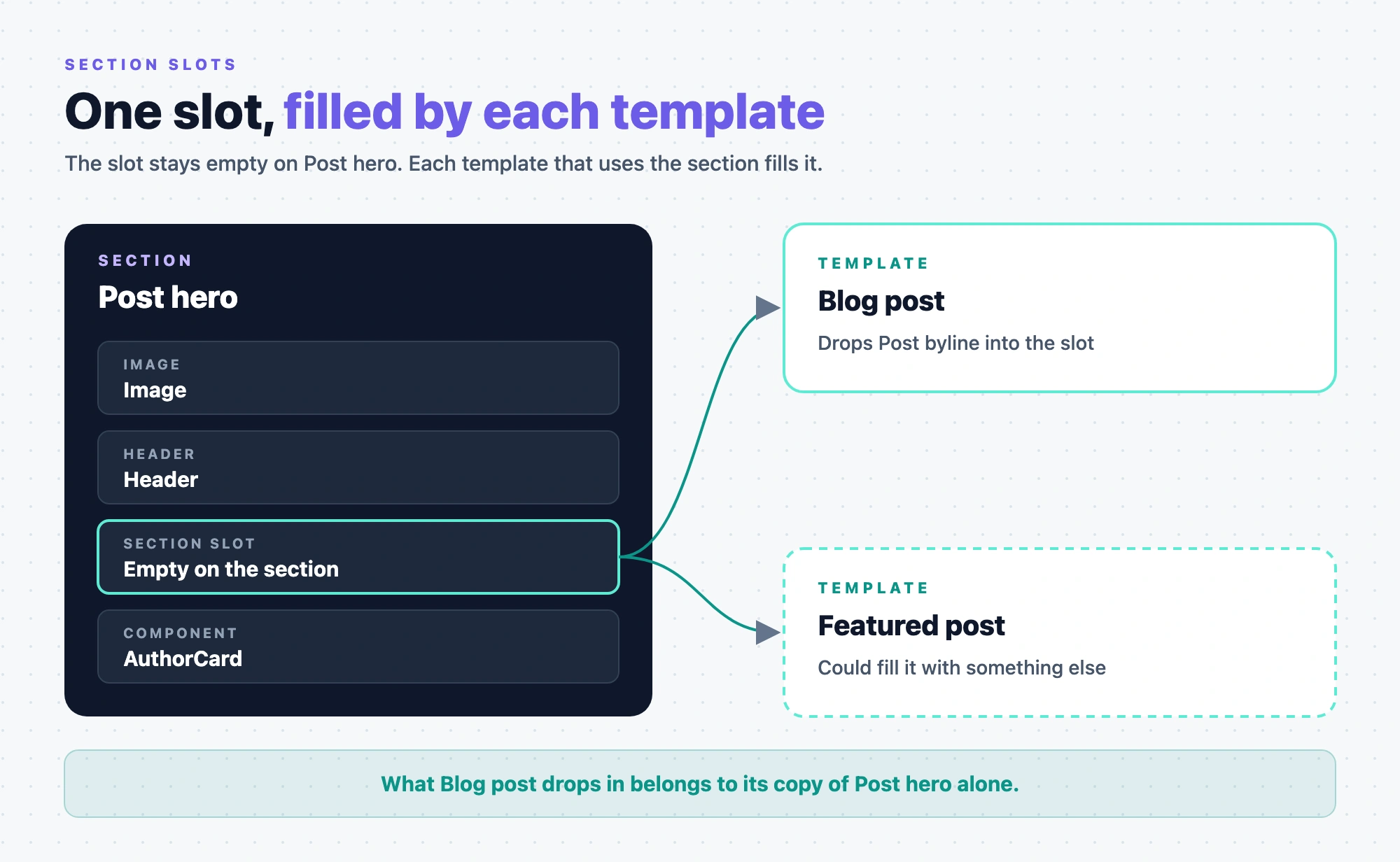
The example is the blog's Post hero section. It has a slot under the title. The Blog post template fills it with the Post byline section, and a Featured post template could fill it with something else.
What is a section slot?
A section slot is a component called Section Slot, in the Smart Containers group of the Components tab. You place it while you build a section. It isn't in the Components tab on a template.
The slot stays empty on the section itself. Each template that uses the section fills it, and what it drops in belongs to that placed copy of the section alone. When the Blog post template drops Post byline into Post hero's slot, other templates that use Post hero don't get it.
A template can drop components or other sections into a slot, and more than one item. How to fill one is in Build a template from sections.
Slot or exposed prop?
Both let a template change part of a section. Pick by how much the template needs to change.
| Section slot | Exposed prop | |
|---|---|---|
| What a template changes | A whole area, and which components or sections go in it | One value on one component, such as a heading level |
| What the section author decides | Where the area is, and which sections may go in it | Which prop, and the name templates see |
| Post hero example | The area under the title, filled with Post byline | The Header's Heading Level, exposed as Title size |
| How to add one | Author a section with slots | Build sections |
If a template only needs a different value, expose a prop. If it needs different content, add a slot.
Component slot or Section Slot?
Some registered components have slots too. A card component, for example, might have a slot for its body. The two work differently.
| Component slot | Section Slot | |
|---|---|---|
| Where it comes from | A slot prop in the component's registerComponent call. Its dataFrom option gives a Repeater in the slot the schema of the data the component passes in. | The Section Slot component, placed on a section |
| Who fills it | Whoever builds the section or template the component is on | Each template that uses the section |
| On a template that uses the section | Locked, like the rest of the section | Open for the template to fill |
| Its name in a template's Layers | The slot prop's displayName, or the prop's name. Set in code. | Always "Slot" |
So a component slot shapes the section itself, and a Section Slot is the part templates may change.
What can a section author set on a slot?
Two things:
- Allowed sections. Only these sections can be dropped in. Components can still go in. Leave the list empty to allow any section. To restrict the slot, name the sections.
- Default section. What visitors see when a template leaves the slot empty.
Both are set on the section. See Author a section with slots.