CSR or SSR
A template route in your app has to fetch a template, render it, style it and fill in the page head. Where those jobs run, in the browser or on your server, decides what search engines and link previews see. The example on this page is the Blog post template, rendering the post AI 101 at /blog/ai-101.
What a template route has to do
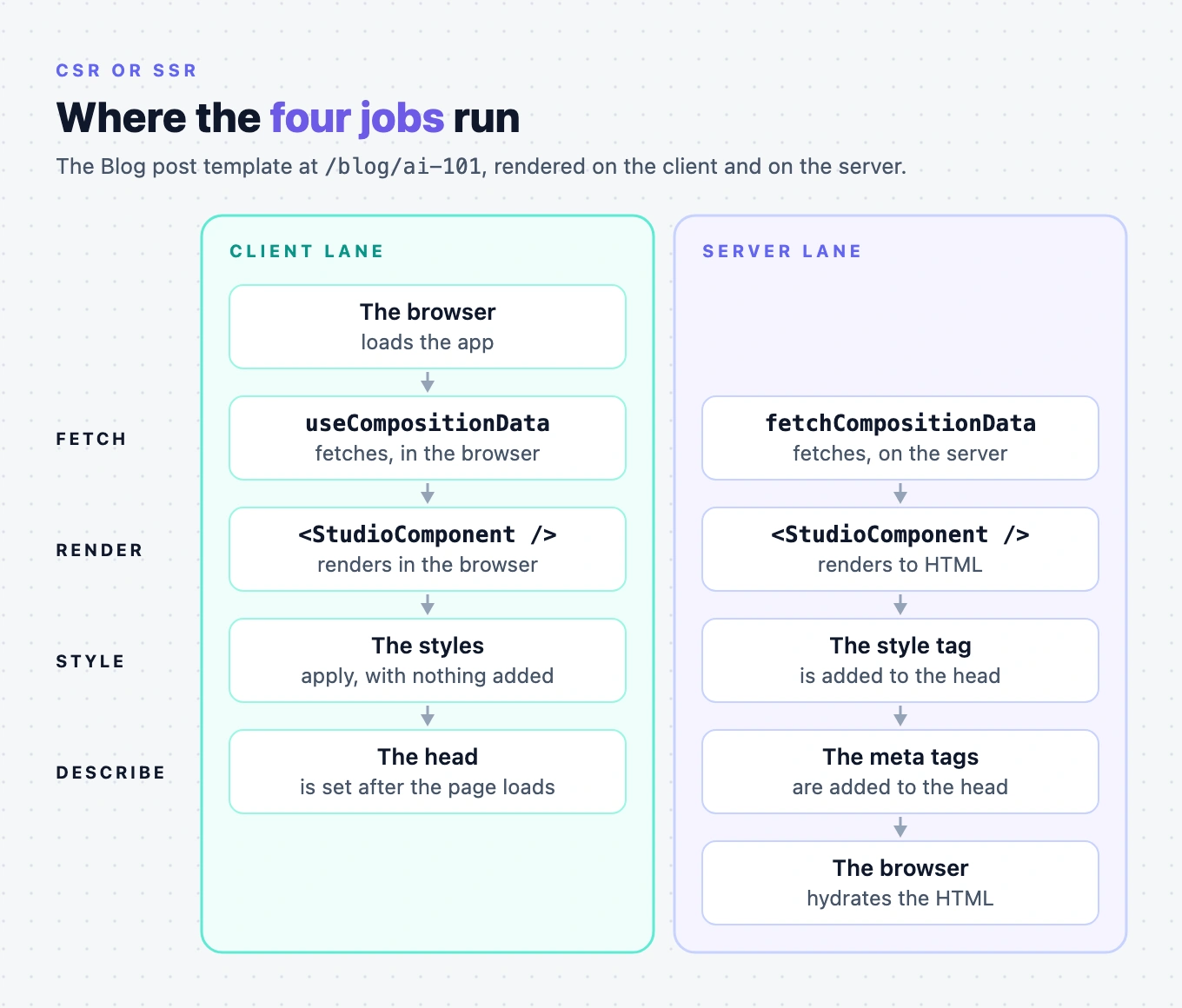
For /blog/ai-101, your route does four jobs:
- Fetch. It gets the composition for that URL, the Blog post template with AI 101's content bound in.
- Render. It turns the composition into your components.
- Style. It gets the template's styles into the first paint. The styles authors set in the Design panel aren't in your stylesheet. The SDK generates them from the composition.
- Describe. It puts the template's title and meta tags in the page head. The SDK doesn't write to the head. Your route does, from the
seovalues the fetch returns.
The two fetch functions and the one renderer
The Studio SDK gives you two ways to fetch and one component to render with.
| API | Where it runs | Returns |
|---|---|---|
useCompositionData(query, options?) | In the browser only. It's a React hook, so it runs inside a client component. | { specOptions, isLoading, error, refetchSpec, refetchData } |
sdk.fetchCompositionData(query, options?) | On the server, or anywhere outside React. It's a method on the object studioSdk.init returns. | The spec options object itself |
Both give you the same object, StudioComponentSpecOptions. The hook wraps it as specOptions, and fetchCompositionData returns it directly.
| Component | Where it runs | What it does |
|---|---|---|
<StudioComponent specOptions={specOptions} /> | In the browser, and on the server. It's a client component that still renders to HTML on the server. | Renders either fetch result the same way. It reads the mode from the URL and picks editing, the Open in Studio button or a plain render. |
Who does each job on the client and on the server
| Job | On the client | On the server |
|---|---|---|
| Fetch | useCompositionData reads the query string from the browser's address itself. | You call fetchCompositionData and pass the request's query string as searchQuery. |
| Render | <StudioComponent /> renders in the browser. | <StudioComponent /> renders to HTML on the server, and the browser hydrates it. |
| Style | You don't add anything. The style helper is only for HTML built on the server. | The HTML is built before any browser script runs, so you add the styles to the head with getSSRStyleTags. |
| Describe | The seo values arrive with the fetch, after the page loads. They aren't in the HTML that crawlers and social previews read. | You write the seo values into the head with getCompositionMetadata and renderMetadataToHtml. |
When you need server rendering
Render on the server when any of these is true for a template:
- Search engines must index its content from the first HTML response. On the client, that HTML has no template content yet.
- Social previews must show its title, description and Open Graph image. Social networks and many crawlers don't run JavaScript, so they never see tags set in the browser.
- The first paint must show the template. On the client, the first paint is your loading state, because
useCompositionDatastarts in its loading state.
A client-rendered template can still set its title and meta tags after it loads, from specOptions.seo. Server rendering is what puts them in the first HTML.
What doesn't change between the two
<StudioCanvas /> renders only in the browser. It renders nothing on the server and on the first client render, so it needs no special handling on either path.
Your section preview route and its Canvas URL, /canvas, stay the same whichever path your template routes use. See Mount the section preview route.
Choose a render path
- Render on the client if the route is part of a single-page app, or search engines and social previews don't matter for it.
- Render on the server if any of the cases under When you need server rendering applies.
Both pages build on the catch-all route from Wire template preview routes.