How the Studio API works
This page explains the rules and records behind the Studio API routes. You need it when you want to know why a call answers the way it does, or what a project and a composition entry hold.
The example is the Blog project and its Blog post Template.
Rules every route shares
Every route starts with /v1. These rows come from the Reference page. The full list is in API endpoints.
| You send | What happens |
|---|---|
| A top-level body field the route doesn't know | The API drops it without an error, so it ignores a misspelled field name. Keys inside settings stay, so a misspelled key there is saved. |
| A trailing slash | The API ignores it. /v1/projects and /v1/projects/ are the same route. |
A DELETE with Content-Type: application/json and no body | The API answers 400 before the route runs. Send a DELETE without Content-Type. |
| A call that succeeds | POST answers 201. Every other method answers 200. |
- The API drops unknown fields only at the top level of a body. It keeps whatever you send inside
uiandsettings. - Service errors come back as
{ error_message, error_code, errors }, anderrorsis there only when a field or node is at fault.error_codestays the same, so branch on it and not onerror_message. A body or query that fails validation answers 400 in the framework shape{ statusCode, message, error }. - The API stops waiting for a call after 60 seconds and answers 408. A 408 doesn't cancel the work, so a create or an update can still finish after you get the answer. List before you retry.
- The API has no rate limit of its own.
See API errors and validation for every status code, error code and message.
What a project holds
A project is the record that ties a stack, a content type, a language and a canvas together. The API stores it in its own database. A project record has fourteen fields, and you can write six: name, description, canvasUrl, connectedStackApiKey, contentTypeUid and settings. For the Blog project, the stack API key is blt1234567890, the environment UID is blt1111111111111111, and the Canvas URL is /canvas.
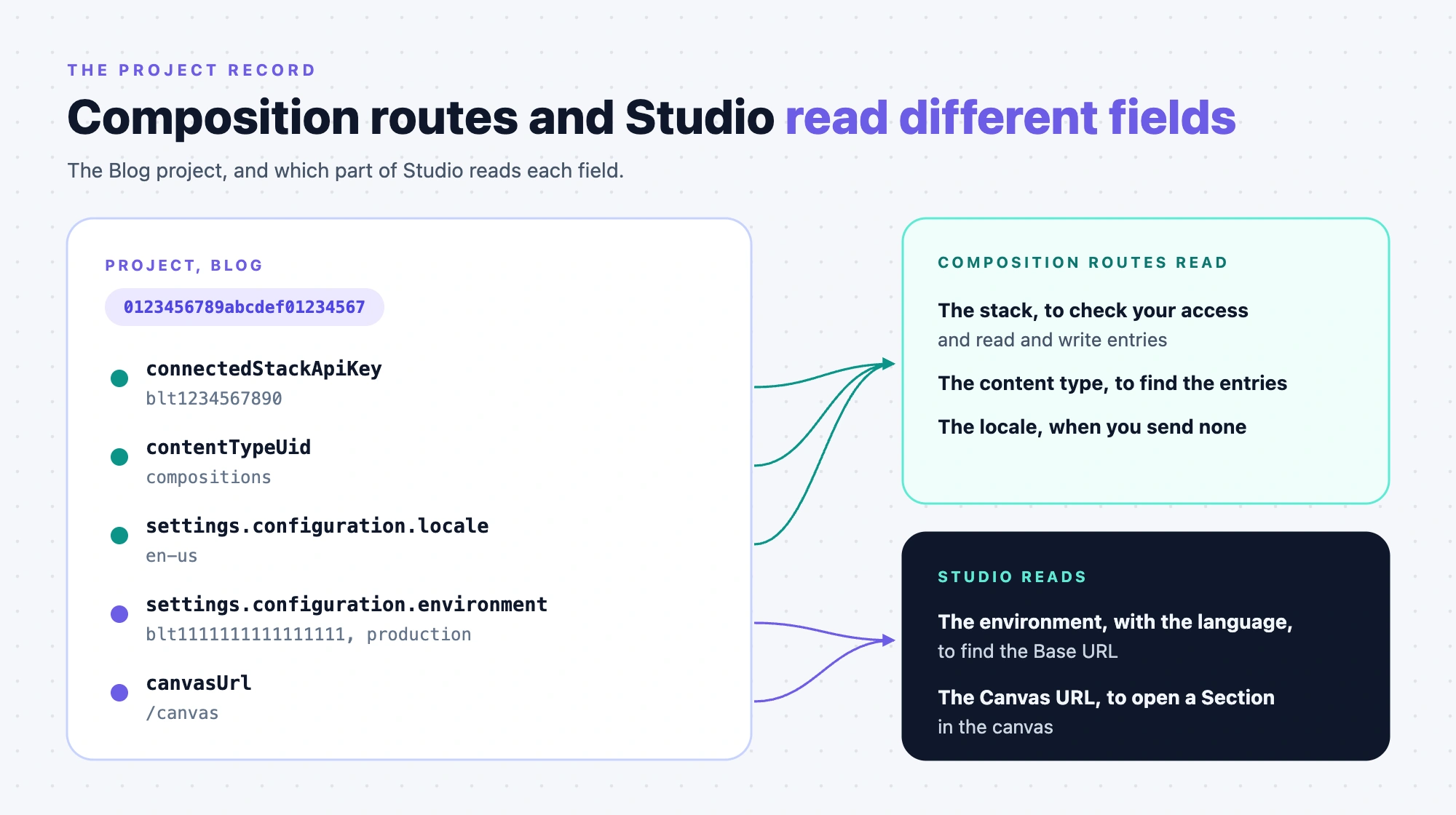
| Field | Who reads it |
|---|---|
connectedStackApiKey | Composition routes use it for the access check and as the stack they read and write entries in. The registered components route uses it only for its read access check. |
contentTypeUid | Composition routes read and write entries in this content type. If it's empty, they use compositions. |
settings.configuration.locale | Composition routes use it as the language: for writes always, and for reads and lists when you don't send locale. If it's empty, they send no locale to Contentstack. Set it to your stack's master language, because Studio opens and saves compositions there. |
settings.configuration.environment | Studio. No API route reads it, and the API stores it and returns it. It holds an environment UID, not a name. Studio uses it with the language to find the Base URL. |
canvasUrl | Studio. No API route reads it. Studio opens a Section's canvas at the Base URL plus the Canvas URL, so start it with a slash, such as /canvas. A Template doesn't use it. |
name, description | Studio shows them as labels. No API route reads them. |
- A project whose
environmentholds an environment name, not a UID, shows no environment in Studio and has no Base URL. - If the environment has no URL for the project's language, Studio uses the Playground canvas. With a Base URL and an empty Canvas URL, a Section's canvas shows "Canvas URL is not configured".
- One stack can hold several projects, each with its own compositions content type. A second live project with the same stack and compositions content type answers 422 with error code 2.
For how Base URL and Canvas URL work in Studio, see Project settings.
The composition entry
A Template and a Section are both entries with a ui tree whose root node has the type page. They also both hold data_sources, static_value and linked_sections. They differ in four fields.
| Field | Template | Section |
|---|---|---|
place_composition_as | page | section |
connected_content_type | A content type UID, or an empty string for a freeform Template | Must be empty, or the API answers 422 with error code 32 |
url | The Template's URL pattern | None. The /sections route drops any url you send. |
linked_schemas | None. The /templates route drops it, and the API stores an empty list. | The schemas the Section can match |
- The API fills
schema_versionwith1.0.0,data_sourceswith[],static_valuewith{}andconnected_content_typewith an empty string. - The API never fills
url,url_metadata,ui_previeworlinked_schemas. The entry keeps what you send, or nothing. A Section you create through the API has no thumbnail. The editor takes one when someone first opens the Section, unless it binds entry data and no preview entry is chosen. data_sourcesis stored as a JSON string, and the saved composition shows it as a string. On a stored entry,url_metadata.url_queriesis a JSON string, not an object.- Studio's editor and the CLI write
url_metadatafor a Section with the sourcedefault_url_pattern. The API doesn't. - The editor's Sections list shows every entry whose
place_composition_asissection, with no filter onlinked_schemas.
For every field and its limits, see API endpoints.
Get the OpenAPI document
The service serves its OpenAPI document at /api-json and a Swagger page at /api. Both paths sit at the host root, so they carry no /v1 prefix.
- The document is titled "Composable Studio API" and has version 1.0. It lists seven servers: AWS NA, AWS EU, AWS AU, Azure NA, Azure EU, GCP NA and GCP EU.
- It declares two credentials, an
authtokenheader key and an OAuth bearer token. It marksorganization_uidas a required header on the project, composition and registered component routes. - It includes the two list routes
GET .../compositions/templatesandGET .../compositions/sections.
Note: Each server URL in the document ends with /v1, and each path in the document also starts with /v1. When a tool joins the two, drop one /v1.
Where to go next:
- Call the API for the first time: Make your first call.
- Look up every field and error: API endpoints and API errors and validation.