Section and template JSON examples
This page shows nine Sections and Templates as JSON, each with what it renders. You need it when you build a layout for the Studio API and want a starting point close to yours.
The examples come from the Blog project. The Sections are Post hero, Post byline, Author card, Post chapters, Post extras and Related posts. The Templates are Blog post and About. Each ui tree is complete, so you can send it as the ui field of a create call. For the nodes themselves, see Composition JSON. For the call, see Create a section and a template with the API.
Sections that loop and sections that don't
A Section loops when its ui contains a Repeater, wherever the Repeater sits. What Studio adds when an author links the Section depends on the field the Section is linked to.
| The Section's root | Repeater at the root |
|---|---|
| The whole content type | None |
| A single group or a single global field | None |
| A reference or modular blocks field | One. Studio opens the Add Condition dialog, even when the field holds a single reference. |
| A multiple group, a global field, a file or a link | Studio asks in the Add Repeater dialog. Add stores "cardinality": "collection". Skip stores "cardinality": "single" and adds no Repeater. |
- The root Repeater's
itemsbinding is{ "type": "template", "value": { "path": {} } }. For a reference or modular blocks root, Studio setsmetadata.repeaterBindingFieldTypetoreferenceormodular_block. - Inside a Repeater, read each item with a
repeaterbinding and the Repeater'suid. Atemplatebinding still points at the Section's whole scope. - The SDK re-scopes
templateto the current item in two places: a Section Slot's fill, and a Section placed inside a Template Repeater. - A Repeater whose
itemsdoesn't resolve to an array renders nothing. - A Section linked to a multiple group with
cardinalitysinglereads one element, the first. Place it inside a Repeater over that group to show every row. - A Section linked to the whole content type can loop by naming the list in the Repeater's
itemspath, such as{ "chapters": {} }. A Template can also hold its own Repeater over any list. - A pinned entry or query that a Section lists in
data_sourcestravels with the Section to every Template that places it. A binding to one resolves only when the Section lists it. - A Section can list several
linked_schemas. Each Template uses the one for its own content type. - The API warns
repeater_no_previewfor a Repeater with nometadata.mode, andrepeater_no_condition_blockfor a Repeater with no Condition Block child. It can't see field types, so it warns for every field. Your site still iterates.
Section with single values and a component (Post hero)
Post hero shows the cover image, the title and the author. It's linked to the whole Blog post content type, so it needs no Repeater: linked_schemas is [{ "content_type_uid": "blog_post" }].
{
  "uid": "post_hero_root",
  "type": "page",
  "attrs": {},
  "metadata": {},
  "props": { "children": { "type": "slot", "slot": "hero_slot" } },
  "slots": {
    "hero_slot": [
      {
        "uid": "hero_image",
        "type": "image",
        "attrs": {},
        "metadata": {},
        "props": {
          "src": {
            "type": "imageurl",
            "binding": { "type": "template", "value": { "path": { "cover_image": { "url": {} } } } }
          },
          "alt": {
            "type": "string",
            "binding": { "type": "template", "value": { "path": { "title": {} } } }
          }
        },
        "slots": {},
        "styles": {}
      },
      {
        "uid": "hero_title",
        "type": "header",
        "attrs": {},
        "metadata": {},
        "props": {
          "text": {
            "type": "plaintext",
            "binding": { "type": "template", "value": { "path": { "title": {} } } }
          },
          "Tag": { "type": "choice", "value": ["h1"] }
        },
        "slots": {},
        "styles": {}
      },
      {
        "uid": "hero_author",
        "type": "AuthorCard",
        "attrs": {},
        "metadata": {},
        "props": {
          "name": {
            "type": "string",
            "binding": { "type": "template", "value": { "path": { "author": { "0": { "title": {} } } } } }
          },
          "photo": {
            "type": "imageurl",
            "binding": { "type": "template", "value": { "path": { "author": { "0": { "photo": { "url": {} } } } } } }
          },
          "link": {
            "type": "href",
            "binding": { "type": "template", "value": { "path": { "author": { "0": { "link": { "href": {} } } } } } }
          }
        },
        "slots": {},
        "styles": {}
      }
    ]
  },
  "styles": {}
}
- Image
srchas typeimageurland binds to{ "cover_image": { "url": {} } }. Headertexthas typeplaintextand binds to{ "title": {} }. - Header's Heading Level is the prop
Tag, typechoice, with the optionsh1toh6and the default["h1"]. A value typed on a node prop, such asTaghere, renders in the SDK. - AuthorCard takes
nameasstring,photoasimageurlandlinkashref. It binds toauthorwith the item index0, because Contentstack returns a reference as an array with one element for a single reference. - The API warns
unknown_typeforAuthorCard, because your app registers it and it isn't a built-in node. It still saves the Section. - To read this Section's
uiback from the API, callGET /v1/projects/{projectUid}/compositions/{uid}?decompression=true, where{uid}is the entry UID.
Section with a Section Slot (Post hero and Post byline)
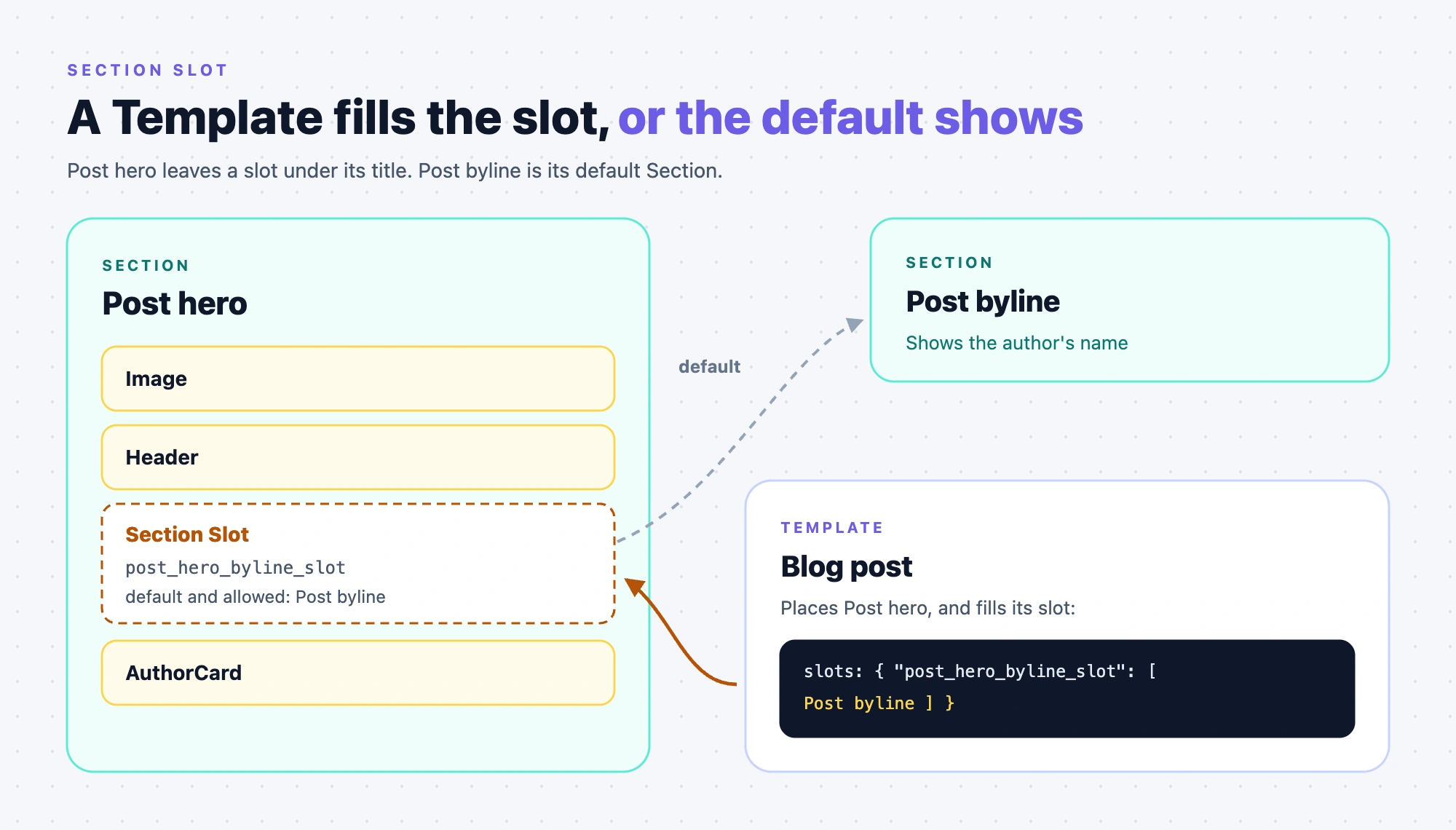
Post hero also holds a Section Slot under the title. The slot's default and only allowed Section is Post byline, a small Section that shows the author's name.
Add this node to Post hero's hero_slot, after the Header.
{
  "uid": "post_hero_byline_slot",
  "type": "section-slot",
  "attrs": {},
  "metadata": {
    "defaultSection": { "uid": "blt8888888888888888", "_content_type_uid": "compositions" },
    "allowedSections": [{ "uid": "blt8888888888888888", "_content_type_uid": "compositions" }]
  },
  "props": {},
  "slots": {},
  "styles": {}
}
Post byline is a Section with one plain-text node.
{
  "uid": "post_byline_root",
  "type": "page",
  "attrs": {},
  "metadata": {},
  "props": { "children": { "type": "slot", "slot": "byline_slot" } },
  "slots": {
    "byline_slot": [
      {
        "uid": "byline_text",
        "type": "plain-text",
        "attrs": {},
        "metadata": {},
        "props": {
          "text": {
            "type": "plaintext",
            "binding": { "type": "template", "value": { "path": { "author_card": { "name": {} } } } }
          }
        },
        "slots": {},
        "styles": {}
      }
    ]
  },
  "styles": {}
}
- Both references use
_content_type_uidcompositions, the project's compositions content type. - A Template that places Post hero with no
slotskey gets Post byline in the empty slot, because it's the default. - To fill the slot, put
slots: { "post_hero_byline_slot": [ <section-composition node for Post byline> ] }on the placed Post hero. A filled slot replaces the default Section instead of adding to it. The node for Post byline is the placed-Section node in Section slots, overrides and exposed props. - The Section Slot node has no
slotsof its own. Leave out that key, because an empty array answers 422. - The API derives
linked_sectionsfor Post hero as Post byline, because the Section Slot default is a reference. A Template that fills the slot gets rows for Post hero and Post byline. One that leaves it empty gets only Post hero. - Post hero needs no Repeater, Condition Block or Box around its Section Slot.
Section over a global field (Author card)
Author card shows a heading, a line of text and the author's card. It's linked to the author_card global field of two content types, so its linked_schemas has two entries.
[
  { "content_type_uid": "blog_post", "selected_field": "author_card" },
  { "content_type_uid": "topic_page", "selected_field": "author_card" }
]
{
  "uid": "author_card_root",
  "type": "page",
  "attrs": {},
  "metadata": {},
  "props": { "children": { "type": "slot", "slot": "card_slot" } },
  "slots": {
    "card_slot": [
      {
        "uid": "card_heading",
        "type": "header",
        "attrs": {},
        "metadata": {},
        "props": {
          "text": { "type": "plaintext", "value": "About the author" },
          "Tag": { "type": "choice", "value": ["h2"] }
        },
        "slots": {},
        "styles": {}
      },
      {
        "uid": "card_text",
        "type": "text",
        "attrs": {},
        "metadata": {},
        "props": { "text": { "type": "plaintext", "value": "Writes for the team blog." } },
        "slots": {},
        "styles": {}
      },
      {
        "uid": "card_author",
        "type": "AuthorCard",
        "attrs": {},
        "metadata": {},
        "props": {
          "name": {
            "type": "string",
            "binding": { "type": "template", "value": { "path": { "name": {} } } }
          },
          "photo": {
            "type": "imageurl",
            "binding": { "type": "template", "value": { "path": { "photo": { "url": {} } } } }
          },
          "link": {
            "type": "href",
            "binding": { "type": "template", "value": { "path": { "link": { "href": {} } } } }
          }
        },
        "slots": {},
        "styles": {}
      }
    ]
  },
  "styles": {}
}
- A single global field root gets no Repeater, so
templatestarts at the global field's own fields:name,photoandlink. AuthorCard binds toname,photo.urlandlink.href. - On a Template, the SDK uses the
linked_schemasentry whosecontent_type_uidmatches the Template's content type. When none matches, it uses the first entry, hereblog_post. - A Repeater over a global field renders only when the field has Multiple on, because a Repeater reads an array.
- The heading and the text are typed values on the node props, so they show the same on every Template.
Section over a repeating group (Post chapters)
Post chapters lists each chapter's title and, under it, the chapter's links. It's linked to the whole Blog post content type. The chapters field is a multiple group with a nested multiple group, links.
{
  "uid": "post_chapters_root",
  "type": "page",
  "attrs": {},
  "metadata": {},
  "props": { "children": { "type": "slot", "slot": "chapters_slot" } },
  "slots": {
    "chapters_slot": [
      {
        "uid": "chapters_repeater",
        "type": "repeater",
        "attrs": {},
        "metadata": { "mode": "preview" },
        "props": {
          "items": {
            "type": "array",
            "binding": { "type": "template", "value": { "path": { "chapters": {} } } }
          },
          "children": { "type": "slot", "slot": "chapter_slot" }
        },
        "slots": {
          "chapter_slot": [
            {
              "uid": "chapter_title",
              "type": "text",
              "attrs": {},
              "metadata": {},
              "props": {
                "text": {
                  "type": "plaintext",
                  "binding": {
                    "type": "repeater",
                    "value": { "repeaterUID": "chapters_repeater", "path": { "title": {} } }
                  }
                }
              },
              "slots": {},
              "styles": {}
            },
            {
              "uid": "links_repeater",
              "type": "repeater",
              "attrs": {},
              "metadata": { "mode": "preview" },
              "props": {
                "items": {
                  "type": "array",
                  "binding": {
                    "type": "repeater",
                    "value": { "repeaterUID": "chapters_repeater", "path": { "links": {} } }
                  }
                },
                "children": { "type": "slot", "slot": "link_slot" }
              },
              "slots": {
                "link_slot": [
                  {
                    "uid": "link_label",
                    "type": "text",
                    "attrs": {},
                    "metadata": {},
                    "props": {
                      "text": {
                        "type": "plaintext",
                        "binding": {
                          "type": "repeater",
                          "value": { "repeaterUID": "links_repeater", "path": { "label": {} } }
                        }
                      }
                    },
                    "slots": {},
                    "styles": {}
                  }
                ]
              },
              "styles": {}
            }
          ]
        },
        "styles": {}
      }
    ]
  },
  "styles": {}
}
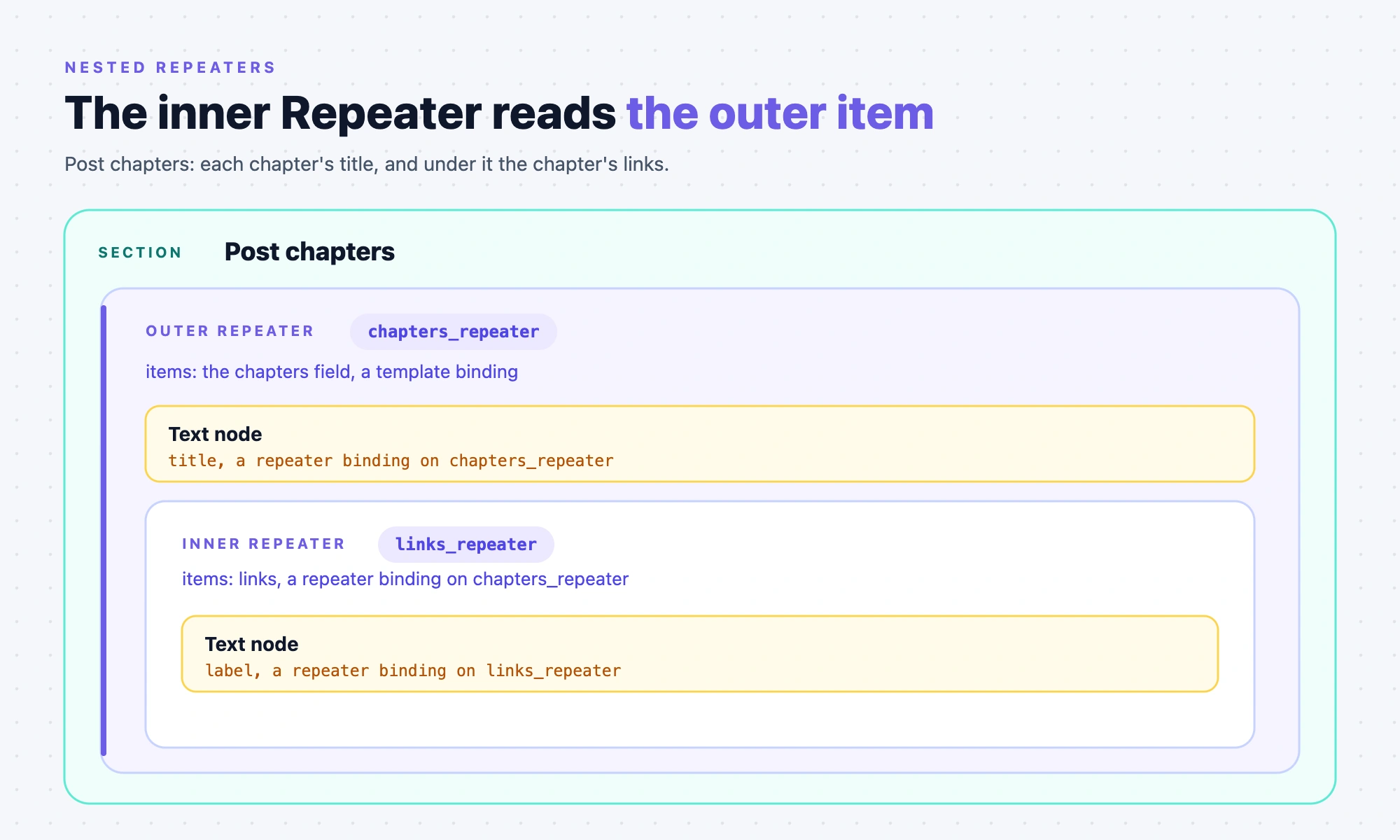
- With the whole Blog post as the schema root, the outer Repeater's
itemspath is{ "chapters": {} }. Withchaptersitself as the schema root, the path is{}. - The inner Repeater's
itemsis arepeaterbinding with the outer Repeater'suidand the path{ "links": {} }. It sits in the outer Repeater's slot, so the outer item is in context when it renders. - The chapter title binds with type
repeater, the outerrepeaterUIDand the path{ "title": {} }. The link label binds the same way with the innerrepeaterUIDand the path{ "label": {} }. - Each
repeaterUIDmust equal theuidof the Repeater that supplies the item. - A
templatebinding with a fixed index, such aschapters.0.links, shows the first chapter's links in every chapter. chaptersandlinksare groups, so neither needs aresolvedReferencesentry. That list holds only reference paths.- The API warns
repeater_no_condition_blockon both Repeaters, andrepeater_no_previewwhenmetadata.modeis missing.
Section over modular blocks (Post extras)
Post extras shows the Blog post's content blocks and its featured content. It's linked to the whole Blog post content type, so its one linked schema has content_type_uid blog_post and no selected_field.
The content_blocks field has two block types, quote and image. A Repeater over the field needs one Condition Block for each block type.
{
  "uid": "blocks_repeater",
  "type": "repeater",
  "attrs": {},
  "metadata": { "mode": "preview", "repeaterBindingFieldType": "modular_block" },
  "props": {
    "items": {
      "type": "array",
      "binding": { "type": "template", "value": { "path": { "content_blocks": {} } } }
    },
    "children": { "type": "slot", "slot": "blocks_slot" }
  },
  "slots": {
    "blocks_slot": [
      {
        "uid": "quote_branch",
        "type": "condition-block",
        "attrs": {},
        "metadata": {
          "condition": {
            "type": "modular_block",
            "operator": "eq",
            "value": "quote",
            "conditionBinding": {
              "type": "repeater",
              "value": { "repeaterUID": "blocks_repeater", "path": { "quote": {} } }
            },
            "dataBinding": {
              "type": "repeater",
              "value": { "repeaterUID": "blocks_repeater", "path": { "quote": {} } }
            }
          }
        },
        "props": { "children": { "type": "slot", "slot": "quote_slot" } },
        "slots": {
          "quote_slot": [
            {
              "uid": "quote_text",
              "type": "text",
              "attrs": {},
              "metadata": {},
              "props": {
                "text": {
                  "type": "plaintext",
                  "binding": {
                    "type": "repeater",
                    "value": { "repeaterUID": "blocks_repeater", "path": { "text": {} } }
                  }
                }
              },
              "slots": {},
              "styles": {}
            },
            {
              "uid": "quote_attribution",
              "type": "text",
              "attrs": {},
              "metadata": {},
              "props": {
                "text": {
                  "type": "plaintext",
                  "binding": {
                    "type": "repeater",
                    "value": { "repeaterUID": "blocks_repeater", "path": { "attribution": {} } }
                  }
                }
              },
              "slots": {},
              "styles": {}
            }
          ]
        },
        "styles": {}
      },
      {
        "uid": "image_branch",
        "type": "condition-block",
        "attrs": {},
        "metadata": {
          "condition": {
            "type": "modular_block",
            "operator": "eq",
            "value": "image",
            "conditionBinding": {
              "type": "repeater",
              "value": { "repeaterUID": "blocks_repeater", "path": { "image": {} } }
            },
            "dataBinding": {
              "type": "repeater",
              "value": { "repeaterUID": "blocks_repeater", "path": { "image": {} } }
            }
          }
        },
        "props": { "children": { "type": "slot", "slot": "image_slot" } },
        "slots": {
          "image_slot": [
            {
              "uid": "block_image",
              "type": "image",
              "attrs": {},
              "metadata": {},
              "props": {
                "src": {
                  "type": "imageurl",
                  "binding": {
                    "type": "repeater",
                    "value": { "repeaterUID": "blocks_repeater", "path": { "image": { "url": {} } } }
                  }
                }
              },
              "slots": {},
              "styles": {}
            },
            {
              "uid": "block_caption",
              "type": "text",
              "attrs": {},
              "metadata": {},
              "props": {
                "text": {
                  "type": "plaintext",
                  "binding": {
                    "type": "repeater",
                    "value": { "repeaterUID": "blocks_repeater", "path": { "caption": {} } }
                  }
                }
              },
              "slots": {},
              "styles": {}
            }
          ]
        },
        "styles": {}
      }
    ]
  },
  "styles": {}
}
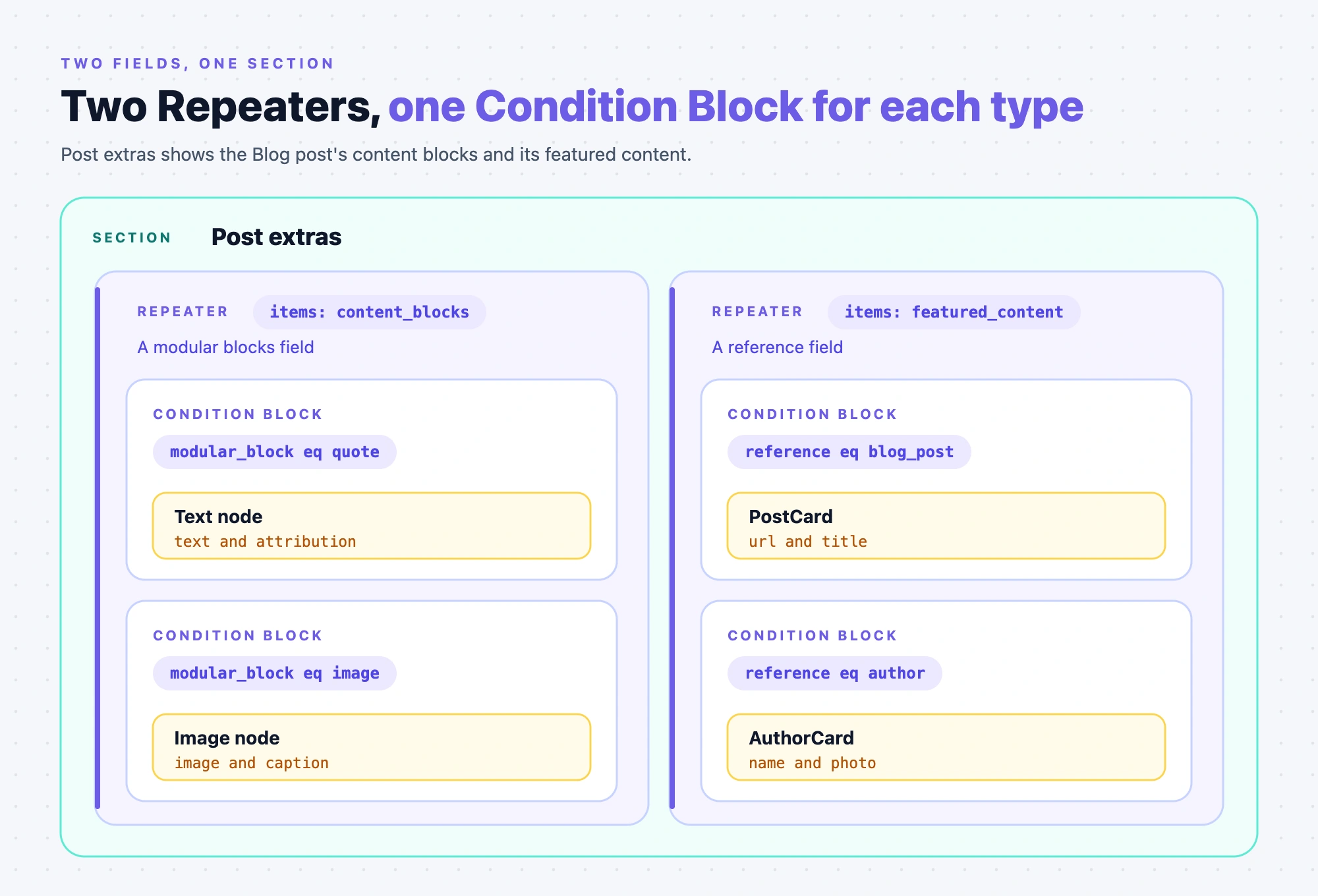
This Repeater goes in the root slot of a page node, as in Post hero. The second Repeater, over featured_content, is on the next case.
- Add one Condition Block for each block type, with
condition.typemodular_block,operatoreqandvalueset to the block UID, such asquote. - A block's
conditionBindingis arepeaterbinding with the Repeater'suidand a path holding the block UID. ItsdataBindingis the same binding, so the block's fields become the Repeater's current item inside the Condition Block. - Inside a block's Condition Block, bind fields relative to the block, such as
{ "text": {} }, not{ "quote": { "text": {} } }. - A block type with no Condition Block renders nothing, and so does an item whose block doesn't match.
- A modular blocks field needs no include path, because the Delivery API ignores an include for a field that holds blocks.
- You can leave
subTypeout of a condition you write. Studio adds it only for its own display. Studio shows the block UID, not the block's name, for a Condition Block written through the API. - Studio puts a Box inside each Condition Block it adds, but the SDK doesn't need one.
- A Section linked to a modular blocks field of another content type needs
sectionBindingOverride.selectedFieldon the placed node to read the Template's own field.
Section over reference fields (Related posts)
Related posts shows a PostCard for each related post. The related_posts field is a reference to Blog post, multiple. The Section is linked to the whole Blog post.
{
  "uid": "related_posts_root",
  "type": "page",
  "attrs": {},
  "metadata": {},
  "props": { "children": { "type": "slot", "slot": "related_slot" } },
  "slots": {
    "related_slot": [
      {
        "uid": "related_posts_repeater",
        "type": "repeater",
        "attrs": {},
        "metadata": { "mode": "preview" },
        "props": {
          "items": {
            "type": "array",
            "binding": { "type": "template", "value": { "path": { "related_posts": {} } } }
          },
          "children": { "type": "slot", "slot": "card_slot" }
        },
        "slots": {
          "card_slot": [
            {
              "uid": "related_post_card",
              "type": "PostCard",
              "attrs": {},
              "metadata": {},
              "props": {
                "url": {
                  "type": "href",
                  "binding": {
                    "type": "repeater",
                    "value": { "repeaterUID": "related_posts_repeater", "path": { "url": {} } }
                  }
                },
                "title": {
                  "type": "string",
                  "binding": {
                    "type": "repeater",
                    "value": { "repeaterUID": "related_posts_repeater", "path": { "title": {} } }
                  }
                }
              },
              "slots": {},
              "styles": {}
            }
          ]
        },
        "styles": {}
      }
    ]
  },
  "styles": {}
}
Without an include path, the Delivery API returns each referenced entry as a stub with only uid and _content_type_uid. A Repeater over a reference field gets the field's include path from a reference Condition Block inside it, or from resolvedReferences in data_sources.
[{ "uid": "template", "resolvedReferences": { "template": ["related_posts"] } }]
- A Repeater over
related_postswith no Condition Block still renders its children for every referenced entry. The API still returns 201, with warnings for the missingmodeand the missing Condition Block. - Studio opens the Add Condition dialog when you bind Items to a reference field, even when the field points at one content type. Every content type the field points to starts checked, and Skip adds no Condition Block.
- A reference Condition Block has
condition.typereference,operatoreqandvalueset to the content type UID, such asblog_post. - Its
conditionBindingis arepeaterbinding with the Repeater'suidand the path{ "_content_type_uid": {} }. Each included reference carries_content_type_uid, which the Condition Block compares with itsvalue. - A reference Condition Block has no
dataBinding, so inside it you bind the referenced entry's fields directly, such as{ "url": {} }. - A reference Condition Block whose
valuematches no item's_content_type_uidrenders nothing for that item.
A field that points at several content types
The featured_content field points at Blog post and Author, so it needs two Condition Blocks, one for blog_post and one for author.
- In the
blog_postbranch, bind PostCard'surlto{ "url": {} }and itstitleto{ "title": {} }. - In the
authorbranch, bind AuthorCard'snameto{ "title": {} }and itsphototo{ "photo": { "url": {} } }. - A Section Slot inside a reference Condition Block lets each Template choose the content for that type, keyed by the Section Slot's
uid. A Section placed in a Section Slot inside a Repeater reads the Repeater's current item as its template data.
Section that exposes a prop (Post hero)
A Section can let a Template change one prop inside it. Post hero exposes its Header's Heading Level as "Title size". The Section stores the exposed prop in sectionExposedProps, in the metadata of its root page node.
{
  "sectionExposedProps": [
    {
      "uid": "title_size",
      "nodeUid": "hero_title",
      "propKey": "Tag",
      "displayName": "Title size",
      "propType": "choice",
      "bindingAtExposeTime": { "type": "choice", "value": ["h1"] }
    }
  ]
}
A Template that places Post hero sets the override in the placed node's props, under the exposed uid.
{
  "uid": "post_hero_placed",
  "type": "section-composition",
  "attrs": {},
  "metadata": { "compositionUID": "blt5555555555555555" },
  "props": {
    "title_size": {
      "type": "choice",
      "binding": { "type": "static_value", "value": "post_hero_placed-title_size" }
    }
  },
  "slots": {},
  "styles": {}
}
The Template's static_value holds the key and the value.
{ "choice": [{ "key": "post_hero_placed-title_size", "value": ["h2"] }] }
nodeUidis theuidof the node inside the Section whose prop you expose.propKeyis the component's own name for the prop, which isTagfor a Header's Heading Level.- A Header's
Tagis achoiceprop with the optionsh1toh6and the defaulth1. A Header shows anh1for any value outside that range. - Studio builds the exposed prop's
uidfrom its name by lowercasing it and turning spaces into underscores, so Title size becomestitle_size. Studio rejects an empty name, or one another exposed prop in the Section already uses. - Studio stores a choice prop's value as a
static_valuebinding whosevalueis the key<node uid>-<propKey>, such ashero_title-Tag. The value sits in thechoicebucket as a list with one string. - The override needs a
binding. A prop with only a literalvalueis skipped, so the Section keeps its own value. Astatic_valuebinding'svalueis a key intostatic_value, not the choice you want to show. - If the node leaves the exposed prop out of
props, the Section keeps its own value. Each placed instance keeps its own override, because the key includes the placed node'suid. - At render, the override becomes
section_exposed_overrides[nodeUid][propKey]inside the Section, and it replaces the Section's own binding. - Studio shows an exposed prop under its
displayName, with the control of the internal component's prop. With nodisplayName, it shows a name built frompropKey. Studio looks upnodeUidin the Section to find the control, so a wrongnodeUidloses the dropdown options.
Connected template (Blog post)
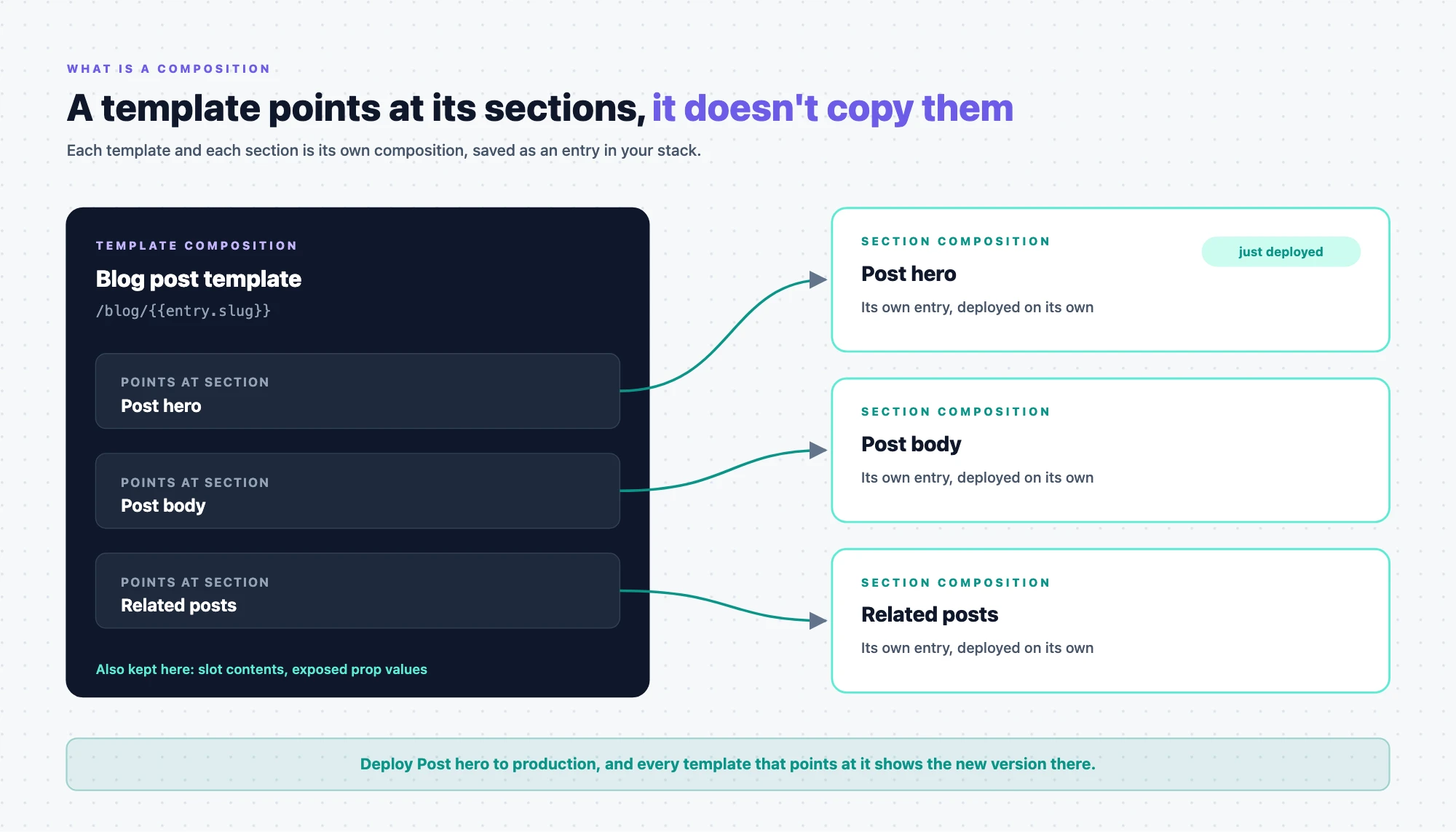
The Blog post Template is connected to the Blog post content type, and it places Post hero, Post body and Related posts. Send it to POST /v1/projects/{projectUid}/compositions/templates.
{
  "title": "Blog post",
  "composable_uid": "blog_post",
  "connected_content_type": "blog_post",
  "url": "/blog/{{entry.slug}}",
  "url_metadata": {
    "url_source": "custom_preview_url",
    "url_queries": "{\"include\":[],\"only\":{\"BASE\":[\"slug\"]},\"where\":{}}"
  },
  "data_sources": [{ "uid": "template", "resolvedReferences": { "template": ["related_posts"] } }],
  "ui": {
    "uid": "blog_post_root",
    "type": "page",
    "attrs": {},
    "metadata": {},
    "props": { "children": { "type": "slot", "slot": "template_slot" } },
    "slots": {
      "template_slot": [
        {
          "uid": "post_hero_placed",
          "type": "section-composition",
          "attrs": {},
          "metadata": { "compositionUID": "blt5555555555555555" },
          "props": {},
          "slots": {},
          "styles": {}
        },
        {
          "uid": "post_body_placed",
          "type": "section-composition",
          "attrs": {},
          "metadata": { "compositionUID": "blt6666666666666666" },
          "props": {},
          "slots": {},
          "styles": {}
        },
        {
          "uid": "related_posts_placed",
          "type": "section-composition",
          "attrs": {},
          "metadata": { "compositionUID": "blt9999999999999999" },
          "props": {},
          "slots": {},
          "styles": {}
        }
      ]
    },
    "styles": {}
  }
}
- On
POST /templates, the route setsplace_composition_astopage, so you leave that field out. OnPOST /compositions,place_composition_asis required, and a missing value returns 400. - A connected Template sets
connected_content_typeto the UID of its content type. If you leave it out, the API stores an empty string. - A Template has no
linked_schemas, so the API stores an empty list for one. If you leavecomposable_uidout, the API sets it to the new entry's UID. - You send
data_sourcesas an array, and the API stores it as a JSON string. A string returns 400. You senduias an object, and the API compresses it for you. - Without a
sectionBindingOverride, a placed Section reads the field its linked schema names for the Template's content type. A Section linked to the whole Blog post needs none on the Blog post Template.
The URL fields
The API doesn't work out url or url_metadata. It stores what you send, or nothing if you send nothing. Studio works them out in the browser when you create a Template, so the API never repeats that logic.
url_source | When Studio sets it | url it writes |
|---|---|---|
custom_preview_url | A connected Template whose content type has a matching Custom Preview URL | The path of that Custom Preview URL |
content_type_url_pattern | Otherwise, for a content type with a URL field | The URL prefix plus {{entry.url}}, or {{entry.url}} alone when the URL pattern is off |
default_url_pattern | If neither applies | /<composition content type UID>/<composable_uid>/{{entry.title}} |
user_specified_pattern | You type a pattern for a connected Template | The pattern you typed |
legacy_url | Never written. Studio and the SDK treat a Template with no url_metadata as legacy_url |
url_queriesis a JSON string, not an object. The API acceptsurl_metadataas any object, so it doesn't catch an object inurl_queries.- With
legacy_urlor nourl_metadata, the SDK finds the connected entry whoseurlfield equals the request path. Withcontent_type_url_pattern, it also matches theurlfield against the whole request path. With the other three sources, it matches the variables inurlagainst the entry's fields. - The SDK adds the
url_queries.includefields to the references it fetches for the connected entry. A variable such as{{entry.author.handle}}counts as a reference only whenauthoris inurl_queries.include. Studio lists the reference field there when you type a pattern with a reference variable. - The SDK ignores
url_queries.wherewhen it looks up an entry.
For every variable and the matching rules, see URL variables. For where a Template's URL comes from, see How template URLs work.
Placing a Section
- You place a Section with a node of type
section-composition. Itsmetadata.compositionUIDis the Section's entry UID, not itscomposable_uid. The node needs its ownuid, and a node withoutmetadata.compositionUIDreturns 422. - The API doesn't check that
compositionUIDnames a Section that exists. When the SDK can't fetch the Section, the node shows the errorComponent with type '<compositionUID>' is not registered. - The node's
propshold the overrides for exposed props, keyed by each exposed prop'suid. Itsslotshold what you place in the Section's Section Slots, keyed by theuidof eachsection-slotnode. - Every
slotsentry needs at least one node, so remove the key to leave a Section Slot unfilled. An empty array returns 422 withSlot "<uid>" on node "<uid>" is an empty array. - An unfilled Section Slot shows the Section named in its
defaultSectionon your site, or nothing if it has none. Aslotskey that matches no Section Slot in the Section never renders.
linked_sections
You send only the section-composition nodes. The API fills linked_sections from ui on every create and on every update that sends ui, and it ignores a value you send. It lists each node's metadata.compositionUID and the defaultSection of each Section Slot, but not allowedSections. Each item holds uid and _content_type_uid, the project's compositions content type.
An update that sends no ui leaves linked_sections as stored. The SDK finds placed Sections by walking ui, so it renders them even when linked_sections is empty. Studio uses linked_sections to load a Template's Sections and to list what uses a Section. The API still warns that the layout places Sections, even though it fills the field itself.
When you save in Studio, it sets data_sources[template].resolvedReferences to the reference paths the layout needs. The SDK adds those paths to the references it fetches.
Freeform template (About)
The About Template is freeform. It has no connected content type and no connected entry, so it reads its data from data_sources. That holds a pinned entry, a pinned query and Component Data.
{
  "title": "About",
  "composable_uid": "about",
  "connected_content_type": "",
  "url": "/about",
  "url_metadata": {
    "url_source": "user_specified_pattern",
    "url_queries": "{\"include\":[],\"only\":{},\"where\":{}}"
  },
  "data_sources": [
    {
      "uid": "contentstack",
      "data": [{ "uid": "blt9f8e7d6c5b4a3210", "_content_type_uid": "author" }]
    },
    {
      "uid": "contentstack_queries",
      "data": [
        {
          "uid": "latest-posts",
          "name": "Latest posts",
          "spec": {
            "contentType": "blog_post",
            "sourceType": "content_type",
            "query": {},
            "params": { "limit": 3, "desc": "created_at" }
          }
        }
      ]
    },
    { "uid": "external_data", "data": { "newsletter": { "subscribers": 12400 } } }
  ],
  "ui": {
    "uid": "about_root",
    "type": "page",
    "attrs": {},
    "metadata": {},
    "props": { "children": { "type": "slot", "slot": "about_slot" } },
    "slots": {
      "about_slot": [
        {
          "uid": "priya_card",
          "type": "AuthorCard",
          "attrs": {},
          "metadata": {},
          "props": {
            "name": {
              "type": "string",
              "binding": {
                "type": "contentstack",
                "value": { "uid": "blt9f8e7d6c5b4a3210", "_content_type_uid": "author", "path": { "title": {} } }
              }
            }
          },
          "slots": {},
          "styles": {}
        },
        {
          "uid": "latest_posts_repeater",
          "type": "repeater",
          "attrs": {},
          "metadata": { "mode": "preview" },
          "props": {
            "items": {
              "type": "array",
              "binding": {
                "type": "contentstack_queries",
                "value": { "queryUID": "latest-posts", "path": { "entries": {} } }
              }
            },
            "children": { "type": "slot", "slot": "latest_slot" }
          },
          "slots": {
            "latest_slot": [
              {
                "uid": "latest_card",
                "type": "PostCard",
                "attrs": {},
                "metadata": {},
                "props": {
                  "title": {
                    "type": "string",
                    "binding": {
                      "type": "repeater",
                      "value": { "repeaterUID": "latest_posts_repeater", "path": { "title": {} } }
                    }
                  }
                },
                "slots": {},
                "styles": {}
              }
            ]
          },
          "styles": {}
        },
        {
          "uid": "subscribers_text",
          "type": "header",
          "attrs": {},
          "metadata": {},
          "props": {
            "text": {
              "type": "plaintext",
              "binding": { "type": "component_props", "value": "newsletter.subscribers" }
            }
          },
          "slots": {},
          "styles": {}
        }
      ]
    },
    "styles": {}
  }
}
- A freeform Template sets
connected_content_typeto an empty string. Its defaulturlis/<composition content type UID>/<composable_uid>, such as/compositions/about, withurl_sourcedefault_url_patternandurl_queriesof{"include":[],"only":{},"where":{}}. About keeps the URL/about, so itsurl_sourceisuser_specified_patternwith emptyurl_queries. - A freeform Template has no
templatedata source, and the API doesn't reject atemplatebinding there. The binding shows the prop's default. data_sourcesis an array of items, and each item has auidthat names its source.- Pinned entries sit in the item with
uidcontentstack, asdata, a list of{ "uid", "_content_type_uid" }. A binding to a pinned entry is{ "type": "contentstack", "value": { "uid", "_content_type_uid", "path" } }. - Pinned queries sit in the item with
uidcontentstack_queries, asdata, a list of{ "uid", "name", "spec" }. Studio builds a query'suidfrom its name by lowercasing it and turning spaces into hyphens, so Latest posts becomeslatest-posts. - A query's
specholdscontentType,sourceType,queryandparams.sourceTypeiscontent_typefor a content type query, and Studio savesparamsof{ "limit": 10, "skip": 0 }when you add none. Latest posts setsparams.limitto3andparams.desctocreated_at, which sorts newest first. - A Repeater binds to a query with
{ "type": "contentstack_queries", "value": { "queryUID", "path": { "entries": {} } } }. A Repeater over a query needs no Condition Block, so you can ignore the API's Condition Block warning there. - Component Data sits in the item with
uidexternal_data, asdata, a plain object. A Component Data binding is{ "type": "component_props", "value": "newsletter.subscribers" }, with the path as a dotted string. The SDK reads it from the storeddata_sourcesJSON string, which the API writes from your array. - A typed static value, such as a PostCard
urlof/blog/ai-101, is astatic_valuebinding plus anhrefentry instatic_value. - Studio saves a Box with
metadata.repeaterWrapperaround the Repeater, but the SDK renders the Repeater without it. - The API returns 201 for this Template, with warnings for the custom types and the Repeater.
To send a tree to the API, see Create a section and a template with the API.