Render on the server
Render a template to HTML on your server, with its styles and meta tags in the head, then hydrate it in the browser. Use this path when search engines or social previews must see the template in the first HTML response. The example on this page is the Blog post template, rendering the post AI 101 at /blog/ai-101.
Prerequisites
- The Studio SDK is installed, and you have the object
studioSdk.initreturned. The examples import it assdkfromlib/contentstack.ts. See Install the Studio SDK. - You passed the Delivery SDK stack to
initasstackSdk. Studio reads every composition and entry through it. - A catch-all template route is mounted. See Wire template preview routes.
- Your server imports
@contentstack/studio-reactand your component registrations before the first fetch. See Register a component. - Your app runs React 18 and up.
What this is and what you get
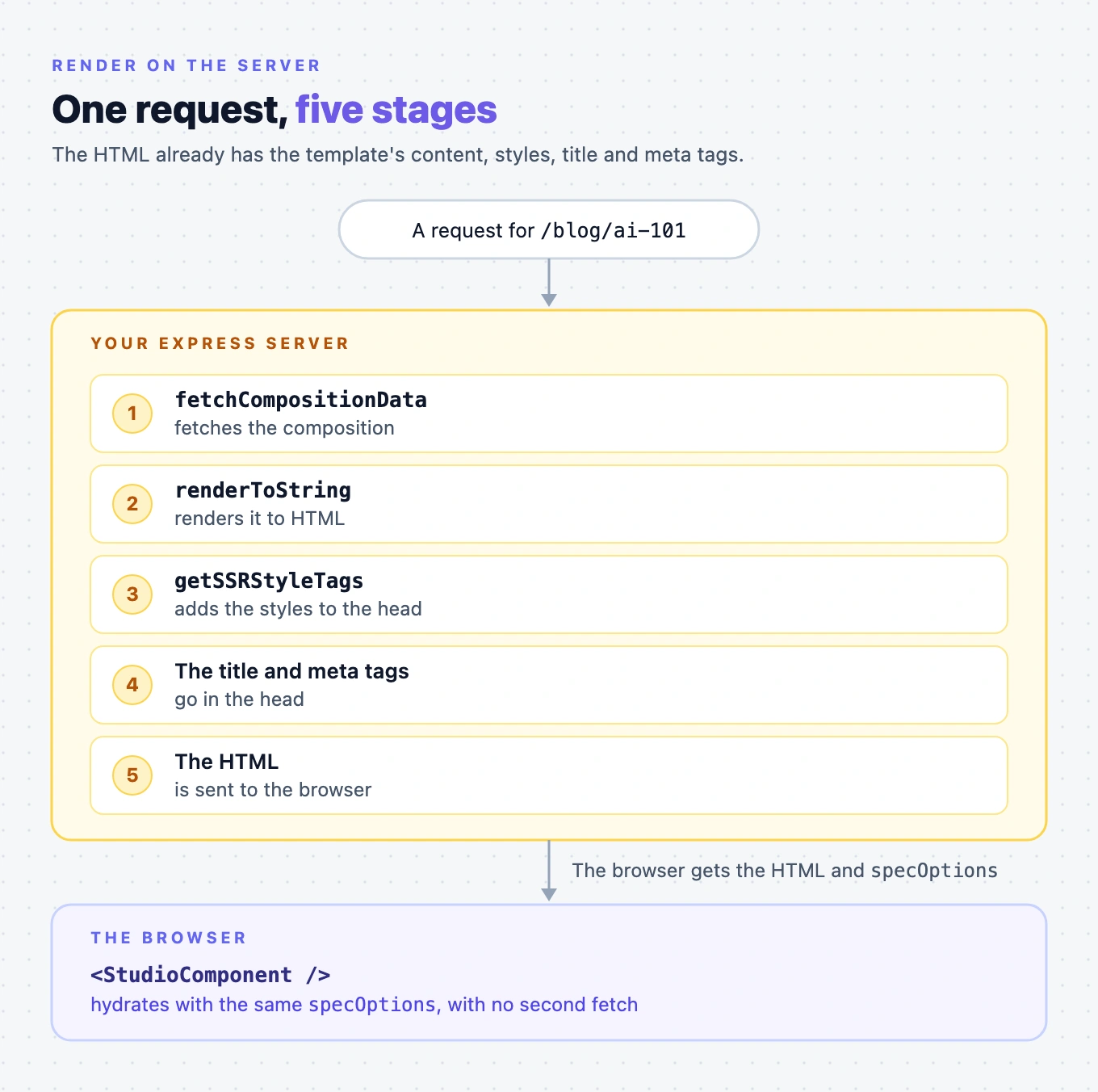
This is server rendering with nothing done for you. For each request, your server does five things:
- Fetches the composition with
fetchCompositionData. - Renders it to HTML with
renderToString. - Adds the styles to the head with
getSSRStyleTags. - Adds the title and meta tags to the head.
- Sends the HTML, which the browser hydrates with the same
specOptions.
You get HTML that already has the template's content, styles, title and meta tags. The example uses Express and renderToString. Framework guides build on the same steps, and this is the path to follow when your framework has no guide. See My framework is not listed.
Fetch the composition with fetchCompositionData
sdk.fetchCompositionData(query, options?) takes the same query fields as useCompositionData, which are url, compositionUid and templateContentTypeUid, plus searchQuery. The options are locale, variantAlias and templateEntryUid. For which language the fetch uses, see How the language is chosen.
It returns the spec options object itself, not an object wrapping it. Call it on the object init returned. There's no .public on it.
const { pathname, search } = new URL(requestUrl, "http://localhost:3106");
const specOptions = await sdk.fetchCompositionData({ url: pathname, searchQuery: search });
For a request to /blog/ai-101, pathname is /blog/ai-101, and search is the query string that came with it.
Fetching by url needs your addresses to hold values stored in your entries. When they don't, such as with a Custom Preview URL that uses transformation rules, fetch by template and entry instead. See Fetch by template and entry instead of by URL.
Forward the request's query string as searchQuery
searchQuery is required, because the server has no browser address to read it from. When your page is open in Studio, the query string carries the language, variant and preview entry the author picked, and the Live Preview hash.
Pass the full query string of the incoming request, as a string, a URLSearchParams or a plain object. Don't read or build the parameters yourself. Their names are between Studio and the SDK.
When there's no request to forward, pass "".
Answer 404 when no template matches
When no template matches the URL, fetchCompositionData rejects. It never resolves with an empty result. Catch the error and pass it to isCompositionNotFound, from @contentstack/studio-react:
isCompositionNotFound(error) | code, for example | Answer with |
|---|---|---|
true | NO_COMPOSITION_FOR_URL, CONNECTED_ENTRY_NOT_FOUND | 404 |
false | TRANSPORT_FAILED, STACK_NOT_FOUND_ON_HOST | 500 |
A false means Studio couldn't get an answer, such as a network failure or a wrong API key. A URL search that couldn't finish, SEARCH_INCOMPLETE or URL_OWNERSHIP_PROBE_FAILED, is false too. Answer 500, so caches and search engines don't drop a page that exists. For every code that counts as not found, see Send a 404 when no template matches.
Don't decide 404 from hasSpec or hasTemplate on the result. Both are deprecated, and hasTemplate is false for every freeform template, so a check on it answers 404 for all of them. To tell a connected template from a freeform one, read connectedContentTypeUid. It's null for a freeform template.
import { isCompositionNotFound } from "@contentstack/studio-react";

try {
  specOptions = await sdk.fetchCompositionData({ url: pathname, searchQuery: search });
} catch (error) {
  if (isCompositionNotFound(error)) return { status: 404, body: "Not found" };
  return { status: 500, body: "Server error" };
}
Add the styles to the head with getSSRStyleTags
The styles authors set in the Design panel aren't in your stylesheet. getSSRStyleTags(specOptions.spec) returns them as a <style data-studio-ssr="true"> tag. It covers every section the template uses, and the design-token variables too.
Call it after renderToString, and put the tag in the head. Without it, the HTML arrives unstyled, and the Design panel styles appear only after hydration.
To leave out the design-token variables, pass { includeDesignTokens: false } as the second argument.
Add the title and meta tags to the head
The SDK doesn't write to the head. Two helpers turn the template's seo values into tags:
getCompositionMetadata(specOptions, { baseUrl: "http://localhost:3106" })returns the title, description, Open Graph and Twitter tags, and one tag per metadata prop. WithbaseUrl, it also adds a canonical URL andog:url.renderMetadataToHtml(metadata)writes those tags as HTML. It leaves out<title>, so write<title>yourself frommetadata.title.
When the template has no title, metadata.title is the template's name.
For a connected template like Blog post, the canonical URL comes from the URL pattern, not the post's address. See SEO and metadata for the fix.
Pass specOptions to the client and hydrate
Send the same specOptions object to the browser, and hydrate <StudioComponent specOptions={specOptions} /> with it. Don't fetch again with useCompositionData.
specOptions is plain data, so you can write it into the HTML as JSON. That holds only while you don't pass fetchComposition or fetchTemplateEntry in the fetch options. Those are copied into specOptions, and functions aren't JSON.
Import the same component registrations in the browser bundle as on the server.
This function does every step so far. It takes the request's path and query string, and returns the status and the HTML:
// render-page.tsx
import { renderToString } from "react-dom/server";
import {
StudioComponent,
getCompositionMetadata,
getSSRStyleTags,
isCompositionNotFound,
renderMetadataToHtml,
type StudioComponentSpecOptions,
} from "@contentstack/studio-react";
import { sdk } from "./lib/contentstack";
import "./register-components";
function escapeHtml(text: string) {
return text.replace(/&/g, "&").replace(/</g, "<").replace(/>/g, ">");
}
export async function renderPage(requestUrl: string) {
const { pathname, search } = new URL(requestUrl, "http://localhost:3106");
let specOptions: StudioComponentSpecOptions;
try {
specOptions = await sdk.fetchCompositionData({ url: pathname, searchQuery: search });
} catch (error) {
if (isCompositionNotFound(error)) return { status: 404, body: "Not found" };
console.error(error);
return { status: 500, body: "Server error" };
}
const html = renderToString(<StudioComponent specOptions={specOptions} />);
const styleTag = getSSRStyleTags(specOptions.spec);
const metadata = getCompositionMetadata(specOptions, { baseUrl: "http://localhost:3106" });
const state = JSON.stringify(specOptions).replace(/</g, "\\u003c");
const body = `<!doctype html>
<html>
<head>
<title>${escapeHtml(metadata.title ?? "")}</title>
${renderMetadataToHtml(metadata)}
${styleTag}
</head>
<body>
<div id="root">${html}</div>
<script>window.__SPEC_OPTIONS__ = ${state};</script>
<script type="module" src="/client.js"></script>
</body>
</html>`;
return { status: 200, body };
}
The Express server sends every request that no other route handles to renderPage:
// server.tsx
import express from "express";
import { renderPage } from "./render-page";

const app = express();
app.use(express.static("public"));

app.use(async (req, res) => {
  const { status, body } = await renderPage(req.originalUrl);
  res.status(status).send(body);
});

app.listen(3106);
The browser bundle, built to public/client.js, hydrates with the same specOptions:
// client.tsx
import { hydrateRoot } from "react-dom/client";
import { StudioComponent, type StudioComponentSpecOptions } from "@contentstack/studio-react";
import "./register-components";

declare global {
  interface Window {
    __SPEC_OPTIONS__: StudioComponentSpecOptions;
  }
}

hydrateRoot(
  document.getElementById("root")!,
  <StudioComponent specOptions={window.__SPEC_OPTIONS__} />,
);
Refresh the template when an entry changes
Live Preview runs in the browser, not on your server. Wire onEntryChange in the browser bundle after hydration, as Install Live Preview describes. With no client-side router, reload the page in the callback, so the server renders the new content.
Use Fastify instead of Express
With Fastify, the steps are the same. Fastify's request.url has the path and the query string, so renderPage reads both from it:
// server.ts
import Fastify from "fastify";
import { renderPage } from "./render-page";

const app = Fastify();

app.get("/*", async (request, reply) => {
  const { status, body } = await renderPage(request.url);
  reply.code(status).type("text/html").send(body);
});

app.listen({ port: 3106 });
Check the server HTML has the template, styles and title
Start the server, then request the post without a browser:
curl http://localhost:3106/blog/ai-101
The HTML has AI 101's content inside <div id="root">. Its head has:
<title>The team blog</title>, the Blog post template's SEO title.- A
<meta property="og:title" content="The team blog">tag. - A
<style data-studio-ssr="true">tag, starting with the design-token variables.
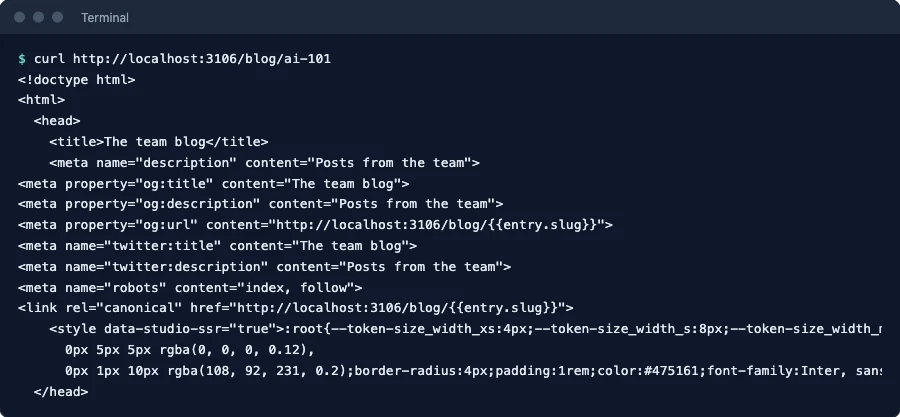
Then request http://localhost:3106/blog/not-a-post. It answers 404.
If it doesn't work
- The server log shows
Error while rendering component Error: Component with type 'blog-hero' is not registered., and the page has an error box where the component should be. The server rendered before yourregisterComponentcalls ran. Import your registrations at the top of the file that renders, asrender-page.tsxdoes. The response is still a 200, so check the log.

- It throws
Required prop `config` not passed to the Composable Component. You passed<StudioComponent />something other than the objectfetchCompositionDatareturned. - The page arrives unstyled, then the styles appear. The head doesn't have the
getSSRStyleTagstag. See Add the styles to the head with getSSRStyleTags. - Every unknown URL answers 500. The fetch isn't wrapped in a
try, or the catch doesn't callisCompositionNotFound. See Answer 404 when no template matches.