What the Studio API is for
The Studio API lets your code create, read, change and delete Studio projects and compositions, and list the components a project has synced. You need it when you build Templates and Sections from a script, an agent or an integration instead of arranging them on the Studio canvas.
The example is the Blog project, its Blog post Template and its Post body and Post hero Sections.
What the Studio API does
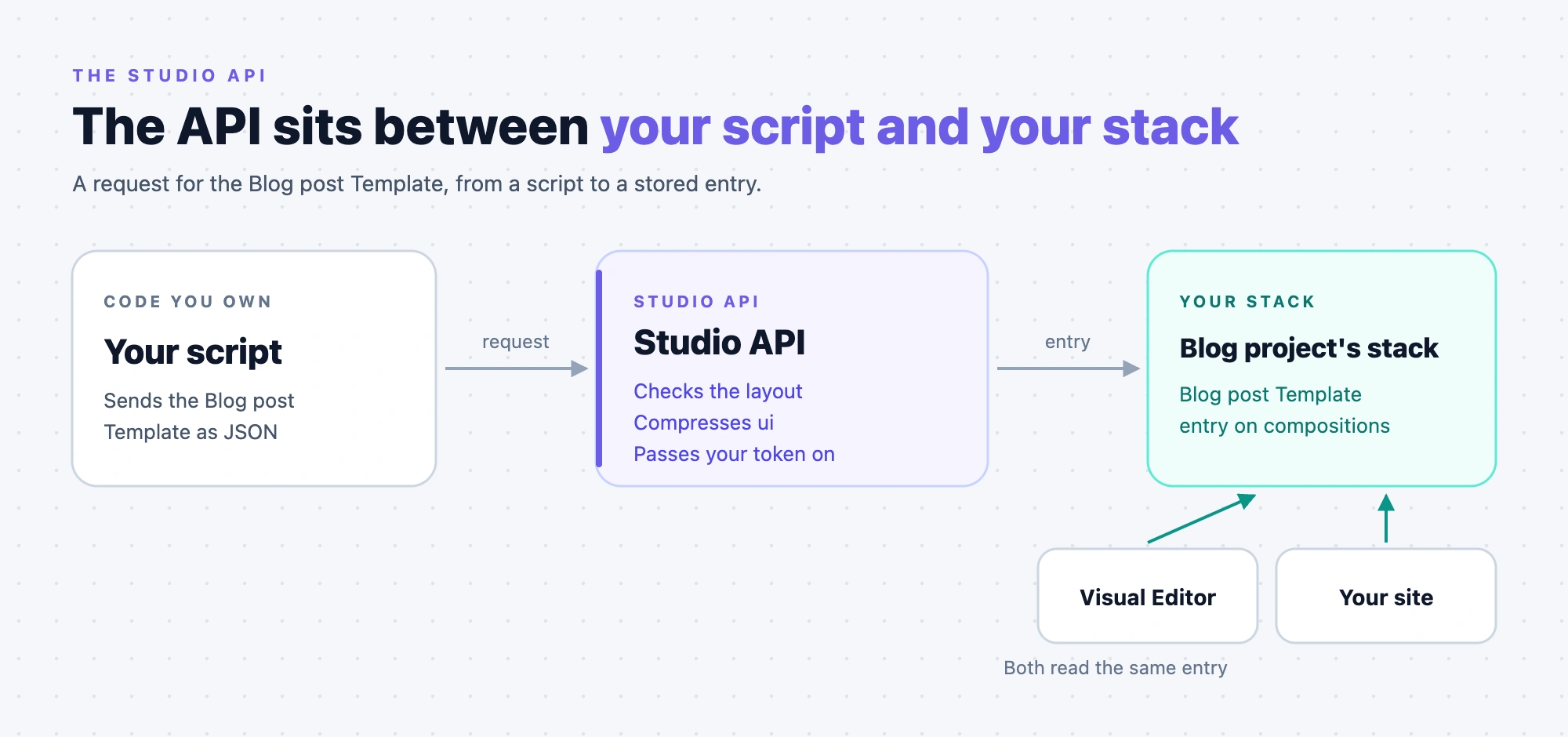
The Studio API stores each composition as an entry on your project's compositions content type, in your stack. It adds layout checks and a stable set of routes on top of that entry.
On every create and update, the API checks the layout against Studio's rules and returns every problem in one 422 answer. You send the ui tree as a plain JSON object, and the API compresses it.
The API acts as you. It passes your own token on to Contentstack, so it can do what your token can do. Studio and your site read the same entry from your stack.
The API has no route that renders or previews a composition, so you check the result on the Studio canvas. It has no publish route and no Deploy route either. See Deploy from code.
Read in this order
- Make your first call. Set up your credential and list your projects.
- Manage projects with the API. Create the project that every composition call needs.
- Create a section and a template with the API. Send a layout and open it in the canvas.
- Deploy, read, change and delete a composition. Put the Template on your site, then manage it.
- List the components a project has synced. Check what a project offers before you choose a node type.
To build the layout JSON itself, see Composition JSON. To learn the rules behind the routes, see How the Studio API works.
When to use the API, and when not to
Use the API when a script, an agent or an integration has to create or change compositions without anyone opening the canvas. It needs only a token, an organization UID and a project UID. It checks the layout on every write, so a malformed layout fails in your script.
| You want to | Use | Why |
|---|---|---|
| Create a Template or a Section, one or a thousand | The API | POST /compositions creates either one. One call per composition, no canvas session, and the layout is checked on every write. Seeding an environment, a migration and a generator all belong here. |
| Turn one component into a Section, or a design into Sections and a Template | The Studio CLI, with csdx studio:section:create or csdx studio:composition:build | Both write straight to your stack with the Contentstack Management API and your OAuth login. They don't use the Studio API composition routes. |
| Start from a Figma file | The Figma plugin | Pasting copied design nodes into the canvas inserts them into the composition you have open. It doesn't create a composition. |
| Let an agent call these routes | The skill use-compositions-api, from LLM skills | It makes an agent call these routes, with the layout checks and compression the API does. |
| Write with a management token, for a migration or a CI job | The Contentstack Management API directly, or the skill author-composition-via-api | The Studio API takes a session token or an OAuth access token as your credential. |
Know what the API doesn't do before you build on it:
- It checks only the shape of the layout. It doesn't check that a binding points at a real field, or that a component is registered. An unregistered node type only produces a warning, so the API accepts a layout that renders as "unknown component".
- It creates no content types, so the compositions content type must already exist in your stack.
- It never sends a
branchheader, so every call goes to your stack's default branch. - A direct Management API write doesn't validate
ui, because the compositionsuifield is a plain text field. On the content type Studio creates, onlytitleandcomposable_uidare mandatory. When you write that way, you buildlinked_sectionsyourself, as the CLI does.
Every route at a glance
Projects. Five routes. See Manage projects with the API.
| Method | Path | What it does | Example |
|---|---|---|---|
GET | /v1/projects | Lists the projects you can see in your organization. | List and read projects |
GET | /v1/projects/{uid} | Returns one project. | List and read projects |
POST | /v1/projects | Creates a project. | Create a project |
PUT | /v1/projects/{uid} | Changes a project. A top-level field you leave out keeps its value, and settings is replaced whole. | Change a project |
DELETE | /v1/projects/{uid} | Deletes a project. Its compositions stay in your stack. | Delete a project |
Compositions. Ten routes, all under /v1/projects/{projectUid}/compositions. See Create a section and a template with the API.
| Method | Path after /compositions | What it does | Example |
|---|---|---|---|
POST | none | Creates a Template or a Section, as place_composition_as in the body says. | Create the Post body section |
POST | /templates | Creates a Template. | Create the Featured post template |
POST | /sections | Creates a Section. | Create the Post body section |
GET | none | Lists Templates and Sections. | Change, list or delete a composition |
GET | /templates | Lists Templates only. | Change, list or delete a composition |
GET | /sections | Lists Sections only. | Create the Featured post template |
GET | /{uid} | Returns one composition. | Read a composition back |
GET | /{uid}/references | Lists what references a composition. | Change, list or delete a composition |
PUT | /{uid} | Changes a composition. | Change, list or delete a composition |
DELETE | /{uid} | Deletes a composition. It answers 409 if another composition places it, unless you pass force=true. | Change, list or delete a composition |
Registered components. One route. See List the components a project has synced.
| Method | Path | What it does | Example |
|---|---|---|---|
GET | /v1/projects/{projectUid}/registered-components | Lists the components synced to a project. The route is read-only. | List the components a project has synced |
Where to go next
- Look up every field, parameter and header: API endpoints.
- Look up an error code or a layout rule: API errors and validation.
- Get the machine-readable contract: Get the OpenAPI document.