Nodes, props and slots
This page covers the parts every node has: its keys, its props and its slots. It also lists the node and prop types you can use. You need it when you write a node by hand or read one that Studio saved.
The examples use the Blog project: the Blog post content type, the Post hero and Related posts Sections, and the entry AI 101.
A node's keys
A node is one object in the ui tree. Every node has the same seven keys.
{
  "uid": "hero_title",
  "type": "header",
  "attrs": {},
  "metadata": {},
  "props": {
    "text": {
      "type": "plaintext",
      "binding": { "type": "template", "value": { "path": { "title": {} } } }
    }
  },
  "slots": {},
  "styles": {}
}
| Key | What it holds |
|---|---|
uid | The node's ID, unique in the tree. Studio makes a 15-character ID, and the API accepts any unique string, such as hero_title. The renderer uses it as the React key and in the class names it generates. |
type | A built-in node type, or the string you registered a component under. The renderer uses it to find the component. |
attrs | The ID and custom HTML attributes an author sets in the Attributes section of the Settings tab. The renderer passes them to your component as props. |
metadata | Settings that aren't props. The next table lists them. |
props | The node's props. See How your component's props become node props. |
slots | The child nodes, in arrays keyed by slot ID. See Slots hold child nodes. |
styles | Style groups. Each entry has classes and responsiveStyles, and responsiveStyles is keyed by breakpoint. |
Studio saves custom attribute names in lowercase. It rejects class, className, style and names that start with data-composable-studio-. The Settings tab hides the Attributes section for a placed Section.
Rules for writing a node
- Write all seven keys, as Studio does. The API requires only
uidandtype. - Give every node a
metadataobject, even an empty one. Studio's canvas readsmetadata.visiblewithout checking that it exists. - Give the root node a
metadataobject for certain. The SDK readsui.metadata.seowithout a guard, so a root node with nometadatamakesfetchCompositionDatathrow a TypeError. - A missing
attrsorstylescounts as an empty object, andstyles: {}is accepted. The renderer applies only the styles saved on the node. It doesn't add a registration's default styles, which Studio copies in when an author drops the component. - A node with no
propskey gets no resolved props, not even the registered defaults. A node with noslotskey has no children. - The API rejects a node that has
bindingsorbindingon the node itself,conditionormodeoutsidemetadata, or a flatchildrenarray. The messages are in Layout rules the API checks on every write. - The API doesn't check
attrs,styles, prop types, binding types or tree depth, and it sets no limit on node count.
What goes in metadata
| Key | What it does |
|---|---|
title | The node's name in Studio. Studio uses it, then the component's display name, then type. |
visible | false hides the node on your site. Studio saves it only for a hidden node, and removes it when the author shows the node again. |
locked | true when an author locks the node. Studio removes it when the author unlocks the node. |
slotNames | Maps each slot ID to the slot's display name. |
mode | design or preview. A repeater, a condition-block and a section-composition read it. See Repeater node. |
condition | The condition of a condition-block. |
compositionUID | The Section that a section-composition places. |
sectionBindingOverride | Points a placed Section at a different field. |
sectionExposedProps | On a Section's root node: the props a Template can change. See Exposed section props. |
defaultSection, allowedSections | On a section-slot: the Section that shows when the slot is empty, and the Sections that can fill it. |
seo | On the root node: pageTitle, pageDescription, openGraphImage and metaProps. Each field can carry a binding in pageTitleBinding, pageDescriptionBinding or openGraphImageBinding. |
bindings | Maps a path inside the node, such as styles.default.responsiveStyles.default.color, to a binding. The SDK writes the resolved value at that path. |
The API types metadata with visible, locked, title, mode, condition, compositionUID and slotNames. It accepts any other key.
How your component's props become node props
A registered component's props become entries under the node's props. The renderer reads only the props named in the registration, and it ignores other keys.
For the PostCard component, registered with the props url and title, a node binds each prop to the connected entry.
{
  "uid": "post_card_1",
  "type": "PostCard",
  "attrs": {},
  "metadata": {},
  "props": {
    "title": {
      "type": "string",
      "binding": { "type": "template", "value": { "path": { "title": {} } } }
    },
    "url": {
      "type": "href",
      "binding": { "type": "template", "value": { "path": { "url": {} } } }
    }
  },
  "slots": {},
  "styles": {}
}
- Prop names match exactly.
Tagon aheadernode isn'ttag. - A bound prop is
{ type, binding }, andbindingis{ type, value }.binding.typenames the value source. - The renderer takes a prop's type from the registration and ignores the
typesaved on the node. Studio writes each prop'stypefrom the registration when an author drops the component. - Studio writes each dropped prop with a
static_valuebinding whosevalueis<node uid>-<prop name>. It stores the prop's startingdefaultValuein the composition'sstatic_valueunder that key. - A registered prop missing from the node gets its
defaultValue. Without one, it gets the empty value for its type. - The renderer skips a prop whose type the SDK doesn't know, so your component gets nothing for it.
- A prop marked
design: truehas no entry underprops. Its value lives instylesunder the prop's name. - The API doesn't compare a node's props with any registration, so a wrong prop name or type still saves.
The simplest node
A text node with one prop, bound to the connected entry's title, shows that title.
{
  "uid": "title_text",
  "type": "text",
  "attrs": {},
  "metadata": {},
  "props": {
    "text": {
      "type": "plaintext",
      "binding": { "type": "template", "value": { "path": { "title": {} } } }
    }
  },
  "slots": {},
  "styles": {}
}
For AI 101, the node renders a p element holding the title. The path { "title": {} } reads the entry's title, and the empty object ends the path.
A text node with only uid and type also passes the API.
Slots hold child nodes
A slot has two parts that must match: a prop that names the slot, and an array of child nodes under slots.
{
  "uid": "intro_box",
  "type": "box",
  "attrs": {},
  "metadata": {},
  "props": {
    "children": { "type": "slot", "slot": "s1" }
  },
  "slots": {
    "s1": [
      {
        "uid": "intro_title",
        "type": "header",
        "attrs": {},
        "metadata": {},
        "props": {
          "text": {
            "type": "plaintext",
            "binding": { "type": "template", "value": { "path": { "title": {} } } }
          }
        },
        "slots": {},
        "styles": {}
      }
    ]
  },
  "styles": {}
}
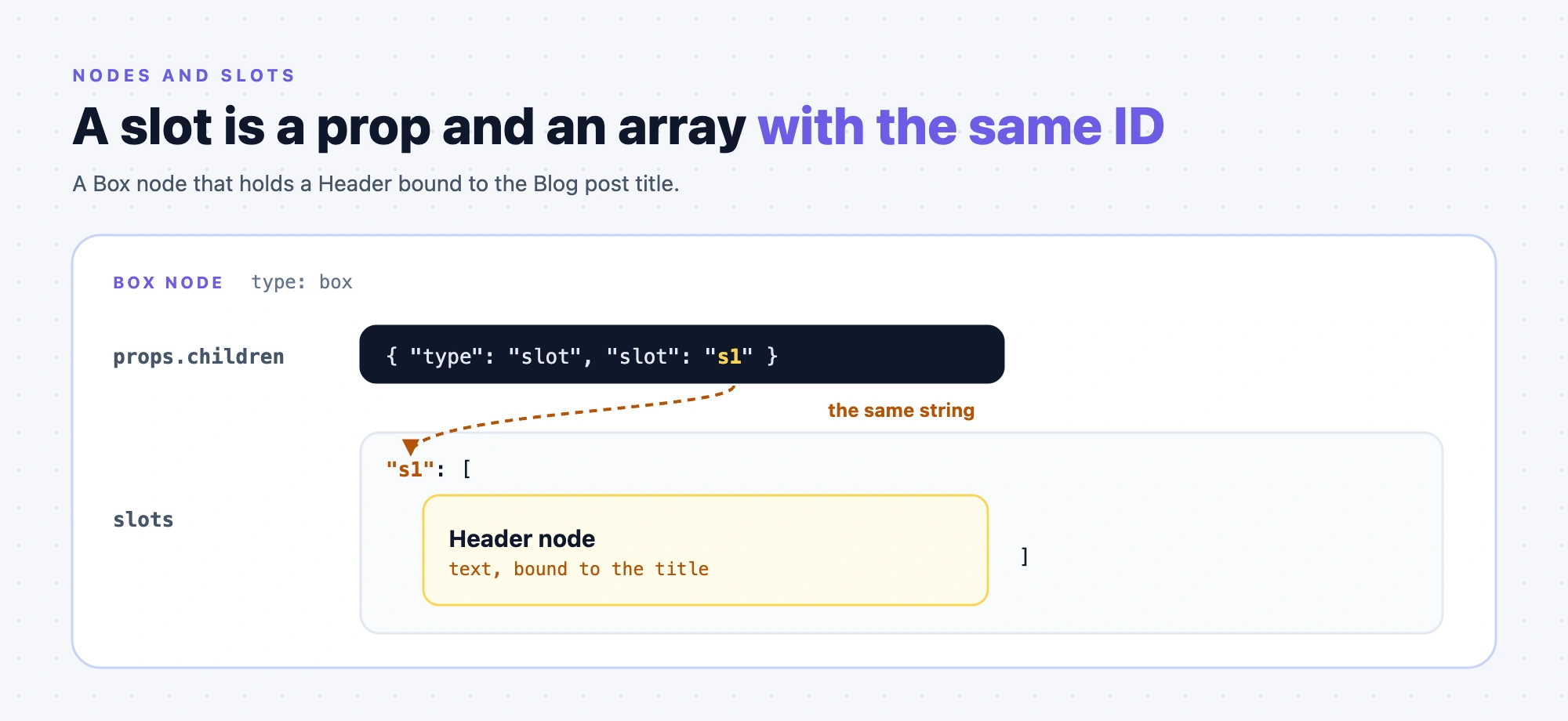
- The
slotstring in the prop and the key inslotsmust be the same. The renderer readsslots[props.<name>.slot]. - A slot prop that points at a missing
slotskey renders no children, with no error. - A slot ID can be any string, including
root. slotis the only prop type that can't carry abinding. The renderer ignores abindingon a slot prop.
Slot prop names
The page, box, hstack, vstack, link-container, html-element, repeater and condition-block nodes name their slot prop children. A fragment node names its slot prop ui. For your own component, the slot prop has the name you registered, and the node's props key uses that name.
Empty slots
The API rejects an empty slot array. Remove the key instead of leaving [].
Slot "…" on node "…" is an empty array. Empty slots crash the renderer — populate it or remove the slot key. <!-- style-lint: allow -->
Studio doesn't follow that rule. It writes an empty array for every new slot. That includes a new Box, the page of a new composition without a starting layout, and each slot of a placed Section. It leaves an empty array when an author removes the last child. SDK 2.0.0 renders an empty slot array as an empty slot, and Studio shows a drop zone.
So a tree you copy from Studio can fail when you send it to the API with a 422. A PUT to a composition whose stored ui has an empty slot fails with a 422 even when you only change title. Add a node to the slot, or remove the key, before you send.
Other slot rules:
- The API rejects a slot value that isn't an array with
Slot "…" on node "…" must be an array. - The API doesn't check that each slot prop's
slotmatches a key inslots, or the reverse. - When a node has no slot prop, the SDK uses the
slotskey named like the registered slot prop, such aschildren. - An
hstackorvstacknode'scountprop doesn't change the render. Studio uses it to add or remove child Boxes.
Prop value types
Every prop has a type. The SDK knows 14. The published prop types page explains how to register each one.
| Type | A bound value can be |
|---|---|
string, plaintext | Text, a number or a boolean |
boolean | A boolean |
number | A number |
datestring, href, imageurl | A string |
object | An object |
array | A list |
choice | A string or a list of strings |
json_rte | An object or a string |
any | Any value |
slot | Not bindable. See Slots hold child nodes |
action | The SDK accepts it. The released editor has no control for it, so it falls back to bind only |
An unset text prop, such as string or plaintext, is "". An unset boolean is false and a number is 0. An unset object or json_rte is {}, and an array is [].
How a field maps to a type:
- A JSON Rich Text Editor field binds to
json_rte. An HTML rich text field binds tostring, becauseplaintextexcludes rich text and Markdown fields. - An
objectprop binds to a single field with children, such as a group. Anarrayprop binds to a reference, modular blocks or multiple field. - A short type such as
"imageurl"works forarray,string,number,boolean,object,datestring,href,imageurl,slotandaction. - The API doesn't check a prop's type, so a node with an unknown type still saves.
Built-in node types
A node's type is one of these, or the string you registered a component under.
| Group in the Components tab | type | Props |
|---|---|---|
| Basic | header | text, Tag (capital T) |
| Basic | text | text, type plaintext. Renders a paragraph |
| Basic | plain-text | text, type string. Renders text with no element around it |
| Basic | rich-text | text, type any |
| Basic | button | label, link, openInNewTab |
| Basic | link | href, label, openInNewTab |
| Basic | collapsible-text | text, maxLines, buttonOnNewLine, buttonAction, redirectUrl, showMoreText, showLessText, openInNewTab |
| Media | image | src, type imageurl, and alt, type string |
| Media | video | src, type string, and posterSrc, type imageurl |
| Media | embed | src, type href |
| Container | box | The children slot |
| Container | hstack, vstack | The children slot. Each is a div, and the row or column layout comes from default styles the editor copies in |
| Container | link-container | href, openInNewTab and the children slot. Makes its content a link |
| Smart Containers | repeater | items, type array, and the children slot |
| Smart Containers | condition-block | The children slot. Reads its condition from metadata.condition |
| Smart Containers | section-slot | label |
| HTML Elements | html-element | Tag, properties (a JSON string) and the children slot |
| HTML Elements | style-sheet | styles, your CSS as a string |
Three more nodes aren't in the Components tab groups:
type | What it is |
|---|---|
page | The root of every composition. It holds the whole tree in a children slot. No registration can replace it, and registering that type throws. |
section-composition | Places a Section. metadata.compositionUID names the Section. The SDK registers each Section under its entry UID. |
fragment | Renders its children with no element around them. Its slot prop is ui. Studio hides it from the Components tab, and nothing in the editor creates one. |
A repeater, condition-block, section-slot and section-composition node also read values from metadata. The published built-in components page describes the 19 in the Components tab.
The API warns about a type that isn't built in, because it can't see your registrations. It still saves the composition.
Registered component node
A node shows your own component when its type is the string you passed to registerComponent. The registry stores the component under that string.
{
  "uid": "post_body_1",
  "type": "blog-body",
  "attrs": {},
  "metadata": {},
  "props": {
    "body": {
      "type": "json_rte",
      "binding": { "type": "template", "value": { "path": { "body": {} } } }
    }
  },
  "slots": {},
  "styles": {}
}
- A
typematches exactly, with case.blogherodoesn't find a component registered asBlogHero. RegisteringTextdoesn't replace the built-intext. - Registration checks only that
typeisn't empty. It doesn't trim, lowercase or validate it. - A node whose
typeisn't registered shows a Component Loading Error box withComponent with type '<type>' is not registered. - In the browser, the SDK fetch throws
COMPONENT_NOT_FOUNDwithCustom components not registered: <types>before it renders an unregistered type. The fetch checks registered types only in the browser, not on the server. - The API warns about a node type that isn't built in, but it still saves the composition, because it can't see your registrations.
To register a component, see Register a component.
Next, see Bind data to a node for how a prop gets its value.