Errors
When Studio, your browser console or your server log shows an error, these pages tell you what went wrong and how to fix it. Every error has a code, and every way it can happen has its own heading with its own fix.
Which page to read
The pages are grouped by what you'll have to change. Ask what fails, then read the page it leads to.
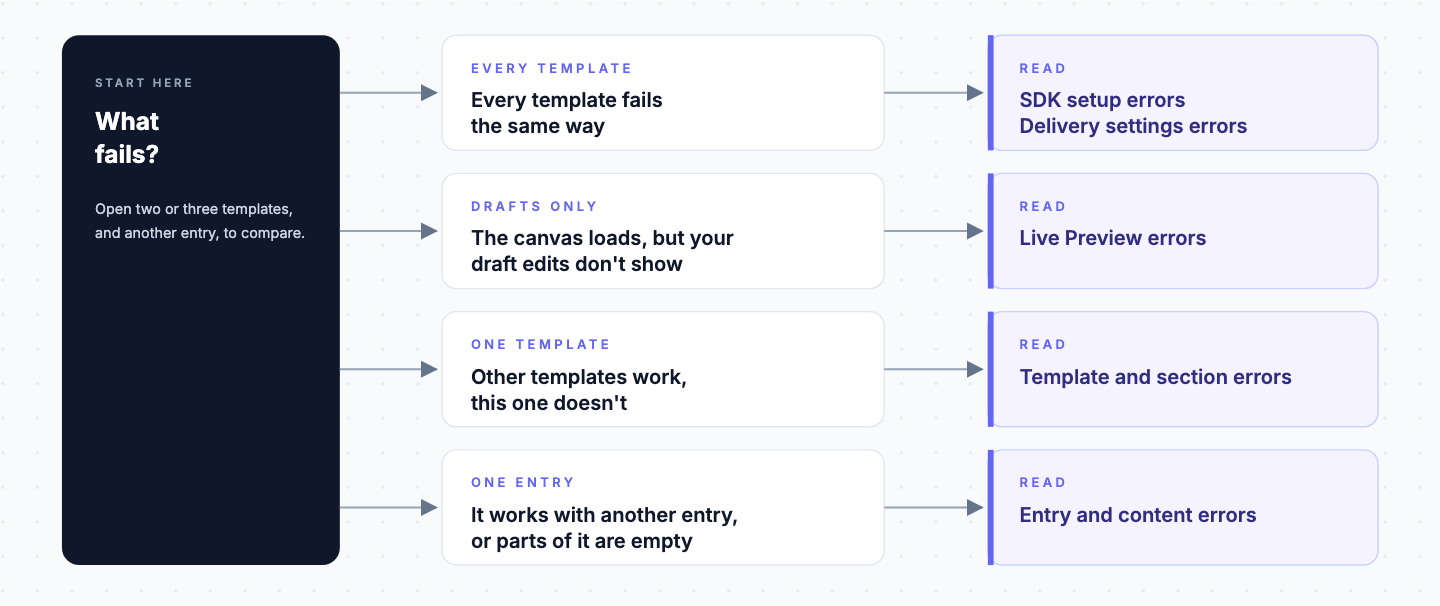
- SDK setup errors Every template fails the same way, because of how your site starts the Studio SDK.
- Delivery settings errors Every template fails, and the card or log names the API key, delivery token, environment, host, branch or language.
- Live Preview errors The canvas loads, but your draft edits don't show.
- Template and section errors Other templates work, but this template or section doesn't.
- Entry and content errors The template works with another entry, or parts of it are empty.
Common errors
- Studio Can't Connect to Your Site Studio waited 30 seconds for the Studio SDK on your page, and it never answered.
- Studio Can't Read Your Content Contentstack didn't accept a value your site sends, such as the API key, delivery token or environment.
- Unpublished Templates Can't Load Here Live Preview is off on your site, so it can't see a template you haven't published.
- This Address Is Nearly Right The address your page asked for differs from the Template URL by one small thing, such as a capital letter.
Where you saw it
The same error shows up in different places. Inside Studio you get a card that links to the fix. Outside Studio there's no card, only a log line with a code. Here's one error, an environment name with a typo, in each place.
In Studio
The card names the problem in plain words and links to the heading with its fix. Here it's Studio Can't Read Your Content, naming the environment your site asked for.
On a site that renders on the server, the canvas can show the Studio SDK's own error card in place of your 404 page. Render on the server explains why.

In your browser console
A site that renders in the browser logs the code and what went wrong. The log has no link, so search these pages for the code.
[Contentstack Studio] ENVIRONMENT_INVALID: Contentstack did not find the environment "prodution".
In your server log
A site that renders on the server logs the same line in your server's output. Search these pages for the code there too.
[Contentstack Studio] ENVIRONMENT_INVALID: Contentstack did not find the environment "prodution".
If you have a code
Search these pages for the code, such as ENVIRONMENT_INVALID. A log line prints only the code. A Studio card links straight to the heading for your case.