Ways to fetch a template
Pick how a route asks Studio for a template: by its address, or by UID. You need this when the catch-all route from Wire template preview routes doesn't fit a route, such as one that already knows its entry.
The example on this page is the Blog post template, blog_post_template, at /blog/{{entry.slug}}, previewing AI 101. The News article template, news_post, shows a route that finds its own entry.
Prerequisites
- Your app has the catch-all route from Wire template preview routes, and it renders
<StudioComponent />with what the fetch returns.
What this is and what you get
Every fetch takes a query, and options when you need them. The query names what to fetch, with url, compositionUid or templateContentTypeUid. compositionUid takes the Template UID you gave the template when you created it, such as news_post, or a section's Section UID. The options are templateEntryUid, locale and variantAlias.
The examples use sdk.fetchCompositionData on the server, which also takes searchQuery, the request's query string. The useCompositionData hook takes the same query and options, without searchQuery.
compositionUid always wins. With it, Studio drops templateContentTypeUid. An empty value counts as not set.
The Studio SDK has no branch option. It reads templates and entries from the branch your Delivery stack is set to.
Which way fits your case
Start with url. Find your case below, and pass what it says. Each case links to where it's explained.
| Your case | Example | Pass | Details |
|---|---|---|---|
| Every template from one catch-all route | AI 101 at /blog/ai-101 | { url: "/blog/ai-101" } | Fetch by address |
A Template URL that uses {{entry.url}} | Blog post at /blog/{{entry.url}}, with AI 101's URL field holding /blog/ai-101 | { url: "/blog/ai-101" }, the same as above | A prefix for everything nested |
| A more specific template beside another | Featured post at /blog/featured, beside Blog post | { url: "/blog/featured" }. The template with more fixed text wins | Which template wins when several match |
| Your home page | A template with the Template URL / | { url: "/" } | Start every Template URL with / |
| A freeform page | About at /about | { url: "/about" } on the catch-all, or { compositionUid: "about" } on a route of its own | Fetch a freeform template or a section by its UID |
| An address shaped by Custom Preview URL transformation rules | Machine Learning Explained at /news/machine-learning-explained | { compositionUid: "news_post" }, with the entry your route finds as templateEntryUid | Fetch a template and an entry by UID |
| A route that already has its entry | Your code loaded AI 101 itself | { compositionUid: "blog_post_template" }, with { templateEntryUid: entry.uid } | Fetch a template and an entry by UID |
| One template on a route of its own | app/blog/[slug]/page.tsx for Blog post | { compositionUid: "blog_post_template", url: "/blog/ai-101" } | Give one template its own route |
| Studio on some routes, your own code on the rest | Studio serves /blog/…, and your code serves your other pages | A catch-all with { url }, and your own routes answering first | Keep your own routes ahead of the catch-all |
| A language in the base URL | https://staging.example.com/fr-fr/blog/ai-101 | { url: "/blog/ai-101" }, with { locale: "fr-fr" } | Put the language in the address |
| A language in the Template URL | /{{locale}}/blog/{{entry.slug}}, opened at /fr-fr/blog/ai-101 | { url: "/fr-fr/blog/ai-101" }, as it is | Put the language in the address |
| A Personalize variant | AI 101 for the variant cs_personalize_0_1 | { url: "/blog/ai-101" }, with { variantAlias: "cs_personalize_0_1" } | Fetch a Personalize variant |
| A list filtered or paged by the query string | The About template's Latest posts query at /about?topic=ai | { url: "/about", searchQuery }. The query reads topic from searchQuery | Filter or page a list from the address |
| A site under a base path | /docs/blog/ai-101 | { url: "/blog/ai-101" } | Pass Studio only the path the Template URL describes |
| A section on a page your code owns | The Latest posts band on the Archive page | { compositionUid: "latest_posts_band" } | Fetch a freeform template or a section by its UID |
| One template connected to a content type, fetched by type | News article, for Machine Learning Explained | { templateContentTypeUid: "news_article" }, with the entry your route finds as templateEntryUid | Fetch by content type |
On the server, every case also passes searchQuery, the request's query string.
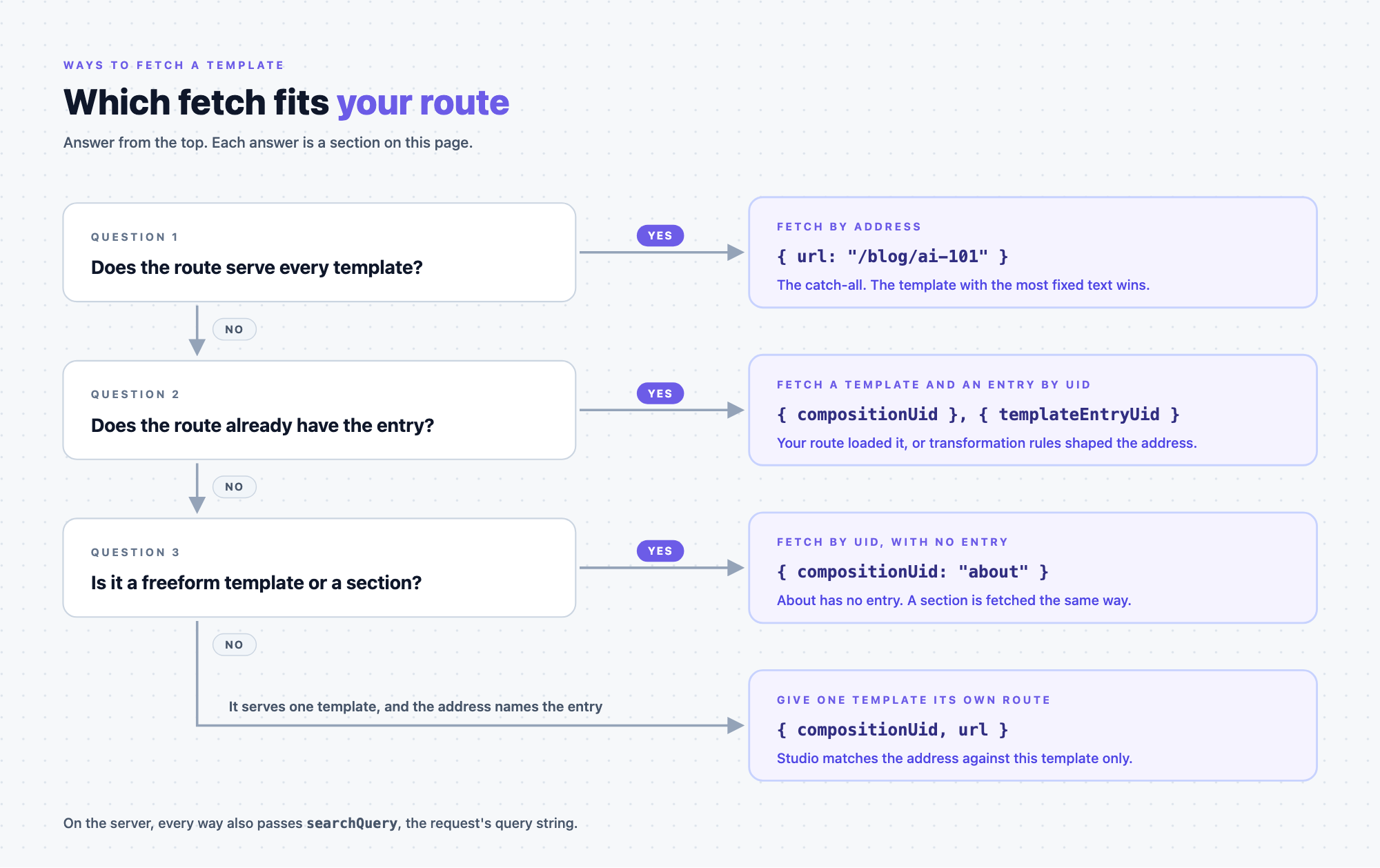
Fetch by address, one route for every template
Use it when your route serves every template, as the catch-all does.
const specOptions = await sdk.fetchCompositionData({
  url: "/blog/ai-101",
  searchQuery,
});
The fetch returns the Blog post template with AI 101.
Studio compares the address only with templates whose whole pattern fits the whole address. The one with the most fixed text wins, and variables count for nothing. Then Studio finds the entry for the address. For /blog/featured, the Featured post template wins over Blog post, because all of /blog/featured is fixed text. On a tie, which template your visitors get isn't something you control. See Which template wins when several match.
When an address has a secondary template, a visitor gets the primary template. The secondary template shows only when the address names it, such as /blog/ai-101?cs-template=blog_post_v2. See How each way of fetching treats secondary templates.
With the catch-all, these addresses need no code change:
- A new template at a prefix of its own.
- An address that names its entry, such as
/blog/ai-101. - A freeform template, such as About at
/about.
A url fetch can't find these:
- An address shaped by transformation rules, such as
/news/machine-learning-explained. Studio matches the address against the values stored in your entries, and no entry storesmachine-learning-explained. See Fetch a template and an entry by UID. - A section. Studio never matches an address against sections. Fetch a section by its Section UID, the same way as a freeform template. See Use sections in pages outside Studio.
Watch out.
- Pass the path only. Studio matches exactly, so capitals and a trailing slash count. It doesn't take off a base path, a language prefix or a slash at the end. Make the path match the Template URL once, in your route. See Keep your own routes ahead of the catch-all.
- A winner with no entry fails. If one template wins and has no entry for the address, the fetch fails with
ENTRY_NOT_FOUND. Studio never tries a less specific template. - On the server, pass
searchQuery. It carries the drafthashand Studio's parameters. Without it, the server reads published content. See Keep Studio's query string.
Fetch a template and an entry by UID
Use it when your route already knows its entry, or its addresses are shaped by transformation rules. A UID skips the search.
Transformation rules shape an address one way only, from the entry to the address. So Studio opens Machine Learning Explained at /news/machine-learning-explained. A fetch by url matches stored values, and no entry stores machine-learning-explained. Your route undoes the rules to find the entry itself, then passes both UIDs. See Transformation rules.
// app/news/[slug]/page.tsx
const { entries } = await stack
  .contentType("news_article")
  .entry()
  .query()
  .equalTo("title", titleFromSlug((await params).slug))
  .find<{ uid: string }>();

const entry = entries?.length === 1 ? entries[0] : undefined;
if (!entry) notFound();

const specOptions = await sdk.fetchCompositionData(
  { compositionUid: "news_post", searchQuery },
  { templateEntryUid: entry.uid },
);
The fetch returns the News article template with Machine Learning Explained.
titleFromSlugundoes the rules: each-back to a space, then a capital at the start of each word.machine-learning-explainedgivesMachine Learning Explained, andequalTofinds the entry with that title. The whole route, and why the reverse works for these titles, is in How to fetch a page whose address uses transformation rules.compositionUidis the Template UID,news_post. It's in the template's Edit Template dialog.templateEntryUidgoes in the options, the second argument, not in the query.
Watch out.
- Take the entry's UID from this request. Don't hardcode one. Inside Studio, the preview entry wins over
templateEntryUid, so a fixed UID looks right on the canvas and shows one entry everywhere on your site. - An unknown
templateEntryUidfails withENTRY_NOT_FOUND. - A UID fetch returns a secondary template too. Visitors get the template you name, secondary or not, with no
cs-templateneeded. Name only templates you mean to show. See How each way of fetching treats secondary templates. - The route has to answer before the catch-all. Which route your framework checks first is on Keep your own routes ahead of the catch-all.
Fetch a freeform template or a section by its UID
Use it when the template is freeform, such as About, or its content type has a single entry. Use it too for a section on a page your code owns, with the section's Section UID, such as latest_posts_band.
const specOptions = await sdk.fetchCompositionData({
  compositionUid: "about",
  searchQuery,
});
On a freeform template, Studio fetches no entry and ignores url. A section works the same way, and <StudioComponent /> renders what the fetch returns. For a section that takes data from your page, or renders once for each item in a list, see Use sections in pages outside Studio.
Watch out.
- On a connected template,
{ compositionUid }alone takes one entry. Studio takes the content type's most recently updated published entry, with no filter. So every address shows that one entry, until another entry is published. The canvas can still look right, because the entry you pick to preview takes its place. PasstemplateEntryUidwhen the content type has more than one entry.
Give one template its own route
Use it when a route serves one template only, such as app/blog/[slug]/page.tsx for Blog post, and its addresses name their entries.
const specOptions = await sdk.fetchCompositionData({
  compositionUid: "blog_post_template",
  url: "/blog/ai-101",
  searchQuery,
});
Studio fetches that template, then matches url against its Template URL to find the entry. If that finds nothing, Studio looks for an entry whose URL field equals the address. If neither finds one, the fetch fails with ENTRY_NOT_FOUND.
Watch out.
- Nothing warns you when
urldoesn't fit the template's pattern. - Each new template needs a code change. A template at a URL no route serves shows "No Studio Code on This Route" on the canvas.
- The route can't show another template. When another template is open at that address, Studio shows "URL Pinned to Another Template". Fetch by
urlon that route instead.

Fetch by content type
Use it when your route knows the content type and the entry, and only one template is connected to the content type, such as News article.
const specOptions = await sdk.fetchCompositionData(
  { templateContentTypeUid: "news_article", searchQuery },
  { templateEntryUid: entry.uid },
);
entry is the News article your route found for this request, as in Fetch a template and an entry by UID. The fetch returns the News article template with Machine Learning Explained.
Studio takes one template connected to that content type, and templateEntryUid picks the entry. When the address names its entry, you can pass url instead of templateEntryUid. Then the content type picks the template and url picks only the entry.
Watch out.
- Pass
templateEntryUidorurl. Without either, Studio takes the content type's most recently updated published entry, with no filter, so every address shows that one entry. The canvas can still look right, because the entry you pick to preview takes its place. - With two templates on the content type, you don't pick which. The Blog post content type has two, Blog post and Featured post. Fetch either one by
compositionUid. See When two templates share a URL. compositionUidwins. With both in the query, Studio dropstemplateContentTypeUid.- Visitors get a primary template. A fetch by content type never returns a secondary template, and it ignores
cs-template. See How each way of fetching treats secondary templates.
Options that change any fetch
Pass these in the second argument of any fetch above.
| Option | Type | What it does |
|---|---|---|
locale | string | The language for this fetch. It overrides the locale you passed to init. Contentstack's language fallback applies. |
variantAlias | string | Fetches the entry's content for that Personalize variant. Inside Studio, the variant the author picked wins. |
templateEntryUid | string | The entry of the connected content type to render. It wins over the URL and over the first-entry default. Inside Studio, the entry the author picked to preview wins. |
A language never changes which template an address matches, only the content. For the locale option and how the language is chosen, see Fetch content in a language. For variantAlias and where the alias comes from, see Fetch a Personalize variant. For every option, see Options that change the fetch.
Which entry wins inside Studio
When Studio opens your site, it can name the entry to show. Studio uses the first of these it has:
- The preview entry the author picked in Studio.
- The
templateEntryUidyou pass. - The entry for the address.
Outside Studio, only the last two count. So the canvas can look right while your site shows the wrong entry. See Which entry does Studio pick?
How to check it
- Deploy the template your route fetches. Outside Studio, your site reads only deployed templates.
- Outside Studio, open two addresses the route serves, such as
http://localhost:3000/blog/ai-101andhttp://localhost:3000/blog/ml-basics. Each one shows its own entry, AI 101 and then ML basics. - Open an address with no entry, such as
http://localhost:3000/blog/not-a-post. The route shows your 404 content. - In Studio, open the Blog post template. The canvas shows its preview entry, AI 101.
If it doesn't work
- Every address shows the same entry, but the canvas looks right. The route passes
compositionUidwithouttemplateEntryUid. Pass the UID of the entry the route found for this request. - The canvas shows "URL Pinned to Another Template". The route at that address always fetches a different template by its UID. Fetch by
urlon that route. Read The route always shows another template. - The canvas shows "Other Templates Load Here". The route fetches two or more templates or sections by UID, and none is the template you opened. Change the route so it loads the template you opened. On a catch-all route, that means fetching by
url. Read The route always shows another template. - The canvas shows "No Studio Code on This Route". No route at the template's address asks Studio for a template. Add the catch-all, or a route for that URL. Read The template's route has no Studio code.
- The template shows on the canvas, but you can't select anything. Your server fetch has no
searchQuery. After about 10 seconds Studio shows "No Studio Code on This Route". Pass the request's query string. See Keep Studio's query string. - A shaped address, such as
/news/machine-learning-explained, fails withENTRY_NOT_FOUND. The route fetches it byurl. Fetch by the template and the entry instead. Read No entry has this address. - The fetch says the query has no identifier. The query has no
url,compositionUidortemplateContentTypeUid, or the one it has is empty. On the server,fetchCompositionDatathrows "No valid composition identifier provided…". The hook returnserrorwith "Either compositionUid, url, or templateContentTypeUid is required". Read Your code doesn't say which template to fetch.
A fetch that can't return a template rejects, and the hook returns the same error in error. When isCompositionNotFound(error) is true, answer with a 404. Otherwise answer with a 500.
code | What it means | isCompositionNotFound |
|---|---|---|
NO_COMPOSITION_FOR_URL | No template matches the URL. | true |
ENTRY_NOT_FOUND | Studio found the template, but no entry for the URL or for your templateEntryUid. | true |
COMPOSITION_UID_NOT_FOUND | No template has the compositionUid you passed. | true |
NO_COMPOSITION_FOR_TEMPLATE_CONTENT_TYPE | No template is connected to the content type you asked for. | true |
URL_LOCALE_NOT_FOUND | The URL names a language your stack doesn't have. | true |
REQUESTED_COMPOSITION_UNAVAILABLE | cs-template names a template that isn't a secondary template at this URL, or isn't deployed in this environment and language. | true |
NO_PRIMARY_TEMPLATE_FOR_SECONDARY | cs-template names a secondary template, but no template is primary at this URL. | true |
SEARCH_INCOMPLETE | Studio checked 2,000 templates, its limit, and found no match. It couldn't rule a match out. | false |
URL_OWNERSHIP_PROBE_FAILED | Several templates match the URL, and every check on which one owns it failed. | false |
For every query field, option and error, see Fetch a composition. For each code's causes and fixes, follow its link in the table.
For a card or log code this page doesn't list, find it on the Errors pages.