Entry and content errors
These errors come from the entry a template reads its content from, and from the content inside it. Start here if the same template works with another entry, or if the template renders but parts of it are empty. The example is the Blog project, previewing AI 101 on the Blog post template, with Studio started in src/studio.ts.
A template's content arrives in four steps, and each error or warning on this page stops one of them. Find the step where yours stops, then read its heading below.
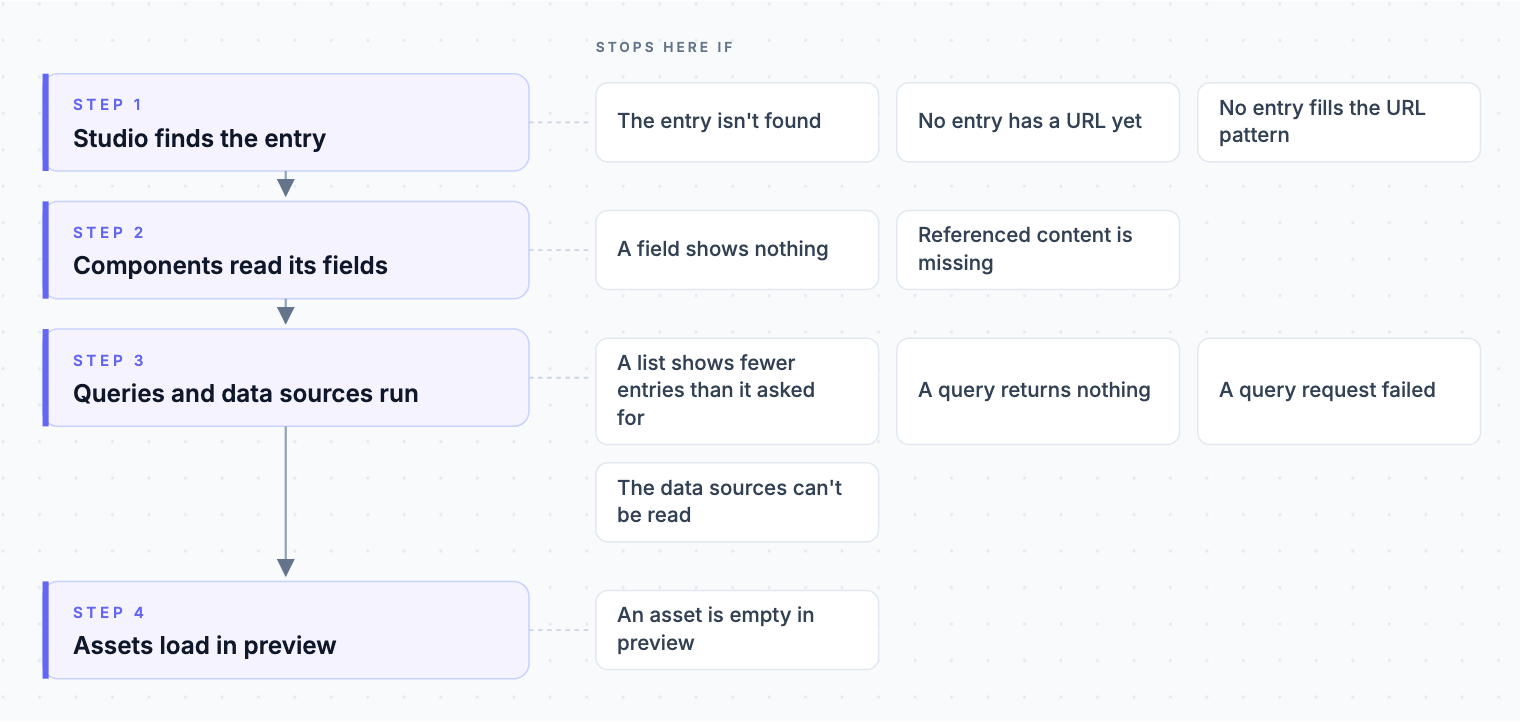
After you fix an error, reload the canvas. The card or screen goes away when the fix worked. For a warning, reload the page and check the console again.
Find your error
| You see | Code |
|---|---|
| This Page Has No Content to Show | ENTRY_NOT_FOUND |
| This Address Has No Content Behind It | ENTRY_NOT_FOUND |
| The URL is not present for this composition | ENTRY_URL_FIELD_MISSING |
| No entry has a URL field populated yet | ENTRY_URL_FIELD_MISSING |
| No entry matches this URL pattern | ENTRY_URL_VALUES_MISSING |
| A warning that a binding doesn't exist, or reads the wrong kind of value | BINDING_UNRESOLVED |
| A warning that references came back as pointers | REFERENCES_UNRESOLVED |
| A warning that a pinned entry is missing, saying fewer entries came back than were asked for | FEWER_ENTRIES_THAN_REQUESTED |
| A warning that a data source returned no entries | QUERY_RETURNED_NO_ROWS |
| A warning that a data source couldn't be fetched | QUERY_REQUEST_FAILED |
| A warning that a template's data sources couldn't be read | DATA_SOURCES_UNREADABLE |
| A warning that an asset came back empty from the preview service | PREVIEW_ASSET_PROJECTION_NULL |
If the whole template fails, not just its entry, read Template and section errors or SDK setup errors.
The entry isn't found
Code: ENTRY_NOT_FOUND
Studio found the template for the address, but not the entry it reads its content from. Inside Studio, the card is "This Page Has No Content to Show" when one template matches the address.
It's "This Address Has No Content Behind It" when two or more templates match it equally.
The card names the content type it searched, such as blog_post. Outside Studio, only the log says it. Your route should answer it with a 404, because the content isn't there.
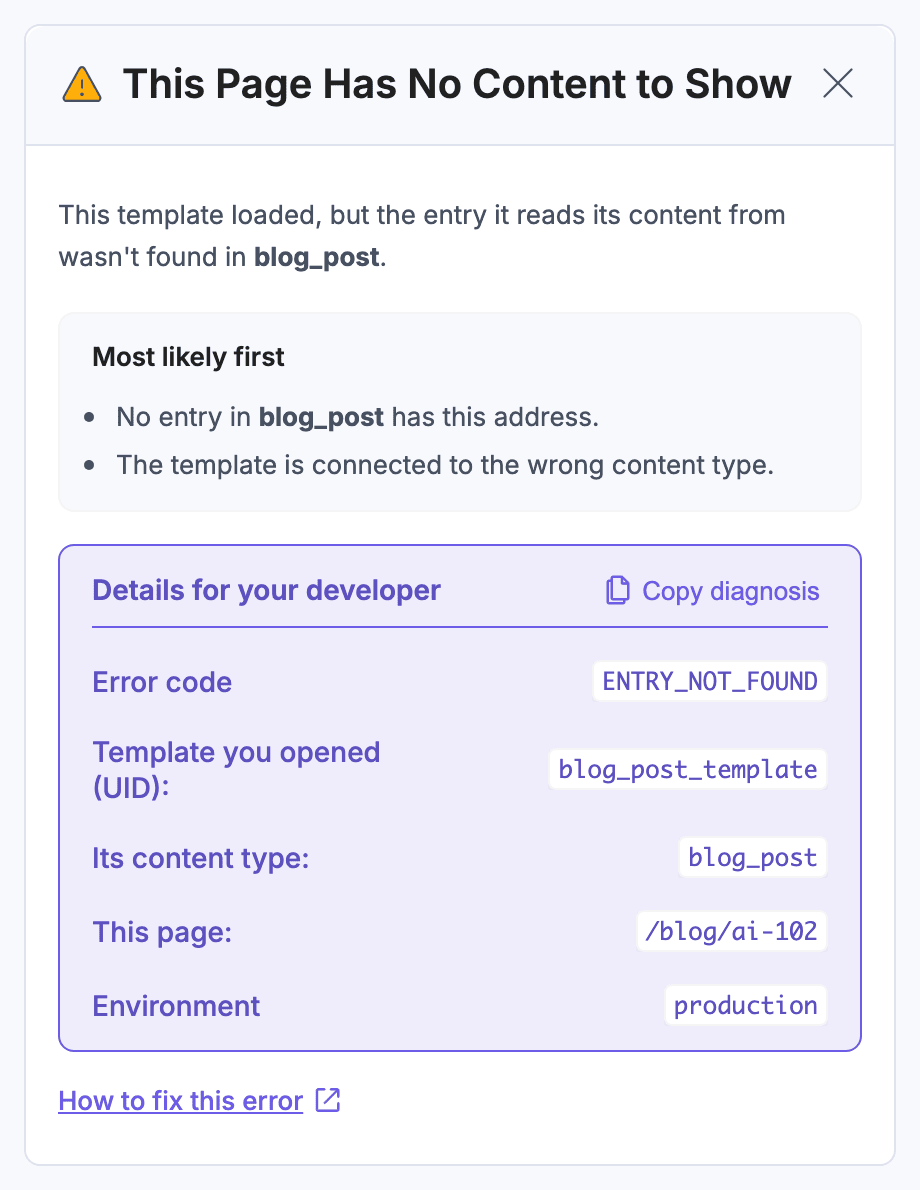
[Contentstack Studio] ENTRY_NOT_FOUND: No entry was found for the content type
"blog_post" this composition is connected to.

[Contentstack Studio] ENTRY_NOT_FOUND: 2 compositions match "/blog/ai-102", and
none of them has an entry for it.
| Check | Read |
|---|---|
No entry has the value the address needs, such as the slug ai-102 | No entry has this address |
Your route passes templateEntryUid, and that entry is gone | The entry your route asks for is gone |
| Only your live site fails, and the entry exists in Contentstack | The entry isn't published to this environment |
| The template's content type has no entries at all | The content type has no entries |
| Your route passes the UID of an entry from another content type | The entry UID isn't in the content type |
| Outside Studio, the log names templates from another project | Your site asks for the wrong content type |
No entry has this address
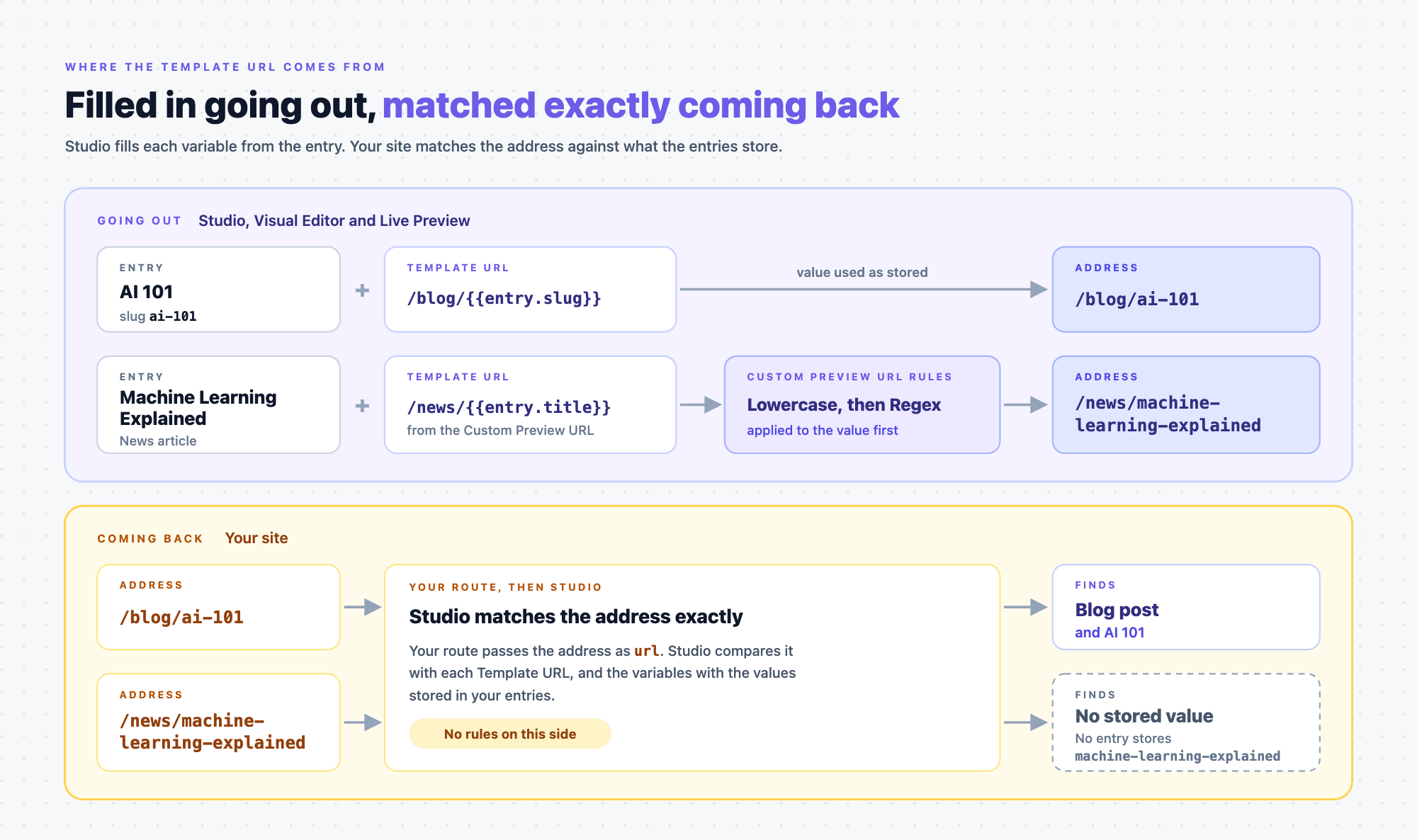
Studio reads the entry's values out of the address. For the Template URL /blog/{{entry.slug}}, /blog/ai-102 asks the Blog post content type for an entry with the slug ai-102. If none has it, Studio looks once more for an entry whose url field is /blog/ai-102. When the URL comes from the content type's URL pattern, Studio only does that second search.
Studio fills a Template URL from an entry to build an address, and reads an address back to find the entry, as Where a template's URL comes from explains.
First, confirm it:
-
Find the address and the content type. Inside Studio, the card's details show both. Outside Studio, the log names the content type, such as
blog_post, and the address is the one your route fetched. -
Work out the value the address gives the Template URL. For
/blog/{{entry.slug}}and/blog/ai-102, that's the slugai-102. -
In Contentstack, look in that content type for an entry with that value, or with
/blog/ai-102in itsurlfield.If you find one inside Studio, this isn't your cause. Go back to the checks for this card. If you find one and only your live site fails, read The entry isn't published to this environment.
Then give an entry the value the address needs:
- Open the entry the address is meant for, and set the field. For
/blog/ai-102, set a Blog post entry'sslugtoai-102. If the address itself is wrong, fix the link that led to it instead. - For your live site, publish the entry to the environment your site reads, such as
production. - Reload the canvas, or the address on your site. The template shows the entry's content.
If an entry has the value and the fetch still fails, check the template's connected content type in Studio. The log lists it as its last cause.
The entry your route asks for is gone
Your route passes templateEntryUid to fetch one entry by its UID. Studio looks only for that UID and doesn't fall back to the address, so a deleted entry fails the fetch. If you picked an entry to preview in Studio, Studio uses your pick instead, so this then shows only on your site.
First, confirm it:
-
Log the UID your route passes, just before its fetch:
console.log("templateEntryUid", templateEntryUid); -
Reload the page, and copy the UID from the browser console, or from your server log if the page renders on the server.
-
In Contentstack, look for an entry with that UID in the template's content type, such as Blog post.
If it's there, this isn't your cause. Go back to the checks for this card. If it's in another content type, read The entry UID isn't in the content type.
Then pass a UID that exists:
- Pass the UID of the entry your route found for this request, not a fixed value.
- Remove the
console.logline and reload the page. The template shows the entry's content.
Without templateEntryUid, Studio takes the first entry the content type returns. Then the fetch fails only when the content type has no entries.
The entry isn't published to this environment
Inside Studio, Live Preview serves entries that aren't published, so this only happens on your live site or a deployment without Live Preview. The SDK can't tell an unpublished entry from a missing one, so its log lists publishing as a possible cause, and names the environment.
First, confirm it:
-
Open the address on your live site, with the browser console open. If the page renders on the server, read your server log instead.
-
Look for the
ENTRY_NOT_FOUNDline with a cause that names your environment. This is an example. The content type and the environment change with your site.[Contentstack Studio] ENTRY_NOT_FOUND: No entry was found for the content type"blog_post" this composition is connected to.What to do, most likely first:1. No entry of "blog_post" matches this composition. Create one, or pointthe composition at a content type that has entries.2. The entry may not be published to "production". Check its publishstatus in Contentstack.If the publishing cause isn't there, this isn't your cause. The SDK adds it only when the published content answered. Go back to the checks for this card.
Then publish the entry:
- In Contentstack, publish the entry to the environment the cause names, such as AI 101 to
production. - If it's already published there, check which environment your site reads, such as
NEXT_PUBLIC_CONTENTSTACK_ENVIRONMENT=stagingon the staging deployment. - Reload the page on your live site. The template shows AI 101, and the line is gone.
The content type has no entries
Inside Studio, the canvas checks for an entry before it opens your site. When the template's content type has none, the canvas shows one of the URL screens instead of your site. Which one depends on where the Template URL comes from:
- A Template URL with variables, such as
/topics/{{entry.slug}}, shows No entry matches this URL pattern. - A URL from the content type's URL pattern shows No entry has a URL field populated yet.
- A template with no saved URL source shows The URL is not present for this composition.
Outside Studio, the log says ENTRY_NOT_FOUND.
First, confirm it:
-
In Contentstack, open the template's connected content type, such as Topic page, and list its entries.
If it has entries, this isn't your cause. Go back to the checks for this card.
Then create an entry:
- Create an entry with a value for every field the Template URL uses, such as a Topic page entry with a
slug. - Save it. The canvas counts entries that aren't published. For your live site, also publish it to the environment your site reads.
- Reload the canvas. It opens your site on the new entry.
The entry UID isn't in the content type
Your route passes templateEntryUid, and Studio looks for it only in the template's connected content type. A UID from another content type, such as an Author entry's, finds nothing, and the fetch fails straight away. The log doesn't print the UID.
First, confirm it:
-
Log the UID your route passes, just before its fetch:
console.log("templateEntryUid", templateEntryUid); -
Reload the page, and copy the UID from the browser console or your server log.
-
In Contentstack, find the entry with that UID, and note its content type.
If it's in the template's content type, such as Blog post, this isn't your cause. Go back to the checks for this card.
Then pass a UID from the right content type:
- Pass the UID of an entry in the template's content type, such as AI 101's
blt5c1d9e0a7f3b2e41for Blog post. - Remove the
console.logline and reload the page. The template shows AI 101.
Inside Studio, an entry you pick to preview takes the place of your templateEntryUid.
Your site asks for the wrong content type
Your site reads templates from another project's content type. Inside Studio, the Content Types Don't Match card shows first, with both values. Outside it, the address can match that project's templates, which have no entry for it. So the log is about the entry, and names content types that aren't in your project. See Your site asks for the wrong content type.
No entry has a URL yet
Code: ENTRY_URL_FIELD_MISSING
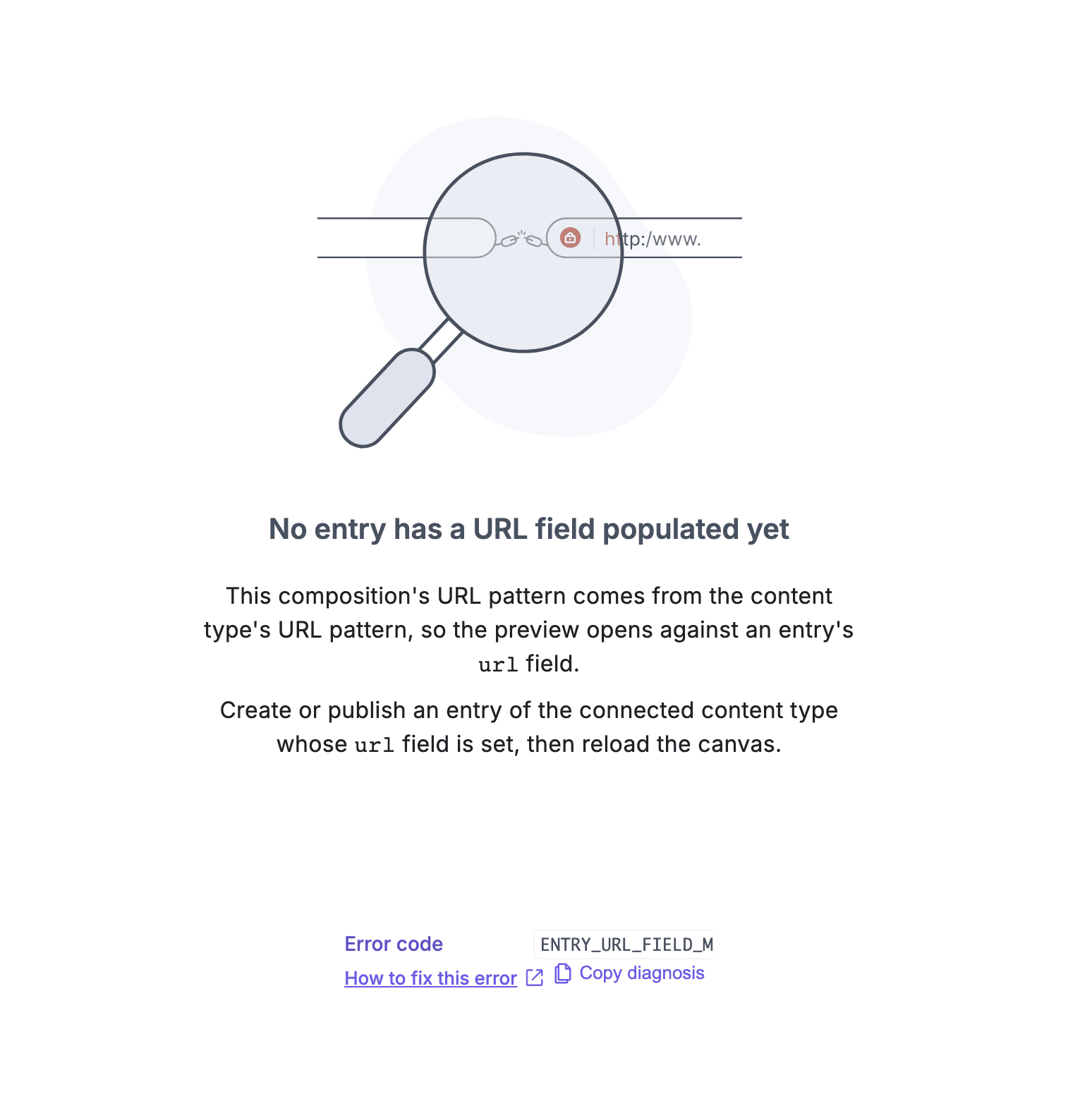
The canvas shows this in place of your site. Studio needs an entry of the template's content type with a url value to build the address it opens. None has one, so there's no address. It's Studio's own check, so your site logs nothing. Studio counts entries that aren't published too, so publishing doesn't change it.
| You see | Read |
|---|---|
| "The URL is not present for this composition" | Your template uses each entry's URL field |
| "No entry has a URL field populated yet" | Your template uses the content type's URL pattern |
Your template uses each entry's URL field
Studio opens each entry's own url value when a template has no saved URL source. No entry of the content type has one, or the content type has no URL field. The screen says to configure the template's URL, but the fix is on the entries.
-
In Contentstack, open an entry of the template's content type, such as AI 101 in Blog post.
-
Set its URL field, such as
/blog/ai-101, and save the entry. The canvas counts entries that aren't published, so you don't need to publish it.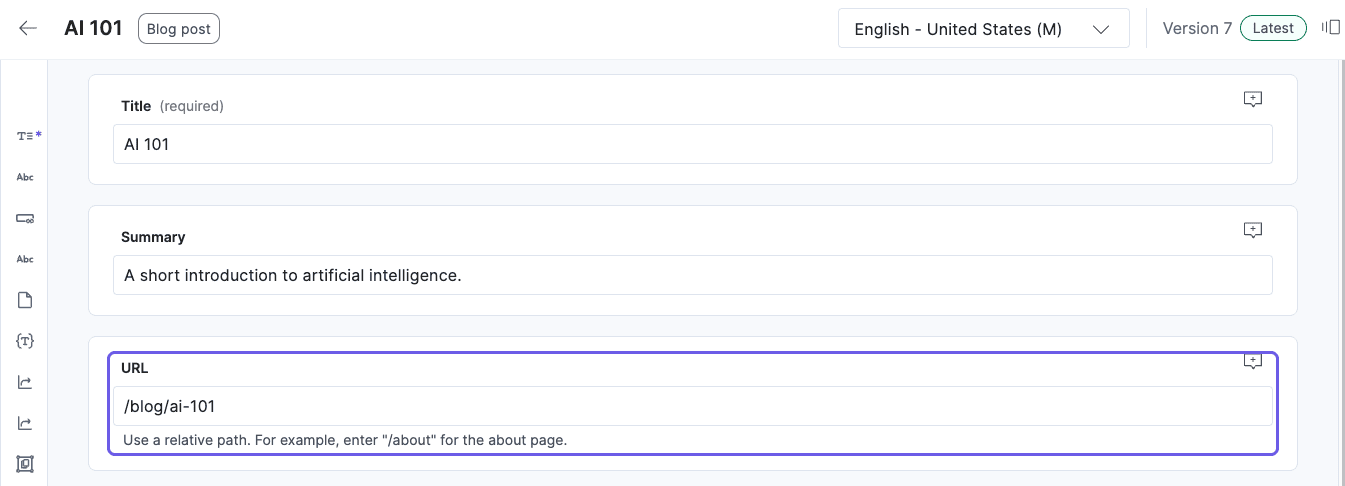
-
Reload the canvas. Your site opens at the entry's URL.
Your template uses the content type's URL pattern
The content type's URL pattern fills each entry's url field, and the canvas opens that value. No entry has one yet. The screen says so: "Create or publish an entry of the connected content type whose url field is set, then reload the canvas."
- In Contentstack, open an entry of the template's content type, such as AI 101 in Blog post.
- Check its URL field has a value, such as
/blog/ai-101. If it's empty, set it and save the entry. - Reload the canvas. Your site opens at the entry's URL.
No entry fills the URL pattern
Code: ENTRY_URL_VALUES_MISSING
The canvas shows "No entry matches this URL pattern" in place of your site. The Template URL uses entry fields, and Studio found no entry with a value for every one. It's Studio's own check, so your site logs nothing. The screen lists the variables, then says which one is the problem:
- "No entry has a value for:" names a field no entry fills.
- "Each of these has a value on some entry, but no single entry has all of them."
- "Base URL alias … has no value for:" names a field the Base URL alias uses.
If you picked the entry to preview, Studio keeps your pick and names the field it lacks.
-
Read the last line on the screen. Say the Template URL is
/blog/{{entry.seo.canonical}}, andcanonicalis empty on every entry. The line reads "No entry has a value for: {{entry.seo.canonical}}". -
In Contentstack, open an entry of the template's content type, such as AI 101, and fill the field the line names, such as
seo.canonical. Save the entry. The canvas counts entries that aren't published. -
If the line says no single entry has all the values, fill every listed field on one entry.
-
If it names a Base URL alias's field, fill that field on the entry, or pick another alias.
-
If you'd rather not fill the field, change the Template URL to use a field your entries have, or pick another entry to preview.
-
Reload the canvas. Your site opens on the entry.
The rest of this page covers warnings. The template renders, but part of it is empty. Studio shows no card for them. The SDK logs each one in your browser console or server log, only in development or when you pass debug: true to studioSdk.init. It logs each message once. So a blank field on your live site has no log unless you turn on debug:
studioSdk.init({ stackSdk: stack, contentTypeUid: "compositions", debug: true });
Some blanks have no warning at all. The SDK doesn't check bindings inside a Repeater or inside a section.
A field shows nothing
Code: BINDING_UNRESOLVED
An element bound to a field is empty. The binding reads a field that isn't on the entry, or it reads one value and got a group or modular blocks. The SDK checks bindings to the template's entry and to pinned entries. It logs this only in development or with debug: true, once per message.
[Contentstack Studio] BINDING_UNRESOLVED: The binding "seo.canonical" does not
exist on the entry this composition is connected to.
| You see | Read |
|---|---|
| The binding "does not exist", and the field was renamed or deleted | The field was renamed or removed |
| The binding "does not exist", and the field is there | The field is empty |
| The binding "reads a single value and resolved to a group" or "a modular block" | The field holds a group or modular blocks |
| A list from a Pinned Query is empty, and its filter reads the address | The query filter's value isn't in the address |
The field was renamed or removed
The content type changed after the binding was made, so the path the binding reads is gone. The element renders empty, and nothing else on the page fails.
First, confirm it:
-
Run your site in development, or add
debug: truetostudioSdk.initinsrc/studio.ts, as shown above. -
Reload the page, and open the browser console, or your server log if the page renders on the server.
-
Look for a line like this. The path in quotes is your binding's, and the rest stays the same:
[Contentstack Studio] BINDING_UNRESOLVED: The binding "summary" does notexist on the entry this composition is connected to.If you don't see it, this isn't your cause. Go back to the checks for this warning.
-
In Contentstack, open the content type the binding reads, such as Blog post, and look for a field with that path.
If the field is there, read The field is empty.
Then bind the element again:
- In Studio, select the empty element on the template and bind its prop to the field it should read. See Bind a component.
- Save the template. For your live site, publish it too.
- Reload the page. The element shows the field's value, and the line is gone.
The field is empty
The field exists, and nobody has filled it in on this entry. The SDK holds the entry, not the content type, so it can't tell an empty field from a removed one. It logs the same line for both.
First, confirm it:
-
Run your site in development, or add
debug: truetostudioSdk.initinsrc/studio.ts. -
Reload the page, and look in the browser console or server log for a line like this:
[Contentstack Studio] BINDING_UNRESOLVED: The binding "seo.canonical" does notexist on the entry this composition is connected to.If you don't see it, this isn't your cause. Go back to the checks for this warning.
-
In Contentstack, check the content type has the field, and that it's empty on this entry, such as
seo.canonicalon AI 101.If the content type has no such field, read The field was renamed or removed.
Then add the content. There's nothing to fix in the binding:
- Fill the field on the entry, and save it. For your live site, publish it to the environment your site reads.
- Reload the page. The element shows the value, and the line is gone.
If the field is empty on purpose, leave it. The element stays empty, and the line is only a report.
The field holds a group or modular blocks
A prop that shows one value, such as Byline's Name, is bound to a container, such as the author_card group. The SDK can tell from the value itself, so the line says which kind of container it got.
First, confirm it:
-
Run your site in development, or add
debug: truetostudioSdk.initinsrc/studio.ts. -
Reload the page, and look in the browser console or server log for a line like this. It ends in "group" or "modular block":
[Contentstack Studio] BINDING_UNRESOLVED: The binding "author_card" reads asingle value and resolved to a group.If you don't see it, this isn't your cause. Go back to the checks for this warning.
Then point the binding at a field inside the container:
-
In Studio, select the element, such as Byline, and open the binding on the prop the line names.
-
Pick a field inside the container, such as
author_card.name. See Bind a component. -
Save, and reload the page. Byline shows the name, and the line is gone.
The query filter's value isn't in the address
A Pinned Query's filter reads a value from the address, such as a URL parameter, and the address doesn't have it. The query runs anyway, and no warning names the filter. So nothing confirms this case. Try the address with the value, and watch the list.
- Open the query in Studio and note the URL parameter its filter reads. See Query filters.
- Open the address with that parameter, such as
/blog/ai-101?topic=ai. - If the list now shows entries, the missing parameter was the cause. Fix whatever links to the page without it.
- If the list is still empty, look for A query returns nothing or A query request failed in the console.
Referenced content is missing
Code: REFERENCES_UNRESOLVED
A reference field came back as a pointer, holding only the entry's UID and content type, not the entry. Anything bound past it is empty. One request follows references three levels deep. The SDK can't tell a reference past that depth from a deleted entry, so the log lists both. It logs this only in development or with debug: true, once per message.
[Contentstack Studio] REFERENCES_UNRESOLVED: 3 references came back as pointers
rather than entries, so anything bound past them has nothing to show.
| Check | Read |
|---|---|
| The empty element reads through more than three references | The reference is more than three levels deep |
| The referenced entry was deleted | The referenced entry was deleted |
| A section linked to the template doesn't appear | A linked section is missing |
The reference is more than three levels deep
One request follows references three levels deep. An element that reads a fourth level gets a pointer, so it renders empty.
First, confirm it:
-
Run your site in development, or add
debug: truetostudioSdk.initinsrc/studio.ts. -
Reload the page, and look in the browser console or server log for a line like this. The count changes with your page:
[Contentstack Studio] REFERENCES_UNRESOLVED: 3 references came back as pointersrather than entries, so anything bound past them has nothing to show.If you don't see it, this isn't your cause. Go back to the checks for this warning.
-
In Studio, look at the empty element's binding, and count the reference fields it goes through.
If it goes through three or fewer, read The referenced entry was deleted.
Then pick one:
- Bind the deep entry directly, by pinning it to the template. See Pin an entry to a template.
- Or flatten the nesting, so the field sits within three references of the template's entry.
- Save, and reload the page. The element shows its content.
The referenced entry was deleted
Something still points at an entry that no longer exists. The pointer never resolves, so anything bound past it renders empty.
First, confirm it:
-
Run your site in development, or add
debug: truetostudioSdk.initinsrc/studio.ts. -
Reload the page, and look for the
REFERENCES_UNRESOLVEDline shown in the checks for this warning.If you don't see it, this isn't your cause. Go back to the checks for this warning.
-
In Contentstack, open the entry that holds the reference, such as AI 101, and check each entry its reference field lists, such as Related posts.
If every referenced entry exists, read The reference is more than three levels deep.
Then fix the reference:
- Point the reference at an entry that exists, or remove it. Save the entry, and publish it for your live site.
- If an element only read the deleted entry, remove the element from the template instead.
- Reload the page. The element shows its content, or it's gone.
A linked section is missing
Studio fetches linked sections in requests of their own, so they never cause this warning. A linked section that was deleted or isn't published is left out with no warning. So nothing confirms this case. Check the section, and watch the page.
- In Studio, check the section still exists in the project.
- If it was deleted, remove it from the template, or link another section.
- If it exists, publish it to the environment your site reads.
- Reload the page. The section appears.
- If it's still missing, run your site in development and look in the console for
getAllSectionCompositions: level fetch failed. That line means the request for the section failed.
A pinned entry is missing
Code: FEWER_ENTRIES_THAN_REQUESTED
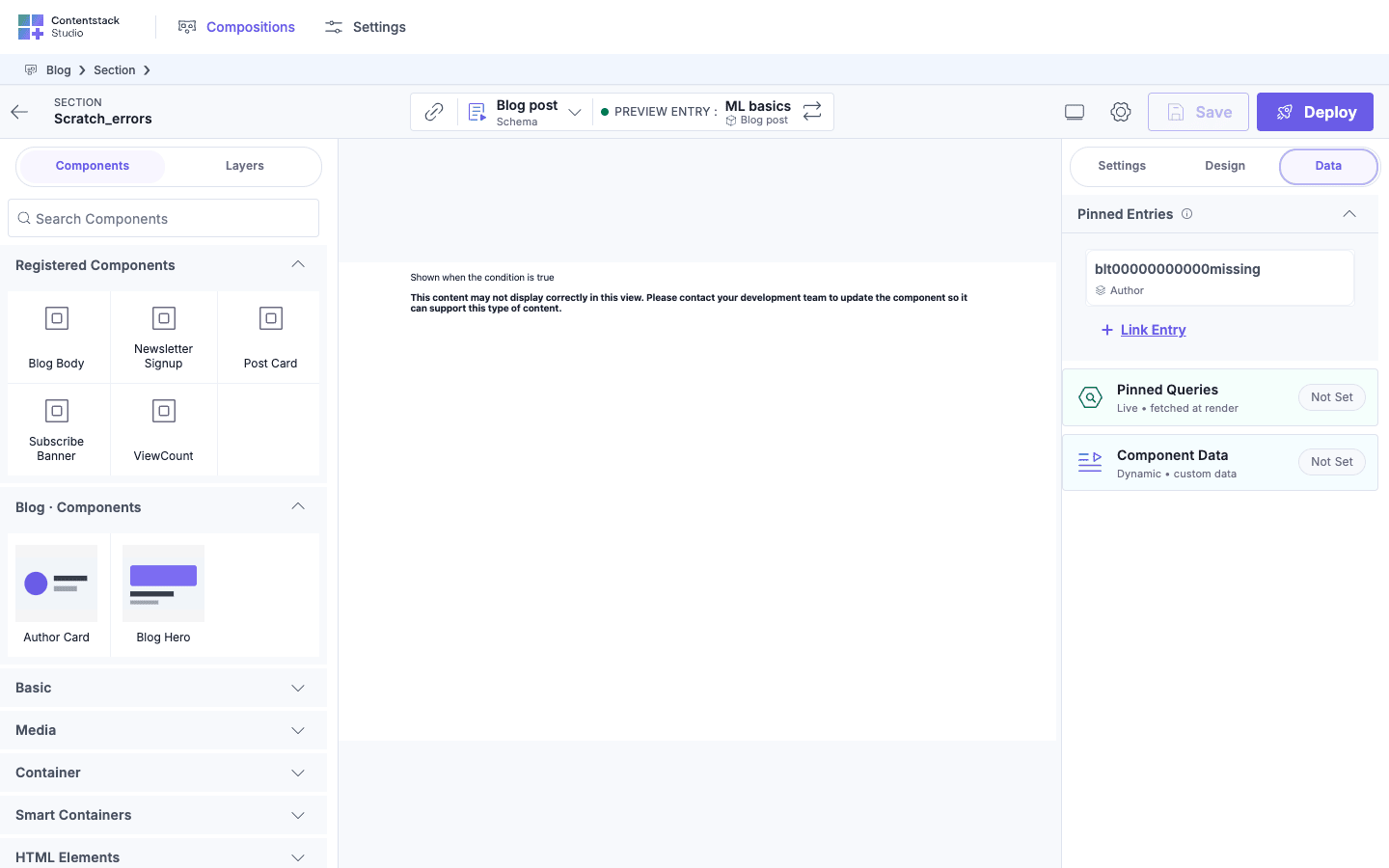
A template or section can pin entries in its Data tab, under Pinned Entries. The Post byline section pins Priya, an Author entry, and its AuthorCard reads her name and photo. Your page fetches pinned entries by their UIDs, one request per content type. When some don't come back, the elements bound to them render empty, and the log names the missing UIDs.
[Contentstack Studio] FEWER_ENTRIES_THAN_REQUESTED: Asked "author" for 1 entry
and got 0. Missing: blt8a2f6c4d1e9b3a70.
Read it as: one entry was pinned from the Author content type, and it didn't come back. It logs this only in development or with debug: true, once per message.
-
Open the template or section in Studio, such as Post byline, and click Data in the right panel. Under Pinned Entries, find the entries from the content type the log names, such as Author.

-
If a row shows a UID in place of a title, the entry was deleted. Remove the pin with the delete icon on its row, pin another entry, and bind the empty elements to it. See Pin an entry to a template.
-
If the row shows a title, such as Priya, the entry exists but isn't published to the environment your site reads. Publish it to that environment, such as
production. See Contentstack's Publish an entry. -
Reload your page. The bound elements show the entry's values, and the log no longer shows the warning.
If the request for a content type fails outright, the log lists every pinned UID from it, even the ones that exist. Look for the failed request in your browser's network tab or your server log, and fix that first.
A query returns nothing
Code: QUERY_RETURNED_NO_ROWS
A Pinned Query ran and matched no entries, so the list bound to it is empty. That isn't always wrong, so the log lists no causes. It logs this only in development or with debug: true, once per message.
First, confirm it:
-
Run your site in development, or add
debug: truetostudioSdk.initinsrc/studio.ts. -
Reload the page, and look in the browser console or server log for a line like this. The name in quotes is your data source's:
[Contentstack Studio] QUERY_RETURNED_NO_ROWS: The data source "…" returned noentries.If the line says the data source "could not be fetched", read A query request failed. If there's no line at all, read The query filter's value isn't in the address.
Then check what the query asks for:
- In Studio, open the template's Data tab, and open the query under Pinned Queries, such as Latest posts. Check its filters. See Add a query.
- In Contentstack, check that entries matching those filters are published to the environment your site reads, such as
production. - Reload the page. The list shows entries, and the line is gone.
A query request failed
Code: QUERY_REQUEST_FAILED
A Pinned Query's request didn't reach Contentstack, or Contentstack turned it down. Its list is empty, and the filters aren't the cause. There's nothing to change in the query. Try the request again. It logs this only in development or with debug: true, once per message.
-
Run your site in development, or add
debug: truetostudioSdk.initinsrc/studio.ts. -
Reload the page, and look in the browser console or server log for a line like this:
[Contentstack Studio] QUERY_REQUEST_FAILED: The data source "…" could not befetched, so its list is empty.If the line says the data source "returned no entries", read A query returns nothing.
-
Open your browser's Network tab, or your server log, and find the failed request to Contentstack.
-
Reload the page. If the request goes through, the list shows entries, and the line is gone.
-
If it fails the same way every time, check the query's content type still exists. See A data source's content type is gone.
The data sources can't be read
Code: DATA_SOURCES_UNREADABLE
The template's saved data sources aren't valid, so none of its Pinned Queries ran. Every element bound to one is empty, and the rest of the template renders. The SDK checks only the template's own data sources. A section's damaged data sources are skipped with no warning. It logs this only in development or with debug: true, once per message.
[Contentstack Studio] DATA_SOURCES_UNREADABLE: The stored data sources for
blog_post_template could not be read, so none of its queries ran.
| Check | Read |
|---|---|
| The log says the data sources "could not be read" | The data sources can't be parsed |
| A Pinned Query reads a content type that was deleted | A data source's content type is gone |
The data sources can't be parsed
The template's saved data sources are damaged, so the SDK can't read any of its Pinned Queries. Nothing in your project fixes this, so report it.
First, confirm it:
-
Run your site in development, or add
debug: truetostudioSdk.initinsrc/studio.ts. -
Reload the page, and look in the browser console or server log for a line like this. It names your template's UID, such as
blog_post_template:[Contentstack Studio] DATA_SOURCES_UNREADABLE: The stored data sources forblog_post_template could not be read, so none of its queries ran.If you don't see it, this isn't your cause. Go back to the checks for this warning.
Then report it:
- Copy the line, and send it to Contentstack support with the template's name.
- Once support has fixed the template, reload the page. Its query lists show entries, and the line is gone.
A data source's content type is gone
This warning is only about data sources that can't be parsed, so a deleted content type doesn't trigger it. Nothing on the page names the deleted content type. Check the query, and watch the list.
- In Studio, open the template's Data tab, and open the query under Pinned Queries. Note its content type.
- In Contentstack, check that content type still exists.
- If it's gone, point the query at a content type that exists, or delete the query. Save the template.
- Reload the page. The list shows entries, or it's gone with the query.
An asset is empty in preview
Code: PREVIEW_ASSET_PROJECTION_NULL
An asset bound by a path such as cover_image.url is empty when the preview service answers. The same request to the published CDN returns it. It's a known Preview API defect. It happens when the same request also asks for a modular blocks field. The SDK logs this in place of BINDING_UNRESOLVED when it sees those conditions. It logs this only in development or with debug: true, once per message.
First, confirm it:
-
Run your site in development, or add
debug: truetostudioSdk.initinsrc/studio.ts. -
Reload the preview, and look in the browser console or server log for a line like this. The path in quotes is your binding's:
[Contentstack Studio] PREVIEW_ASSET_PROJECTION_NULL: The asset at"cover_image.url" on the entry this composition is connected to came back emptyfrom the preview service. The same request returns it from the published CDN.If you see
BINDING_UNRESOLVEDinstead, read A field shows nothing. -
Open the same address on your published site. If the asset shows there, it's the defect. The binding is fine, and nothing in your project fixes it.
If the asset is empty on your published site too:
- In Contentstack, open the entry, such as Featured, and set the asset, such as its cover image. Publish the entry.
- Reload the page. The asset shows, and the line is gone.
Still stuck
Use Copy diagnosis on the card, or copy the log line, and paste it into your AI assistant or a support ticket.