Wire Template Preview Routes
First principle (headless). Studio stores compositions. Your framework serves the HTML. A URL can exist in your Contentstack project (the composition is there, the entry is there) and still 404 in a browser if no app route receives the request and renders it. This is why every Studio-rendered URL needs a route, same as any CMS-backed dynamic page. One dynamic route per URL space renders every entry of that type. You don’t add one route per URL.
Templates render at real URLs on your site: visitors land on /blog/ai-101, /products/widget-x, /contact-us, and your routes serve them. Studio doesn’t host those pages. Your app does.
Do It With a Skill
setup-template-preview-routes wires the routing described here. It asks which mode you want, one catch-all or dedicated per-pattern routes, and in catch-all mode also handles header and footer preservation and 404 behaviour, which is the part that usually bites.
curl -fsSL https://studio-documentation.contentstackapps.com/install.sh | sh
It requires the /canvas route to exist first, so run setup-section-preview before it, or let it create the route as its first step.
Default: ONE Catch-All Route Serves the Whole Site
Studio is the default renderer for every URL on your site. Wire ONE catch-all route that forwards every URL to <StudioComponent />. Studio’s CDA query resolves which template (if any) matches each URL at render time:
| Framework | Catch-all file/registration | Caveat |
|---|---|---|
| Next.js App Router, greenfield (no existing app/page.tsx) | app/[[...slug]]/page.tsx, optional-catch-all, matches / AND every nested URL | None |
| Next.js App Router, app already has app/page.tsx | app/[...slug]/page.tsx, non-optional catch-all | The optional [[...slug]] form collides with app/page.tsx at / (both match the root). Use the non-optional [...slug] when a root page exists. The existing app/page.tsx keeps owning /. |
| Next.js Pages Router | pages/[[...slug]].tsx | Same root-collision rule applies if you have a pages/index.tsx. Use pages/[...slug].tsx then. |
| React Router (Vite/CRA) | <Route path="*" element={<StudioRoute />} /> registered LAST | None: register opt-outs BEFORE the catch-all (route order = precedence). |
| Remix | app/routes/$.tsx (splat route) | None |
| Astro | src/pages/[...slug].astro | None |
Per-template route registration is NOT needed. Do NOT create app/blog/[slug]/page.tsx, app/products/[sku]/page.tsx, app/contact-us/page.tsx. The catch-all handles all of them. Studio matches URL patterns (/blog/{{entry.url}}, /products/{{entry.sku}}, /contact-us) inside csStudio.fetchCompositionData({ url }). Your router doesn’t need to know about each template.
Opt-outs
If specific paths must NOT go through Studio (/api/*, /admin/*, custom static pages), register those routes ahead of the catch-all (or in framework-natural locations that take precedence, e.g. app/api/... in Next.js wins over app/[[...slug]]/page.tsx automatically).
// React Router example — opt-outs before the catch-all
<Routes>
  <Route path="/canvas" element={<CanvasRoute />} />          {/* existing — section authoring */}
  <Route path="/api/*"  element={<NotFoundOrApiHandler />} />  {/* opt-out */}
  <Route path="/admin/*" element={<AdminApp />} />             {/* opt-out */}
  <Route path="*"       element={<StudioRoute />} />           {/* DEFAULT — catch-all */}
</Routes>
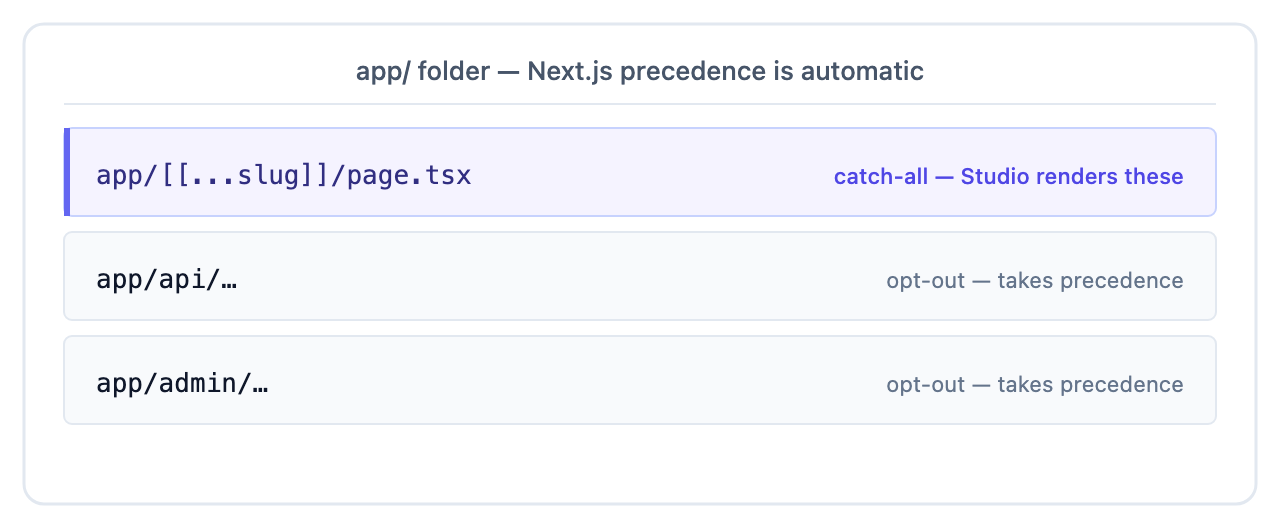
The skill that wires this is setup-template-preview-routes. Its primary input is optOutPaths (default empty = catch-all unrestricted).
What You’ll Add
ONE file that contains the catch-all route component. It receives the request URL from your router, fetches via Studio’s SDK, and renders <StudioComponent />.
Pattern: the Catch-All Route
Recommended: SSR (Next.js App Router with RSC)
For visitor-facing routes that need SEO + a server-rendered first paint, fetch in a Server Component and hand the resolved specOptions to a client wrapper:
// app/[[...slug]]/page.tsx — Server Component (no "use client")
// ONE file, handles every URL on the site.
import { csStudio } from "@/lib/contentstack";
import StudioRouteClient from "./StudioRouteClient";

export default async function StudioRoute({ params, searchParams }) {
  // Server can't detect Studio iframe — always fetch the visitor spec here.
  // The client wrapper switches to <StudioCanvas /> when it sees iframe context.
  const url = "/" + (params.slug ?? []).join("/");
  const searchQuery = new URLSearchParams(searchParams as Record<string,string>).toString();
  const specOptions = await csStudio.fetchCompositionData({ url, searchQuery });
  return <StudioRouteClient specOptions={specOptions} />;
}
// app/[[...slug]]/StudioRouteClient.tsx — Client Component
"use client";
import { StudioComponent } from "@contentstack/studio-react";

export default function StudioRouteClient({ specOptions }) {
  if (!specOptions?.spec) return <div>No composition for this URL.</div>;
  // StudioComponent handles iframe context internally — the same component
  // serves direct visitors and Studio's in-iframe preview render.
  return <StudioComponent specOptions={specOptions} />;
}
Use this pattern for any SEO-relevant site. ONE file handles every URL (/blog/ai-101, /products/widget-x, /contact-us, etc.) because Studio matches URL patterns inside the CDA query.
CSR alternative (SPAs without SEO needs)
For Vite SPAs, React Router, or pages where SEO doesn’t matter, the CSR hook is fine:
// app/[[...slug]]/page.tsx (Next.js App Router) — CSR variant
// or src/routes/StudioRoute.tsx for a Vite + React Router SPA
"use client";

import { usePathname } from "next/navigation";
import { useCompositionData, StudioComponent } from "@contentstack/studio-react";

export default function StudioRoute() {
  const pathname = usePathname();

  const { specOptions, isLoading, error } = useCompositionData({ url: pathname });
  if (isLoading) return <Loading />;
  if (error)     return <ErrorState message={error instanceof Error ? error.message : String(error)} />;
  if (!specOptions?.spec) return <NotFound />;
  // Same component handles direct visits + Studio's in-iframe preview.
  return <StudioComponent specOptions={specOptions} />;
}
CSR re-fetches on the client after first paint: no SSR-rendered HTML for crawlers, no server-side data in the initial response. Pick this only if the route doesn’t need SEO. Note: even in CSR, the route is still ONE catch-all. The path is read from the router at render time.
Why fetch by url vs compositionUid
You almost always fetch by url on visitor-facing routes: the visitor hits a URL, you don’t know the composition UID up front. Studio matches the URL to a composition.
The faster compositionUid shape is useful when:
- You’re rendering a known composition (e.g. a recommended-content widget)
- You’ve already resolved the composition UID elsewhere (route metadata, sitemap)
See Install the Studio SDK: Fetch a composition for the full query / option matrix.
SSR / SSG / RSC
The example above is client-rendered. For server-side rendering, static generation, or React Server Components, you fetch via csStudio.fetchCompositionData(...) instead of the hook, and pass the result into <StudioComponent /> from a client component wrapper.
There’s a dedicated page covering the framework-specific patterns (Next.js App Router, Pages Router, Remix, SSG with ISR, Astro):
CSR vs SSR: choosing a render strategy
That page covers when to pick each, the searchQuery requirement on the server, hydration considerations, and Live Preview wiring across all modes.
Common Pitfalls
- ”Template did not load” error in Studio when opening a template. Your route pattern doesn’t match what Studio expects. Either edit the template’s URL in Studio to match your route, or add a route that matches the template’s URL.
- <StudioCanvas /> on a template route: wrong component. Template routes use <StudioComponent />. The canvas route uses <StudioCanvas />. They are not interchangeable.
- Preview Entry from Studio doesn’t render: the connected entry doesn’t have the data the template binds to. Switch the Preview Entry from the canvas toolbar to one that has the field populated.
What You’ve Done
If you’ve followed this chapter end-to-end, you should now have:
- All three SDKs installed and initialized
- Components registered
- A canvas route mounting <StudioCanvas />
- ONE catch-all route mounting <StudioComponent /> (with any opt-outs you specified registered ahead of it)
- A Studio project linked to your stack with Environment + Language + Canvas URL set
The next step verifies everything works.