Your Components. Pages Anyone Can Build.
Product Overview
The composability layer for your component library: ship pages at the speed of content, on the stack you already run.
Want to skip ahead and just build something? Jump to Getting Started: Quickstart 1. The 5-Quickstart chain builds Studio into a React app end-to-end in about an hour.
Do It With a Skill
studio-tour is the moving version of this page: it meets you at whatever you already have and routes you through setup, registration, sections, templates and ship.
curl -fsSL https://studio-documentation.contentstackapps.com/install.sh | sh
What is Studio?
Studio is the visual composition layer for your component library. Engineers register your existing React components once. From then on, anyone composes them into pages (drag, bind real CMS content, publish) without writing code or shipping a deploy.
Studio doesn’t replace your stack. It plugs onto the React app and Contentstack you already run, and it works through two building blocks: a Section and a Template.
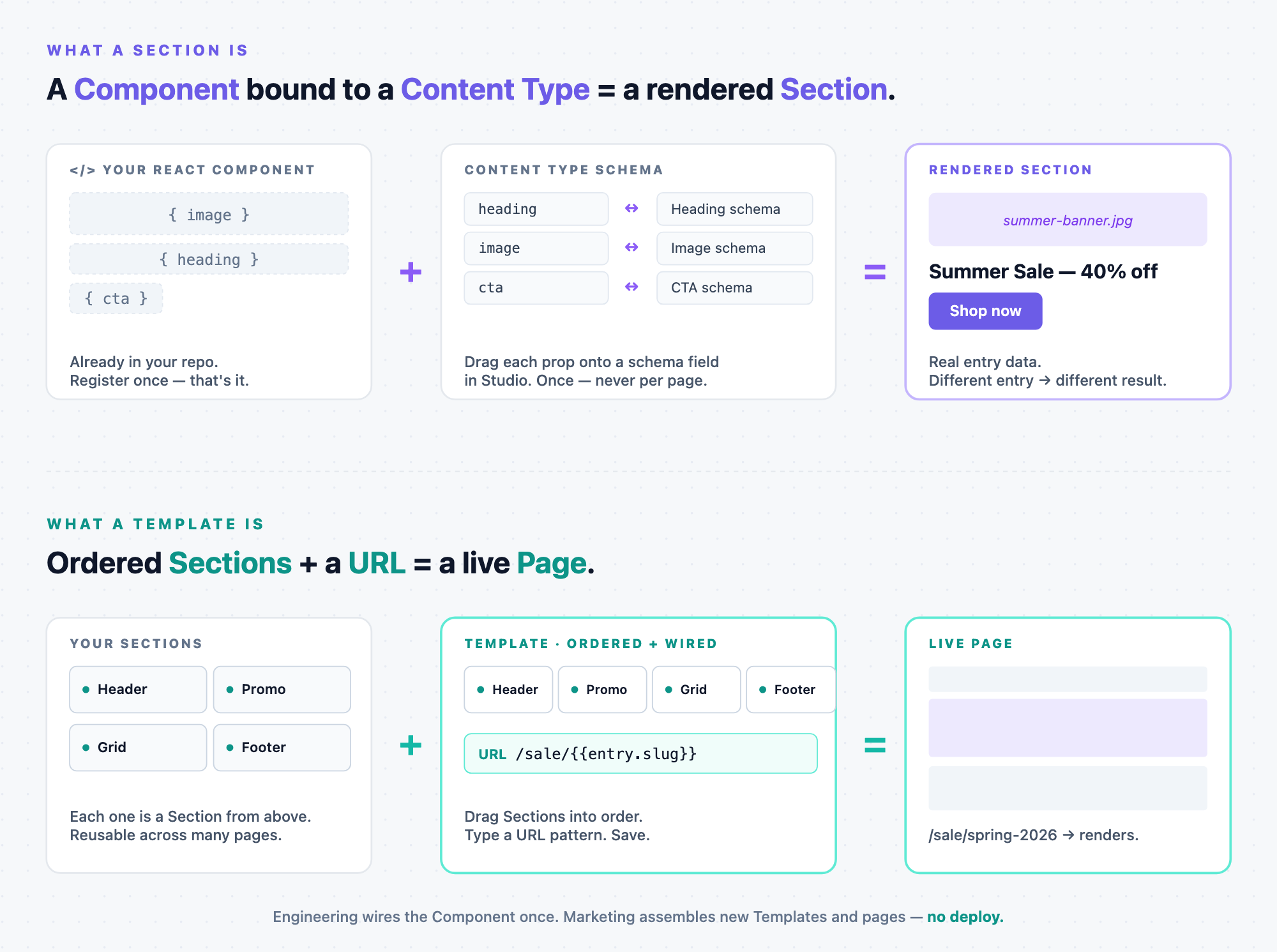
A Section is a Component bound to a Content Type
Take a registered React component: a banner with props image, heading, cta. In Studio you map each prop to a field on a Content Type schema (heading ↔ Heading schema, image ↔ Image schema, cta ↔ CTA schema). Once mapped, the component renders with real entry data (a summer-banner.jpg, a “Summer Sale: 40% off” headline, a working “Shop now” button) pulled live from the CMS, reusable forever.
Full mechanics: Sections chapter: the “Section is a compound component” framing, binding, exposing props, Slot patterns.
A Template is ordered Sections wired to a URL
A Template is the page recipe. Drag Sections onto a canvas (Header, Promo, Grid, Footer), type a URL pattern like /sale/{{entry.slug}}, save. When a visitor hits /sale/spring-2026, Studio fetches the matching entry, renders each Section in order against that data, serves the page. No new route file. No deploy. New campaign? New Template with the same Sections in a different order, or the same Template with a different entry. Publish.
Full mechanics: Templates chapter: Connected vs Freeform, URL patterns, pinned entries/queries.
How Section and Template fit together
- Engineering wires the Component into a Section, once.
- Marketing assembles Sections into Templates, anytime.
Every Section your engineers ship compounds across every Template (and every page that Template serves). Same React, same CMS, same render path: pages stop being code and start being composition.
That’s the entire mental model. The rest of this page is detail.
The Three-Part Model: How a Page Reads From the CMS
Any CMS-driven page does three things: fetch data, iterate schema, bind fields to props. Studio’s building blocks map one-to-one:
- Fetch the data maps to the Template (URL-bound, tied to a Content Type). Plus optional pinned entries or saved queries.
- Iterate the schema maps to a List Section, a Section whose root is a Repeater. Used whenever a field holds N items (reference field, modular blocks, group with multiple: true).
- Bind fields to component props maps to a Simple Section, a Section with no root Repeater. Maps one schema field to one component prop.
Fetch, then iterate, then bind. Every composition, from one hero to a full marketing page, is these three in combination.
The Gap Studio Fills
Today’s component-driven frontend stack solved two big problems and left a third unsolved.
- Component libraries (React + design systems + Storybook) solved components: write once, isolate, test, ship.
- Headless CMS (Contentstack + Live Preview + Visual Editor) solved content: model, author, translate, version, publish.
- What got left out: composition. How components compose into sections, how sections compose into pages, how a page binds to entries, how an author rearranges any of it without filing an engineering ticket. All of that still lives in code. In route files. In JSX shipped through git, then PR, then deploy.
Storybook can tell you what a <Card /> looks like. It can’t tell you what this Blog Post template, with this author, these related posts, and this hero image looks like. Today the only way to see that is to ship a build and load the live URL. Studio closes that gap: same components, composed visually, previewed against any entry, recomposable on the fly.
The Shift in One Table
Studio is a runtime composability layer: it holds the composition itself (Sections, Templates, bindings, slot fills, prop overrides) as data, not code. You author in a canvas. A runtime render component (<StudioComponent />) renders that data at request time against real CMS data, locale, and variant alias.
| Before Studio | With Studio |
|---|---|
| Layout is code. Every layout change ships through git, then PR, then deploy. | Layouts are visual blocks. Layout changes ship through Contentstack publish, alongside content. |
| Components are reusable. Composition isn’t: it’s hand-coded per page, per route. | Both are reusable. The same components, the same Sections, on any page. The same bindings auto-emit data-cslp for Visual Editor. |
| Authors file tickets. Marketers describe layouts to engineers, who translate them into JSX. | Authors compose directly. Engineers ship components. Authors arrange, re-bind, swap, and publish without an engineer in the loop. |
| New pages = new route files. Each new URL pattern requires code. | New pages = published data. New entries (existing CT), new content types, or no CT at all (Freeform). All light up live URLs through Studio’s catch-all route. |
Note on data-cslp tags. The binding map you author in Studio (prop ↔ field) is the source of truth Studio uses to emit data-cslp tags at render time. Studio itself provides no inline editing. All value edits happen in Studio’s right panel. But if you have Visual Editor installed independently in the same app, VE reads those tags to draw its own inline-editing surface. Studio and Visual Editor are two separate products that coexist. See CMS Binding: data-cslp tag emission.
What You Get That You Don’t Have Today
Six things the rest of the stack doesn’t do. Each builds on the previous.
| # | Capability | What changes for you |
|---|---|---|
| 1 | Explore your component library with real data | Drop any registered component onto an empty canvas, bind its props to a real entry, see exactly what visitors see. The rung between Storybook (fixtures) and a full composition (multi-component). |
| 2 | Preview composed components against real CMS data: including locale and variant | Compose multiple components, pick a preview entry, switch locale, toggle a variant. Same SDK code path, same Delivery API calls, same live_preview channel as production. The preview is the production render, earlier. |
| 3 | Externalise the prop-to-field mapping | Mapping is stored as data inside the composition, not inside the page component. Renaming entry.title to entry.headline doesn’t break anything. Re-bind in the Studio UI, publish, done. Mapping a different field to a prop is a non-engineer task. |
| 4 | Mix and match components | Swap one Section for another. Reorder Sections. Drop a different component into a slot. Apply layout overrides for one entry without affecting the rest. Structural decisions move from JSX to the canvas. |
| 5 | Delegate to content authors | Once a component is registered and wrapped into a Section, the Section is self-serve. Ten engineers can equip a hundred authors with the building blocks for a thousand pages. |
| 6 | New pages on the fly, with or without a content type | Studio’s catch-all route resolves every URL via a CDA query. Publishing a new blog_post entry lights up /blog/spring-launch immediately. Launching a whole new content type (Events, Case Studies, Product Lines) is also deploy-free: model the CT, build a Connected Template targeting it, publish the first entry. |
A Section is a Studio Component. A Template is a Studio Page. Both are still pure React. Studio adds the knowledge, not new runtime. Your <Hero>, <Card>, <Button> run exactly as they would in a hand-coded page. What Studio wraps around them is knowledge of bindings, knowledge of how they compose. If you already think in terms of components that compose into pages, Studio’s vocabulary is one level up: React components become Sections (Studio Components), and Sections become Templates (Studio Pages).
Who Benefits
Content authors and marketers get a real visual page-builder backed by their own brand’s components and real entries, not a generic page builder with bolted-on components.
Frontend developers focus on building good components instead of plumbing data into hand-coded layouts. Register once, expose props, let authors compose forever.
Design system teams stay sovereign. Studio uses your components, your design tokens, your breakpoints. No fork, no shim, no compromise.
Enterprise platforms get a content-driven page model that scales: launching a new content type means modeling the CT and dropping a Template against it, not writing a new page route.
What Studio is NOT
- Not a component framework. Studio doesn’t replace React, your bundler, or your build pipeline. Your components stay in your repo, built and deployed exactly as before.
- Not a CMS replacement. Studio is a layer on top of Contentstack. Entries, content types, and the publishing workflow stay standard Contentstack.
- Not a Storybook replacement. Storybook for isolated component dev. Studio for composed-with-real-data preview. The two coexist.
- Not a “no-code” pitch. Authors still need engineers to register components and model content types. Studio removes the layout coupling between code and content, not the engineering work behind the components themselves.
Where Studio Sits vs the Rest of Your Stack
| Layer | Tool | Who acts | Ships through |
|---|---|---|---|
| Build-time: writing components | Your IDE + AI (Cursor / Claude Code / Copilot) | Engineer | git, then PR, then deploy |
| Runtime: composing pages from those components | Studio | Author / marketer / content team | CMS publish |
| Content authoring: entries, models, workflow | Contentstack | Author / editor | CMS publish |
| Inline visual editing on the live page (optional) | Visual Editor (separate product) | Author | CMS publish |
AI tools + Studio stack, they don’t compete. AI makes engineers faster at writing components. Studio lets the rest of the org compose with those components without an engineer in the loop. The dream stack is both.
For a full positioning breakdown against page builders / headless-CMS-alone / AI-alone alternatives, see Studio for sales, marketing, and platform buyers.
The 30-Second Technical Picture
Studio ships as a React SDK with two components you add to your app:
- <StudioCanvas />: goes on one route (the canvas route). The in-browser authoring surface where authors preview sections in isolation against real entries. Used only inside Studio’s iframe.
- <StudioComponent specOptions={specOptions} />: goes on your app’s catch-all route (default: ONE route, app/[[...slug]]/page.tsx for Next.js, <Route path="*"> for React Router, handles every URL). The specOptions object is the return value of useCompositionData({ url }) (CSR) or csStudio.fetchCompositionData({ url, searchQuery }) (SSR). Studio’s CDA query inside those calls resolves which Template (if any) matches each URL. No per-Template route registration needed.
A typical Studio-powered app ships both. See the Setup chapter.
Next
- The development flow, with and without Studio: the side-by-side dev flow (setup / build / compose / publish)
- The composability ladder: Studio’s whole architecture in one idea: slot props climbing four rungs (Component, Section, Section-in-Slot, Template)
- When to use Templates vs Sections: quick decision tree
- Two ways to start: pick your onboarding path
- Set up Studio in your app: install the SDKs, configure your stack, create a project