Production Deployment Edges
Studio works on every common React deploy target. The edges show up around caching (compositions change without code changes, caches need to invalidate), edge-runtime weight limits, and monorepo patterns. This page is the deployment playbook.
Do It With a Skill
deploy-studio-site ships to Vercel or Netlify and handles the traps this page catalogues: production env vars, composition Deploy, Live Preview gating, region and host config, cache and 401s.
curl -fsSL https://studio-documentation.contentstackapps.com/install.sh | sh
ISR + SSG: Cache Invalidation When Compositions Change
Studio compositions are content, not code. Caching them as if they were code means stale layouts persist even after a publish.
The pattern: short revalidation + on-publish webhook
For ISR / on-demand SSG (Next.js, Astro), use a short revalidate AND a Contentstack webhook to invalidate on publish:
// app/blog/[slug]/page.tsx
export const revalidate = 60;   // safety net — 60s max staleness

export default async function BlogPost({ params }) {
  const specOptions = await csStudio.fetchCompositionData({ /* … */ });
  return <StudioComponent specOptions={specOptions} />;
}
Then configure a Contentstack webhook on the compositions content type to hit your deploy platform’s revalidation API on every publish:
// app/api/revalidate-composition/route.ts
import { revalidatePath, revalidateTag } from "next/cache";

export async function POST(request: Request) {
  const { event, data } = await request.json();
  if (event !== "publish") return Response.json({ ok: true });

  const compositionUid = data.entry.uid;
  const linkedTemplate = data.entry.linked_content_type;   // e.g. "blog_post"
  revalidateTag(`composition:${compositionUid}`);
  revalidatePath(`/${linkedTemplate}/[slug]`);
  return Response.json({ revalidated: true });
}
This combination gives you fast cache misses on publish (the webhook) AND a backstop in case the webhook fires late or misses (the 60s revalidate).
What NOT to do
| Don’t | Why |
|---|---|
| revalidate = false (cache forever) without a webhook | A composition publish doesn’t invalidate the cache. Layout changes never appear |
| revalidate = 0 (always fresh) on every visitor route | Defeats ISR. Every visitor pays a full SSR render |
| Tag-based caching without tagging the composition UID | revalidateTag can’t target specific routes when compositions change |
CDN Cache Invalidation
If you’re behind a CDN (Cloudflare, Fastly, CloudFront), the deploy-platform revalidation isn’t enough: the CDN’s edge cache must also flush.
The pattern: webhook hits your origin’s revalidate endpoint AND purges the CDN. Most platforms have an API for surgical purge by URL or tag:
async function purgeCDN(paths: string[]) {
  await fetch("https://api.cloudflare.com/client/v4/zones/<zone>/purge_cache", {
    method: "POST",
    headers: { Authorization: `Bearer ${process.env.CF_API_TOKEN}` },
    body: JSON.stringify({ files: paths.map(p => `https://yoursite.com${p}`) }),
  });
}
Trigger this from the same webhook handler as the deploy-platform revalidation.
Edge Runtime Compatibility
Studio’s SDK currently exceeds the Vercel Edge / Cloudflare Workers 1 MB limit for many configurations. For edge-deployed routes:
- Use Node runtime for Studio routes. Mark the route file:
export const runtime = "nodejs"; // Next.js App Router
- Keep edge-deployed routes minimal (auth checks, redirects, simple JSON APIs) and proxy Studio renders to Node-deployed routes.
- For full edge SSR: wait for the SDK’s edge-runtime story to mature OR ship hand-coded routes for the edge-critical pages.
The SDK team is actively shrinking the edge-runtime footprint. This constraint relaxes over time.
Monorepo Patterns
For monorepos where Studio is one of several apps:
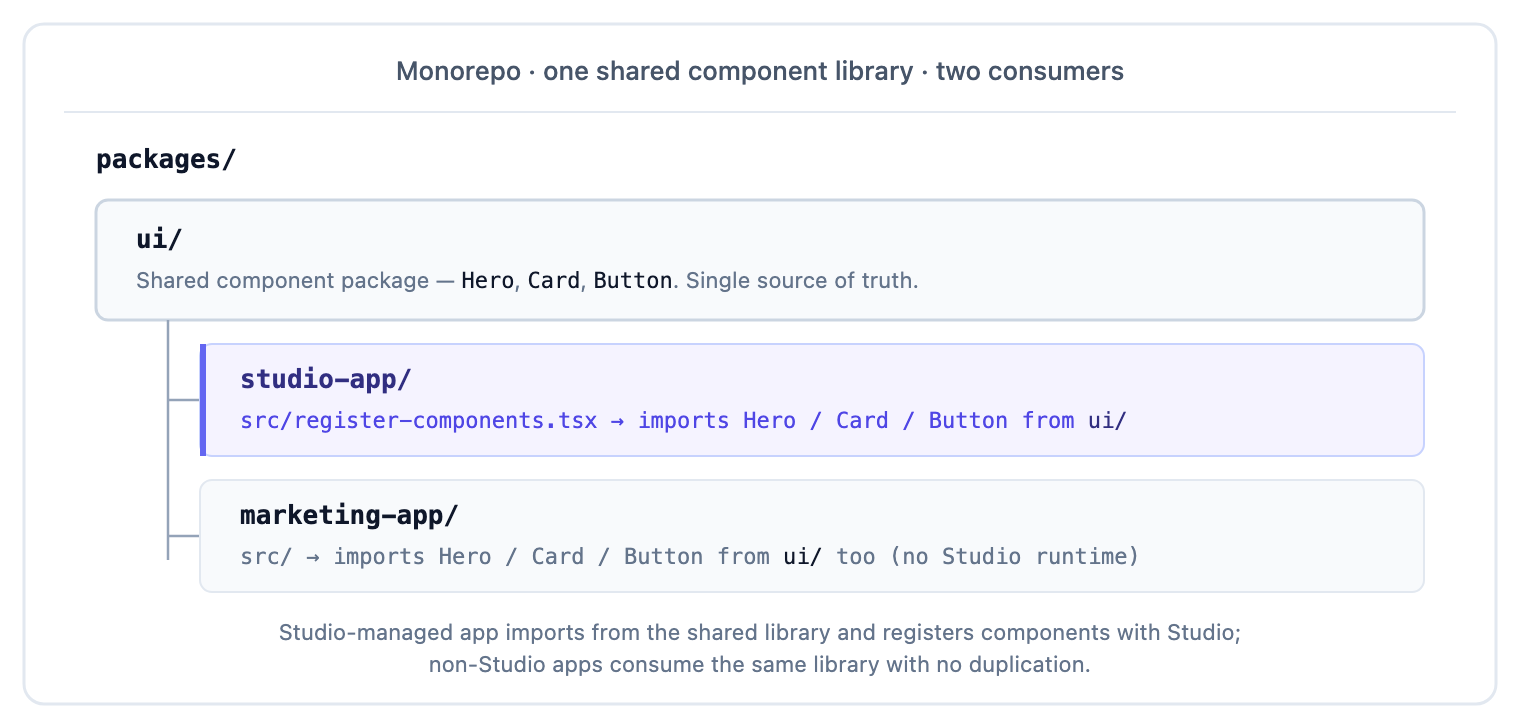
Shared component library
Components live in a shared package. Both the Studio-rendered app and other apps consume them. The Studio-rendered app’s register-components.tsx imports from the shared package, no duplication.
Shared Contentstack config
The lib/contentstack.ts factory lives in a shared package. Both apps init the SDK with their own credentials.
Independent deploys
Each app deploys independently: Studio renders don’t block deploys of other apps. Composition publishes flow through Contentstack webhooks to the Studio-rendered app’s revalidate endpoint only.
Deploy-Platform Specifics
| Platform | Studio runtime | Caching | Notes |
|---|---|---|---|
| Vercel | Node only (edge limit) | ISR + on-demand revalidate + revalidateTag | Use runtime = "nodejs" for Studio routes |
| Netlify | Node | On-demand builders + cache tags | Same pattern, netlify-functions for the revalidate handler |
| Cloudflare Pages | Workers (size constrained) | Cache rules + purge API | Use Pages Functions + Node runtime for Studio routes |
| AWS Amplify | Lambda (no edge limit) | CloudFront invalidation via webhook | Trickier: CloudFront invalidation is path-based, plan paths up front |
| Self-hosted (Node) | Node | Whatever you build | Same patterns. Just wire the webhook to cache invalidation yourself |
Patterns to Avoid
| Pattern | Why it bites |
|---|---|
| Caching SSR output without including the variant + locale in the cache key | Stale variant/locale content served to wrong visitors |
| Ignoring the publish webhook, so all caches go stale until the safety-net revalidate fires | Authors publish. Nothing changes for visitors for minutes |
| Deploying Studio routes to edge runtime without confirming size limits | Build fails or the route OOMs at request time |
| Running the same Studio project against staging + production environments | One author edit in staging accidentally affects production |
| Monorepo + duplicated component registrations across apps | Two apps register the same type UID differently. Studio uses whichever loaded last |
Secret Handling Per Host
The four CONTENTSTACK_* secrets need different handling per environment and per host. Never commit them to git. Use each host’s secret store.
| Host | Where secrets live | Preview vs production split |
|---|---|---|
| Vercel | Project, then Settings, then Environment Variables (per environment) | Set the same key with different values for Preview and Production environments. NEXT_PUBLIC_CONTENTSTACK_ENVIRONMENT=preview on preview, =production on production. |
| Netlify | The site’s Settings, under Build & deploy, then Environment | Use “Deploy contexts” to scope per-branch. Production branch gets production, deploy previews get preview. |
| Cloudflare Pages | Project, then Settings, then Environment variables (Preview vs Production tabs) | Same key, different values per tab. |
| AWS Amplify | App, then Environment variables (per branch) | Bind each branch to an environment name. |
| Self-hosted (Node / Docker) | .env files loaded by dotenv, or systemd EnvironmentFile=, or Docker --env-file | Ship a .env.production and .env.preview. Never ship .env with real values into the container image, mount at runtime. |
Public vs server-only:
- NEXT_PUBLIC_CONTENTSTACK_* / VITE_CONTENTSTACK_* / PUBLIC_CONTENTSTACK_* are client-visible: the bundler inlines them into the JS bundle. Only put values here that are safe to see in the browser (API key + delivery token used from CSR + preview token).
- Plain CONTENTSTACK_* stays on the server. Management tokens, auth tokens, and any secret used only in server-side fetchCompositionData() calls belong here: the bundler won’t inline them.
Preview vs Production Environment Split
Studio + Contentstack use environments (preview, staging, production, etc.) to gate what content is deployed where. The split matters for three reasons:
- Authors deploy to preview first for review, then production for launch. The same composition can be in different versions on each environment.
- Your app must configure the environment name explicitly: CONTENTSTACK_ENVIRONMENT=preview on the preview host, =production on the production host. The SDK reads the env at bootstrap and fetches composition versions matching that name.
- Never point staging + production at the same environment name. An author’s staging Deploy would surface on production instantly. Provision distinct environments in Contentstack (open Stack, then Settings, then Environments). Wire each host to the right one.
Preview URL split: Studio’s Canvas URL (Layer 2 setup) should point at your preview host, not production. Authors compose against fresh preview builds. Production stays untouched until Deploy.
Canvas Iframe Embedding: CSP / Allow-List
Studio renders your Canvas URL inside an iframe hosted at app.contentstack.com. Two headers can break this if misconfigured on your app:
Content-Security-Policy: if your app sends a CSP header, add frame-ancestors https://app.contentstack.com (plus regional hosts like https://eu-app.contentstack.com, https://au-app.contentstack.com per your region). Without this, the browser refuses to render your app in Studio’s iframe and the canvas shows a blank state or “refused to connect” error.
X-Frame-Options: legacy header. If set to DENY or SAMEORIGIN, remove it or explicitly whitelist Contentstack. Prefer frame-ancestors (CSP), modern browsers honour it over X-Frame-Options.
Regional hosts to allow-list:
| Region | Studio app host |
|---|---|
| US (default) | app.contentstack.com |
| EU | eu-app.contentstack.com |
| AU | au-app.contentstack.com |
| Azure US | azure-na-app.contentstack.com |
| Azure EU | azure-eu-app.contentstack.com |
Add every region your team’s Studio project uses to the CSP frame-ancestors list.
Preview + production both need the allow-list. Authors previewing on staging need Studio to iframe the staging URL. Production canvases need production allow-listed.
Pre-Flight CI Checks
Every production Studio deploy should gate on these checks in CI. Each maps to a common failure mode we’ve seen ship: catch them at PR time, not at 3am.
1. Single React copy in the deployed bundle. Rule 1 from framework recipes.
npm ls react
# expect exactly one line under the root package
Fail the build if react appears twice: that’s the “Invalid hook call” bomb at runtime.
2. Every required env var present at build time. Miss one and the SDK falls back to defaults that don’t match production.
: "${CONTENTSTACK_API_KEY:?}" \
  "${CONTENTSTACK_DELIVERY_TOKEN:?}" \
  "${CONTENTSTACK_PREVIEW_TOKEN:?}" \
  "${CONTENTSTACK_ENVIRONMENT:?}" \
  "${CONTENTSTACK_REGION:?}"
(Bash ${VAR:?} fails fast with the var name if it’s empty.)
3. Framework-recipe curl assertions pass on a boot-and-fetch. After building + starting the app in CI, run:
URL=http://localhost:3000/some-known-path curl -s "$URL" > /tmp/out.html
grep -q '<main' /tmp/out.html || { echo "empty body"; exit 1; }
grep -q 'data-studio-ssr' /tmp/out.html || { echo "styles missing"; exit 1; }
grep -q '<title>' /tmp/out.html || { echo "metadata missing"; exit 1; }
Details + rationale: Framework recipes: Verification.
4. CSP frame-ancestors includes every regional Studio host you use.
CSP=$(curl -sI https://your-preview-host.example.com/ | grep -i content-security-policy)
echo "$CSP" | grep -q 'app.contentstack.com' || { echo "CSP missing Studio host"; exit 1; }
5. No accidental commit of .env files. Simple grep in CI:
git ls-files | grep -E '^\.env$|^\.env\.[^.]+$' && { echo "env file committed"; exit 1; } || true
6. Studio SDK version pinned or in a tight range. Major-version drift is the top cause of “worked yesterday, broken today.” Prefer ~1.5.0 or exact-pin over ^1.5.0 on the SDK packages.
Wire these six into your CI job. Every one has bitten a real deployment. Every one is a 30-second check.
What’s Still Unsolved
- Edge-runtime SSR for Studio: a major open item. Until the SDK shrinks, Node-only is the answer.
- CDN tag-based purge across multiple compositions: most CDNs purge by URL or by surrogate-key. If you have hundreds of routes and one section’s composition changes affecting all of them, surgical purge is non-trivial. Workaround: shorter revalidate for affected routes.
- Multi-region deploys with composition replication: Contentstack’s CDA handles read-replicas across regions, but composition publishes propagate at content-stack speed (seconds). For sub-second cross-region consistency, you’re back to short revalidate.
See Also
- <StudioComponent /> reference: every prop + option that flows into a deployed page’s render
- Performance + bundle-size: what to ship to visitors vs editors
- SSR streaming patterns: getting Studio to play nicely with streaming SSR
- Editorial workflow at scale: environment promotion alongside cache invalidation
- Variant aliases: cache key strategy when variants are in play
- Configure CSR vs SSR: pick the right render path before deploying